

Author’s note: This review looks at how the open-source tool headroom compresses context inside AI coding agents like Claude Code and Codex—how many tokens it saves, how to integrate it, and which scenarios it isn’t meant for.
Developers who run long tasks with Claude Code and Codex every day have all hit the same problem: once a task gets long, the agent keeps re-reading search results, logs, JSON, and file contents, the context keeps growing, and the bill keeps climbing. Switching to a cheaper model can save money, but performance may suffer. The open-source tool reviewed in this article, headroom, takes a different path: it doesn’t switch models—it just strips out redundancy before content is sent to the Large Language Model.
This isn’t a recommendation that “the higher the compression rate, the better.” All compression ratios and accuracy figures in this article are self-reported by the repository; cost figures are estimates based on APIYI pricing. We’ll list both where you can save and where you can’t.
What you’ll get from this article: how to install it and use the headroom wrap command, how the individual compressors divide the work, the four scenario data points self-reported by the repo, a one-day cost calculation based on the price list, and when you shouldn’t use this approach.
headroom evaluation takeaways: how much you save, and on which workloads
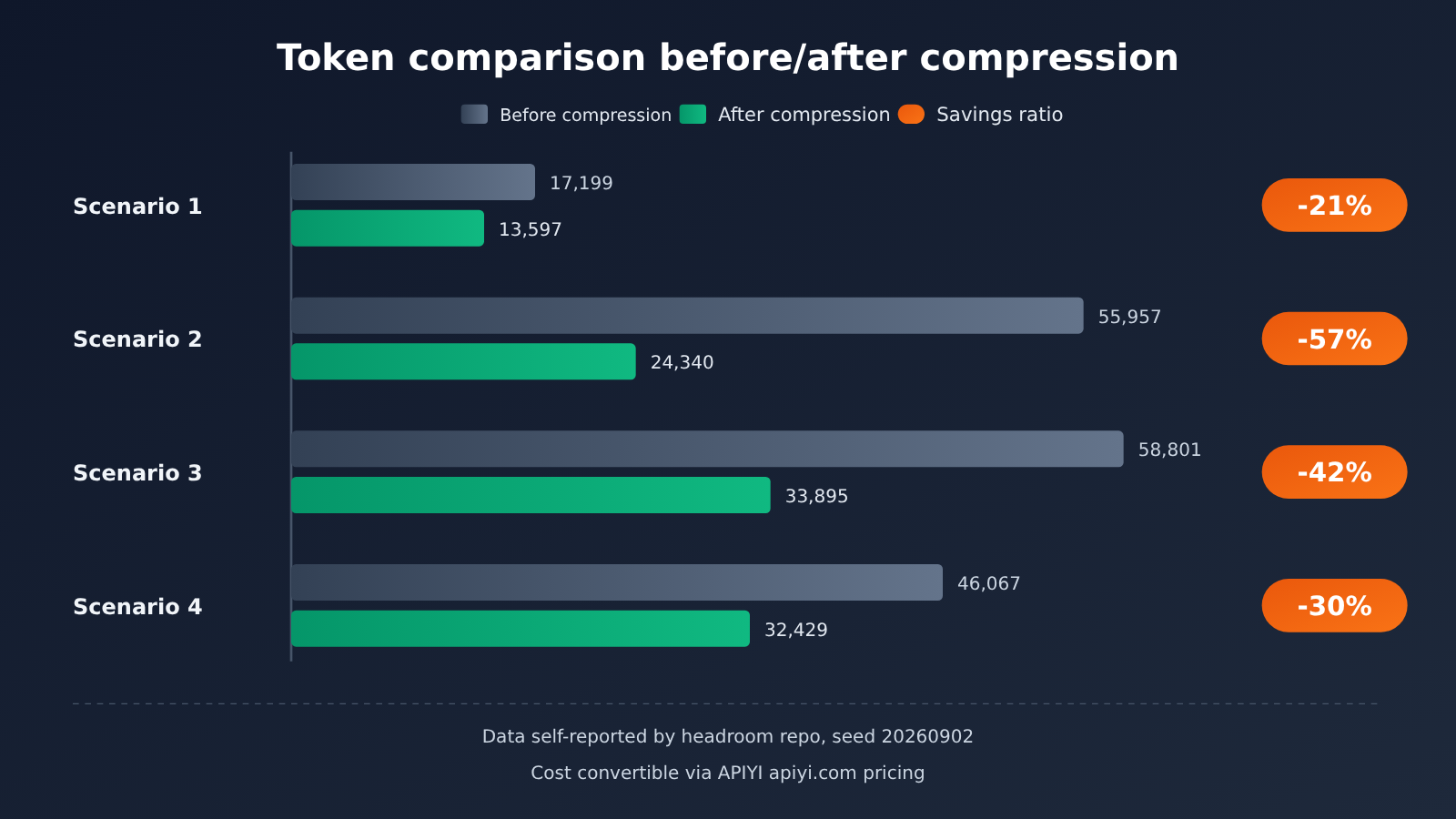
Let’s start with the conclusion: headroom saves the most on structurally repetitive content, and very little on prose or output that’s already dense. The repo reports data for four scenarios, based on the provider’s tokenizer and the default config (seed 20260902), with compression ratios ranging from 21% to 57%.
| Scenario (repo-reported) | Tokens before | Tokens after | Savings | Main content type |
|---|---|---|---|---|
| Code search (100 results) | 17,199 | 13,597 | 21% | Search results, code snippets |
| SRE incident debugging | 55,957 | 24,340 | 57% | Logs, alerts, JSON |
| Codebase exploration | 58,801 | 33,895 | 42% | Source files, directory info |
| GitHub issue triage | 46,067 | 32,429 | 30% | Issue text, comments |
Why headroom’s compression ratios vary
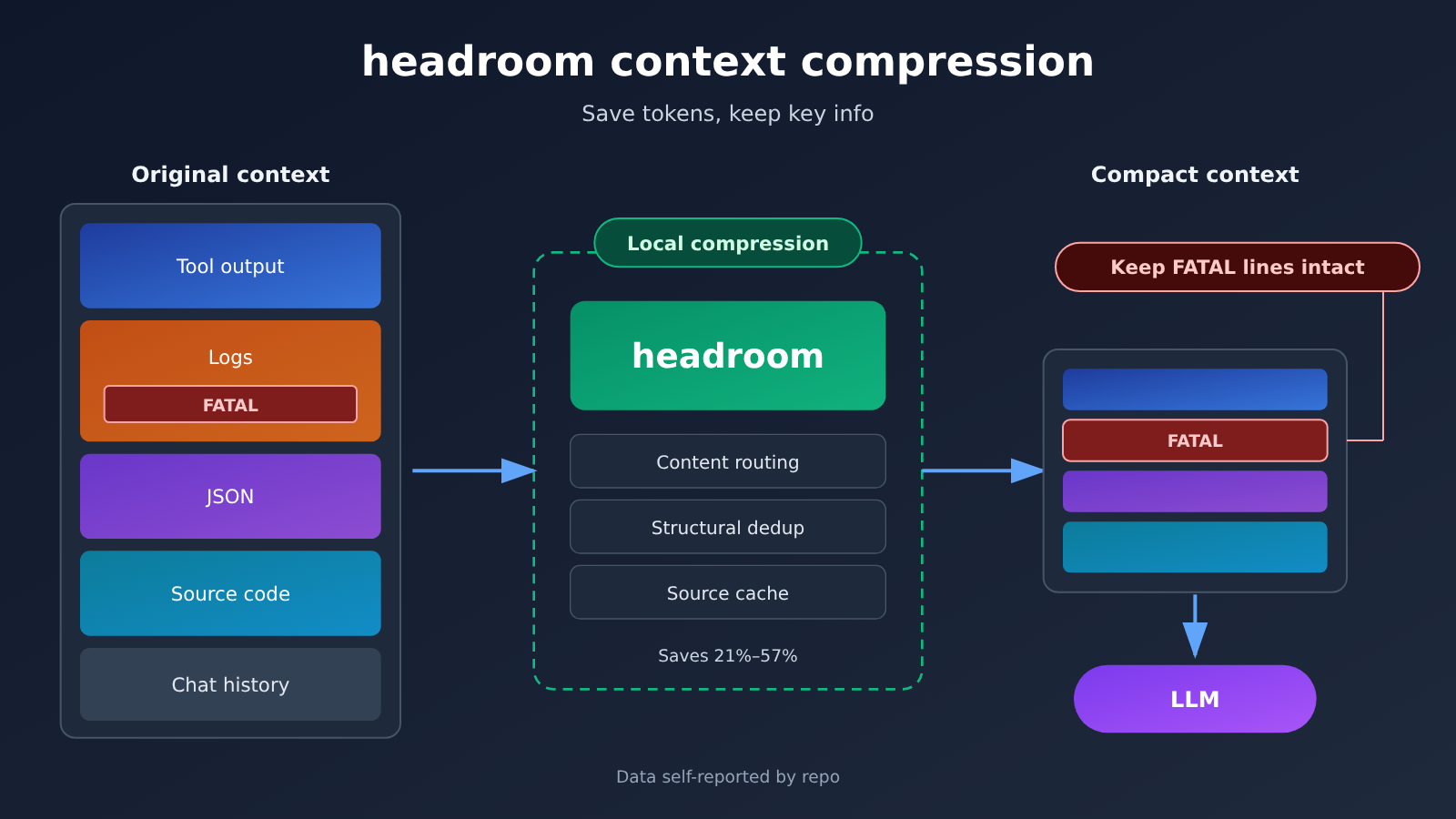
The standout in this table is that the incident debugging scenario compresses by over half. The reason is straightforward: logs and monitoring JSON are full of repeated lines and repeated fields, leaving plenty of room for structural deduplication. The repo also notes that repeated JSON arrays and log lines can be compressed by more than 90%. In the official demo, a 10,144-token log was compressed down to 1,260, while the FATAL line was preserved verbatim.
By contrast, issue triage and code search only save 20–30%, because most of their content is human-written natural language and code snippets that are already fairly compact. So the “cut 20%” in the title is a conservative expectation: for mixed workloads, budget 20–30% first; only troubleshooting-type workloads might double that.
headroom Core Features: How the Compressors Divide the Work
headroom’s job is to compress — before anything reaches the LLM — the tool output, logs, RAG chunks, files, and conversation history that the agent reads, aiming for “the same answer with fewer input tokens.” Compression runs locally, and your prompts or file contents are never sent out to be squeezed somewhere else.
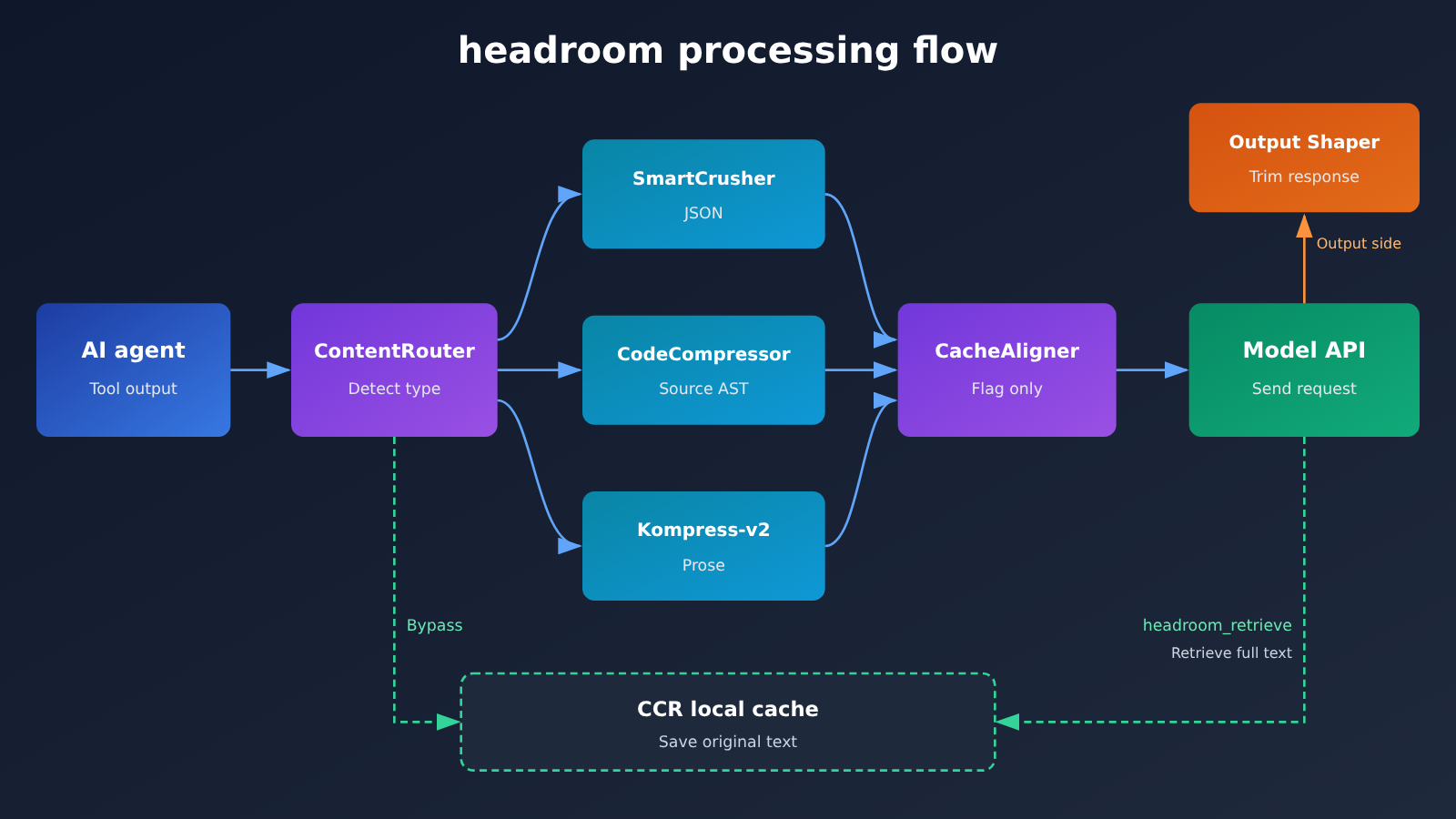
At its core, it’s a router plus a handful of dedicated compressors, backed by two “safety net” components. The table below lays out who does what.
| Component | What it handles | How it works | What it means for you |
|---|---|---|---|
| ContentRouter | All input | Identifies the content type, then dispatches | You don’t have to figure out which compressor to use |
| SmartCrusher | JSON | Structurally compresses repeated fields and arrays | Biggest savings on logs and API responses |
| CodeCompressor | Source code | AST-based compression | Keeps structure intact when reading a codebase |
| Kompress-v2-base | Prose | Compression model from HuggingFace | Can shrink docs and issues, but only modestly |
| Output Shaper | Model output | Trims pleasantries and repeated restatement | Pays off most when output is priced high |
| CacheAligner | Volatile content | Flags the parts that would break the KV-cache prefix | Doesn’t rewrite the prompt, just hints |
| CCR | Original text | Local cache, retrieved on demand | A rescue path when compression drops details |
headroom’s Three Input Compressors
SmartCrusher, CodeCompressor, and Kompress-v2-base handle JSON, source code, and prose respectively, and together these three cover just about every kind of tool output a coding agent reads. Routing is handled automatically by ContentRouter, so within a single conversation, logs go through JSON compression, the source files being read go through AST compression, and issue descriptions go through the prose model — all without stepping on each other.
One thing worth noting: prose compression relies on a model, which is part of why its compression ratio is limited — in natural language, every word can carry meaning, so there’s inherently little you can cut.
headroom’s Output-Side Compression
A lot of people fixate solely on input tokens, but output usually costs more per unit. Set the environment variable HEADROOM_OUTPUT_SHAPER=1, and headroom trims the pleasantries and repeated restatement in the model’s answers. It works with Anthropic’s /v1/messages endpoint, as well as the OpenAI-compatible /v1/chat/completions and /v1/responses endpoints.
How headroom Avoids Dropping Critical Information
This is the question readers care about most. headroom gives you two layers of protection: the first is CCR, which caches the original text locally — when the model feels it’s missing information, it can call headroom_retrieve to pull the full text back. The second is CacheAligner, which flags the volatile content that would otherwise invalidate the provider’s KV-cache prefix. It only flags — it doesn’t rewrite the prompt, so it won’t go behind your back and mess with your system prompt.
headroom measured data: accuracy and compression time
The premise of saving tokens is that answer quality doesn’t drop. The repo compared performance before and after compression on several public benchmarks, and the numbers are below (all self-reported by the repo).
| Benchmark | Condition | Before compression | After compression | Repo note |
|---|---|---|---|---|
| GSM8K | 100 questions | 0.870 | 0.870 | No change |
| TruthfulQA | 100 questions | 0.530 | 0.560 | ±0.03 is within the confidence interval, so there’s no measurable difference |
| SQuAD v2 | 19% compression | — | Retains 97% | Relative to uncompressed |
| BFCL | 32% compression | — | Retains 97% | Function-calling scenario |
How to interpret headroom’s accuracy data
GSM8K and TruthfulQA are small 100-question samples, so the only conclusion is “we didn’t see an obvious drop”—not “compression improves accuracy.” The repo itself puts the TruthfulQA change within the margin of error. The 97% on SQuAD v2 and BFCL is more useful: it suggests that at 20–30% compression, there’s roughly a 3% capability loss. Whether that 3% is acceptable depends on how sensitive your task is to detail.
On time cost, the repo reports that compressing a 10K-token JSON result takes 0.21 ms at p50, and 100K tokens takes 1.4 ms. Compared with a model invocation that often takes several seconds, this overhead is negligible.
headroom Quick Start: Connecting Claude Code and Your Own API
The steps below use Claude Code as an example. Each step includes acceptance criteria, so check that it passes before moving on.
-
Install headroom
- Command:
pip install "headroom-ai[all]" - Or install it in an isolated environment with uv:
uv tool install --python 3.13 "headroom-ai[all]" - Acceptance criteria: your terminal recognizes the
headroomcommand without a command-not-found error.
- Command:
-
Wrap your coding agent with the compression layer
- Command:
headroom wrap claude - It also supports agents like
codex,cursor,aider,opencode,cline,continue, andgoose - Acceptance criteria: after restarting the agent, you can chat normally; run
headroom unwrapwhen you need to undo it.
- Command:
-
Use the local proxy for projects you don’t want to modify
- Command:
headroom proxy --port 8787 - Your client sends requests to local port 8787, and you configure the upstream address as a model API endpoint per the repo docs—for example, APIYI’s OpenAI-compatible URL
https://api.apiyi.com/v1 - Acceptance criteria: a regular request sent through the proxy returns a normal response.
- Command:
-
Call it on demand in MCP scenarios
- Available tools:
headroom_compress,headroom_retrieve,headroom_stats - Acceptance criteria: the agent can list these three tools and use
headroom_retrieveto fetch the compressed original text.
- Available tools:
-
Enable output-side trimming (optional)
- Environment variable:
HEADROOM_OUTPUT_SHAPER=1 - Acceptance criteria: opening pleasantries and restatements in answers drop noticeably, while the code and conclusion sections stay intact.
- Environment variable:
-
Measure savings with your own traffic
- Command:
headroom savings - Acceptance criteria: you can see savings stats based on real traffic, and use them instead of the estimates in this article.
- Command:
🚀 Quick start: Before connecting, it’s a good idea to confirm the upstream model’s model ID and pricing. APIYI apiyi.com offers an OpenAI-compatible interface; a single API key can call models like Claude, Gemini, and Qwen. New users get free test credits, so it’s a good fit to run a short stretch of real traffic through
headroom savingsfirst, then decide whether to keep it enabled long term.
The daily cost math for headroom: estimating with APIYI pricing
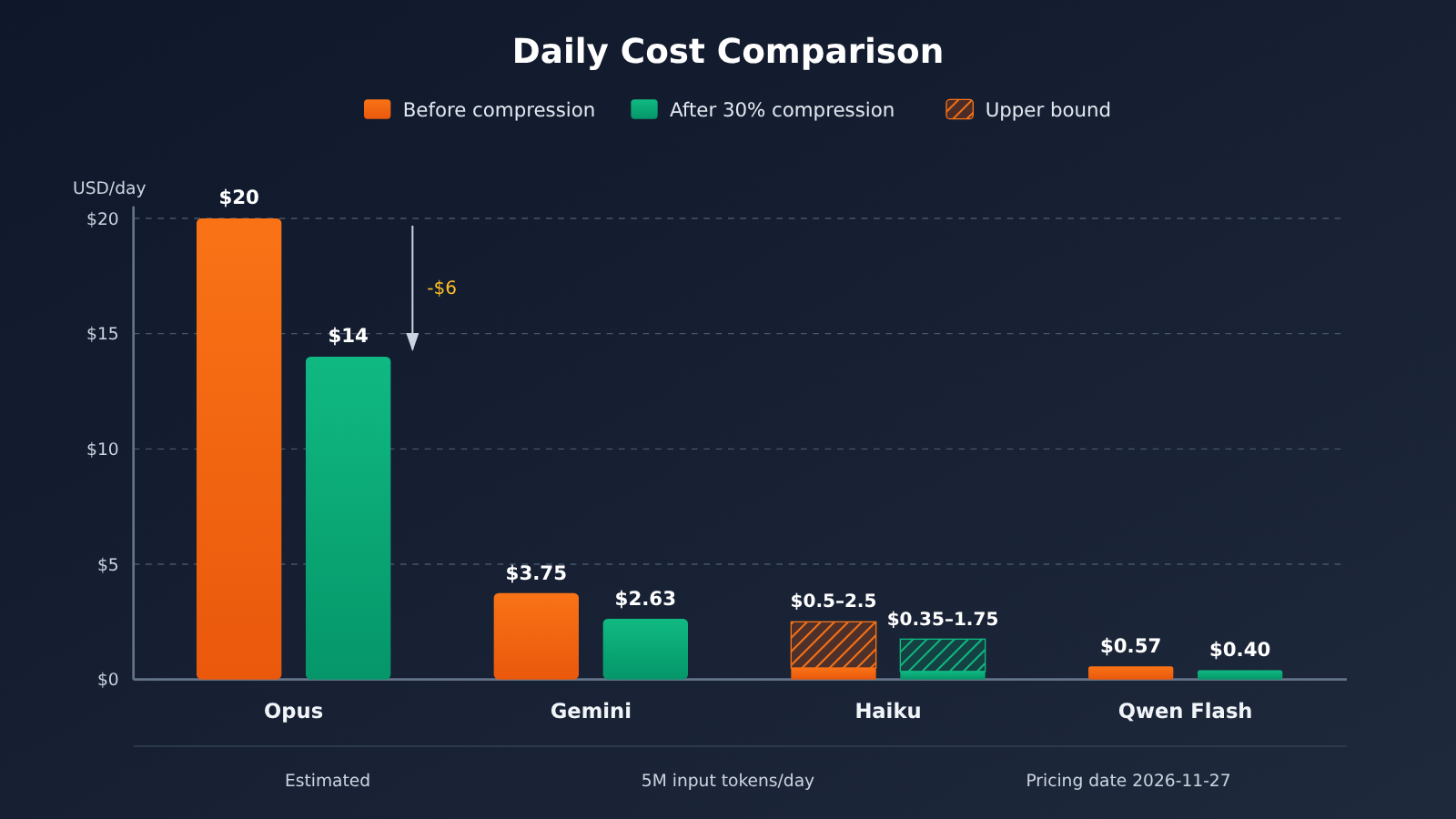
Compression saves tokens, and tokens are what drive cost. Below, I assume 5 million input tokens per day with 30% compression, and estimate using the pricing on APIYI’s model page at apiyi.com (USD per 1M tokens, pricing data as of 2026-11-27).
| Model ID | Input | Output | Cache read | 5M input tokens/day (estimate) | Daily savings at 30% compression (estimate) |
|---|---|---|---|---|---|
claude-opus-5-5 |
$4 | $20 | $0.2 | $20 | $6 |
gemini-3.8-flash |
$0.75 | $3.75 | $0.075 | $3.75 | about $1.13 |
claude-haiku-5-5 |
$0.1 (0–100,000 tier) / $0.5 (over 100,000 tier) | $0.5 | $0.01 | $0.5 to $2.5, depending on which tier you land in | $0.15 to $0.75 |
qwen3.8-flash |
$0.114 | $0.3876 | $0.01425 | $0.57 | about $0.17 |
Three patterns you can see from the cost math
First, the more expensive the model, the more compression pays off. For the same 30% reduction, claude-opus-5-5 saves $6 a day, while qwen3.8-flash saves only $0.17. When you run lightweight tasks on a cheap model, the effort to integrate and maintain it can cost more than the money you save.
Second, the output side can’t be ignored. claude-opus-5-5‘s output price is 5 times its input price. In long tasks, once output tokens add up, the portion of the response that Output Shaper trims can also deliver meaningful savings.
Third, cache-read pricing is a dividing line. claude-opus-5-5‘s cache read costs only one-twentieth of its input price. If your long context already has a high cache hit rate, then the “full-price input” that’s actually billed before and after compression isn’t much, and the savings get diluted. When comparing prices, I’d suggest opening APIYI’s model page to verify the day’s rates, and treating your bill as the source of truth.
headroom Common Troubleshooting Table
| Symptom | Possible cause | Diagnosis and fix |
|---|---|---|
| No visible change after wrap | Proxy wasn’t restarted or wrapping didn’t take effect | Restart the proxy; if needed, run headroom unwrap and then headroom wrap claude again |
| Compression rate far below 20% | Workload is mostly prose or dense output | Use headroom savings to inspect the content composition; these workloads naturally save less |
| Model responses lack detail | Key snippets were compressed | Have the model call headroom_retrieve to get the original text back, or disable compression for that task |
| Cache hit rate drops | Volatile content changed the prefix | Check the CacheAligner markers and move volatile content out of the fixed prefix |
| Proxy-mode requests fail | Upstream URL or API key is misconfigured | Verify the upstream is https://api.apiyi.com/v1 and that the API key is valid |
| Responses are trimmed too short | Output Shaper is enabled | Disable HEADROOM_OUTPUT_SHAPER=1 and compare |
headroom Pros and Cons Analysis
Strengths
- Runs locally: Compression doesn’t send prompts or file contents out, making it suitable for teams with code confidentiality requirements.
- Automatic routing: ContentRouter assigns compressors by content type, so logs, source code, and prose each take their own path.
- Reversible: CCR keeps the original text, and
headroom_retrievelets the model get the full text back when needed. - Low overhead: The repo reports about 1.4ms to compress 100K tokens, which is essentially imperceptible during interaction.
- Lightweight integration: One
headroom wrapcommand wraps common coding agents, and oneheadroom unwrapcommand reverts it.
Limitations
- Prose doesn’t compress much: Issue and documentation workloads save only 20–30% or even less; the fix is to enable it only on tasks with lots of logs and JSON.
- There’s some capability loss: The repo reports that SQuAD v2 and BFCL retain 97% after compression; for tasks that require high exact-match accuracy, validate with a small traffic share first.
- It may offset caching gains: CacheAligner only marks content but doesn’t rewrite it, so you still need to adjust the cache structure yourself.
When you shouldn’t use headroom
headroom isn’t a switch you should flip on by default. In the following scenarios, it’s best to skip it — or only apply it in a limited way:
- Cache hit rate is already high: with a long system prompt and a stable prefix, most input is billed as cache reads. Compression saves very little full-price input, and it may end up disrupting the prefix.
- The workload is mostly natural language: writing, translation, document Q&A — the content is already dense, so compression gains are small.
- You have a hard requirement for verbatim precision: contract comparison, audit log forensics, anything that needs to be quoted exactly. A 3% loss and compressed details are both real risks.
- The model itself is cheap and call volume is low: at
qwen3.8-flashrates you’d save only about $0.17 a day, and the integration and maintenance costs could easily be higher. - Your team doesn’t have usage stats yet: start with
headroom savingsor your bill to figure out where the tokens are going, then decide what to compress.
FAQ
Q1: What is headroom?
headroom is an open-source context compression tool from headroomlabs-ai, released under the Apache-2.0 license. The package name is `headroom-ai` on both PyPI and npm. It compresses tool output, logs, RAG chunks, files, and conversation history before the content is sent to the Large Language Model — and the compression happens locally on your machine.
Q2: How is headroom different from just switching to a cheaper model?
Switching models lowers the unit price, but it may affect capability; headroom lowers the token count while keeping the same model. The two can be combined, but the absolute savings from compression are much smaller on a cheap model.
Q3: Is headroom still actively maintained?
Reference materials show the repo’s most recent commit date as 2026-11-26, with more than 80,000 stars, so it’s actively maintained. For specific version changes, check the repository’s release notes.
Q4: What tasks is headroom best suited for?
– **Online incident triage**: large volumes of logs and monitoring JSON — the repo claims 57% savings.
– **Codebase exploration**: reading lots of source files — the repo claims 42% savings.
– **Issue triage and code search**: the repo claims 30% and 21% savings respectively.
Q5: How do I connect headroom to my own model API?
First start the local proxy with `headroom proxy –port 8787`, then point the upstream to the model endpoint you use, following the repository docs. If you’re using APIYI, set the upstream to the OpenAI-compatible address `https://api.apiyi.com/v1`; you can verify the model ID and current pricing on the model page at APIYI apiyi.com. The free trial credit for new users is enough to run some traffic first and compare results.
Q6: Will headroom compress away critical information?
It’s possible, but there are ways to recover it. In the repo’s demo, FATAL lines are preserved verbatim, CCR keeps the original text locally, and the model can retrieve it via `headroom_retrieve`. For tasks that demand high precision, compare the output with compression on and off first.
Q7: How do I confirm the savings?
Don’t rely on the estimates in this article. Use `headroom savings` to measure the actual savings on your own traffic, then cross-check the input, output, and cache-read line items on your model provider’s bill. APIYI bills by usage, which makes it easy to compare item by item.
headroom Key Takeaways
- What gets compressed: tool outputs, logs, JSON, source code, RAG snippets, and conversation history — all handled locally on your machine.
- How much it saves: the repo reports 21% to 57% savings across four scenarios, and 90%+ for repetitive logs.
- How the work is divided: JSON, source code, and prose each have a dedicated compressor, and the output side can get its own trimming pass.
- Quality cost: the repo reports no measurable difference on small samples, with SQuAD v2 and BFCL holding at 97%.
- How to plug it in:
headroom wrap claudeor a local proxy, with the upstream pointed at APIYI apiyi.com. - When not to use it: when cache hit rates are high, the workload is mostly prose, you need verbatim accuracy, or the model is cheap.
Summary
The core conclusions from the headroom review:
- The payoff depends on the workload: troubleshooting and code-exploration tasks full of logs and JSON save a lot; prose-heavy tasks save less.
- Quality has a safety net: CCR keeps the original text locally and can pull it back when needed, but you should still run a small-scale validation first on precision-critical tasks.
- The more expensive the model, the more it’s worth: compressing the same 30% saves roughly $6 a day on
claude-opus-5-5, but only about $0.17 a day onqwen3.8-flash(estimate, pricing as of 2026-11-27).
Start by running headroom savings against a stretch of real traffic, confirm the savings, then roll it out fully. Upstream models can all be reached through APIYI apiyi.com, so a single key lets you compare cost and quality across different models before and after compression.
📚 References
-
headroom repository: source code, compressor docs, and benchmark data
- Link:
github.com/headroomlabs-ai/headroom - Note: The scenario data and accuracy numbers in this article all come from the repo’s own reporting
- Link:
-
headroom-ai PyPI page: install package and version info
- Link:
pypi.org/project/headroom-ai - Note: confirms the install command and optional dependencies
- Link:
-
APIYI model pricing: input, output, and cache-read prices for each model
- Link:
docs.apiyi.com/models - Note: the price source for the cost estimates in this article; data dated 2026-11-27
- Link:
Author: APIYI Technical Team
Technical discussion: Reach us through the APIYI homepage if you’d like to get in touch; for more integration resources, check out the docs.apiyi.com documentation center


