
Summary: For the same meeting recording, should you give it to Gemini 4 Neon or GPT‑6.2 Sol to extract action items? Here’s how to connect each path and how to make every item traceable.
Let’s get to the conclusion first. Gemini 4 Neon’s specs support audio input, so you can upload the recording and directly ask it to return structured action items. GPT‑6.2 Sol’s specs explicitly do not support audio as a modality, so you must first use a transcription endpoint to convert the recording to text, then give Sol the text with segment IDs to extract. The two paths involve a different number of endpoints, but you can’t infer from that which one is more accurate, cheaper, or faster. What determines quality is the same data contract—evidence citations, nullable fields, status determination, and coverage completeness—and you need to validate against human annotations for the same set of recordings.
The information in this article was verified as of Beijing time 2026-11-25, covering the scope from the recording file entering the native provider API to obtaining verifiable action items. The meeting snippets in this article are all synthetic examples, not actual test records.
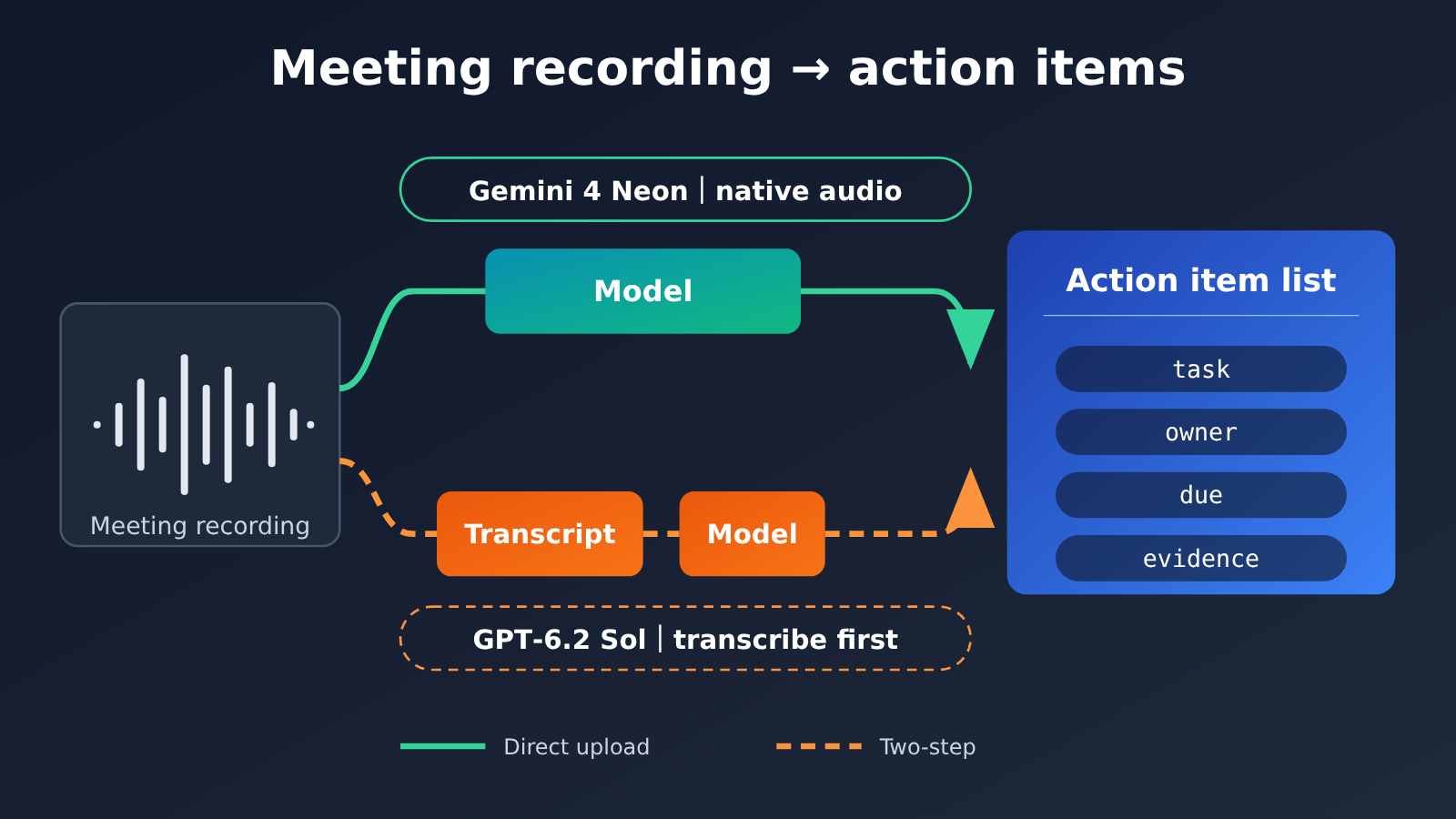
Gemini 4 Neon vs GPT‑6.2 Sol Knowledge Map
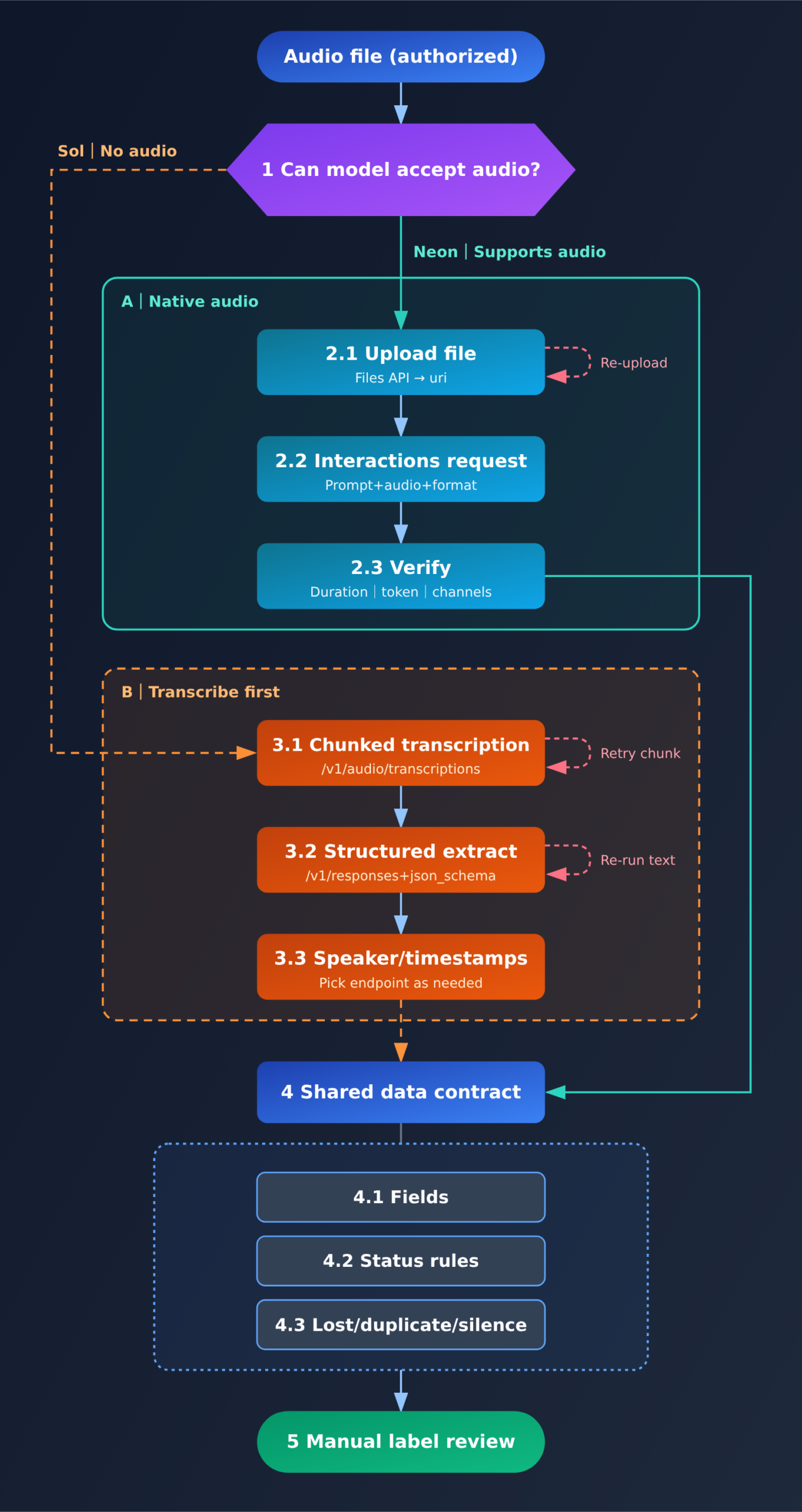
Figure note: there’s only one decision at the entry — can the model accept audio. Neon follows Section 2, Sol follows Section 3, and both paths ultimately have to satisfy the same set of field and status rules from Section 4 before they reach acceptance in Section 5. The loops in the diagram mean that when something breaks, you redo only the step that broke — you don’t have to resubmit the whole recording.
Index: Reading Order for Gemini 4 Neon and GPT‑6.2 Sol
We recommend starting with Section 1 — it uses the model specs to determine which path to follow next. Sections 2 and 3 are parallel; if you only use one of the models, you can just read the corresponding section. Section 4 is the data contract shared by both paths — the raw results from the first two sections all need to land in the fields and states defined here, so all readers should read it. Section 5 gives the method for acceptance and model selection, and it depends on the fields from Section 4 to be executable.
- 1 Decide first: which model can take the recording directly
- 2 Gemini 4 Neon native audio path (2.1 upload, 2.2 request, 2.3 duration and channels)
- 3 GPT‑6.2 Sol transcribe-first path (3.1 transcription segmentation, 3.2 structured extraction, 3.3 speakers and timestamps)
- 4 Action item data contract (4.1 fields, 4.2 status determination, 4.3 dropped segments, duplicates, and silence)
- 5 Acceptance and model selection
To Know: Key Terms for Extracting Action Items from Meeting Recordings
| Term | Plain Explanation |
|---|---|
| Native audio input | The model reads the audio file directly, with no separate transcription step in between |
| Files API | Google’s file upload interface, which returns a file uri you can reference in requests |
| Structured output | Making the model return results that follow a given JSON Schema, so programs can validate and store them easily |
| Speaker diarization | Labeling each segment of the transcription with which speaker it belongs to, along with start and end times |
| Idempotency key | A unique identifier assigned to each submission, so retries won’t create duplicate records |
| Normalized date | Converting relative phrases like “Friday” into specific dates, given that the meeting date and timezone are known |
1. Gemini 4 Neon vs GPT‑6.2 Sol: Which Model Can Take a Recording Directly?
The deciding factor here is the input modalities spelled out on each model’s spec page. Google lists gemini-4-neon as a stable model with audio, text, image, video, and PDF inputs, text output, and structured output support. Its spec page marks Live API as unsupported, but we’re working with files that are already recorded and going down the offline analysis path, so that item doesn’t affect us.
OpenAI lists gpt-6.2-sol as text and image input with text output, and explicitly does not support audio. Sol’s spec page also lists the platform’s endpoint catalog, but that’s no reason to assume Sol can accept audio. Routing decisions should follow the model’s own modalities and usage guidance, so whatever Sol gets has to be transcribed text.
| Capability | Gemini 4 Neon | GPT‑6.2 Sol | Source |
|---|---|---|---|
| Audio input | Supported | Explicitly not supported | Both model spec pages |
| Text input | Supported | Supported | Both model spec pages |
| Image input | Supported | Supported | Both model spec pages |
| Video and PDF input | Supported | Not listed in specs | Both model spec pages |
| Output | Text | Text | Both model spec pages |
| Structured output | Supported | Supported (json_schema in Responses) |
Spec pages and the structured output guide |
| Live API | Not supported | Not relevant here | Neon spec page |
| How the recording gets in | Analyzed directly after upload | Has to go through a transcription endpoint first | Inferred from the modalities above |
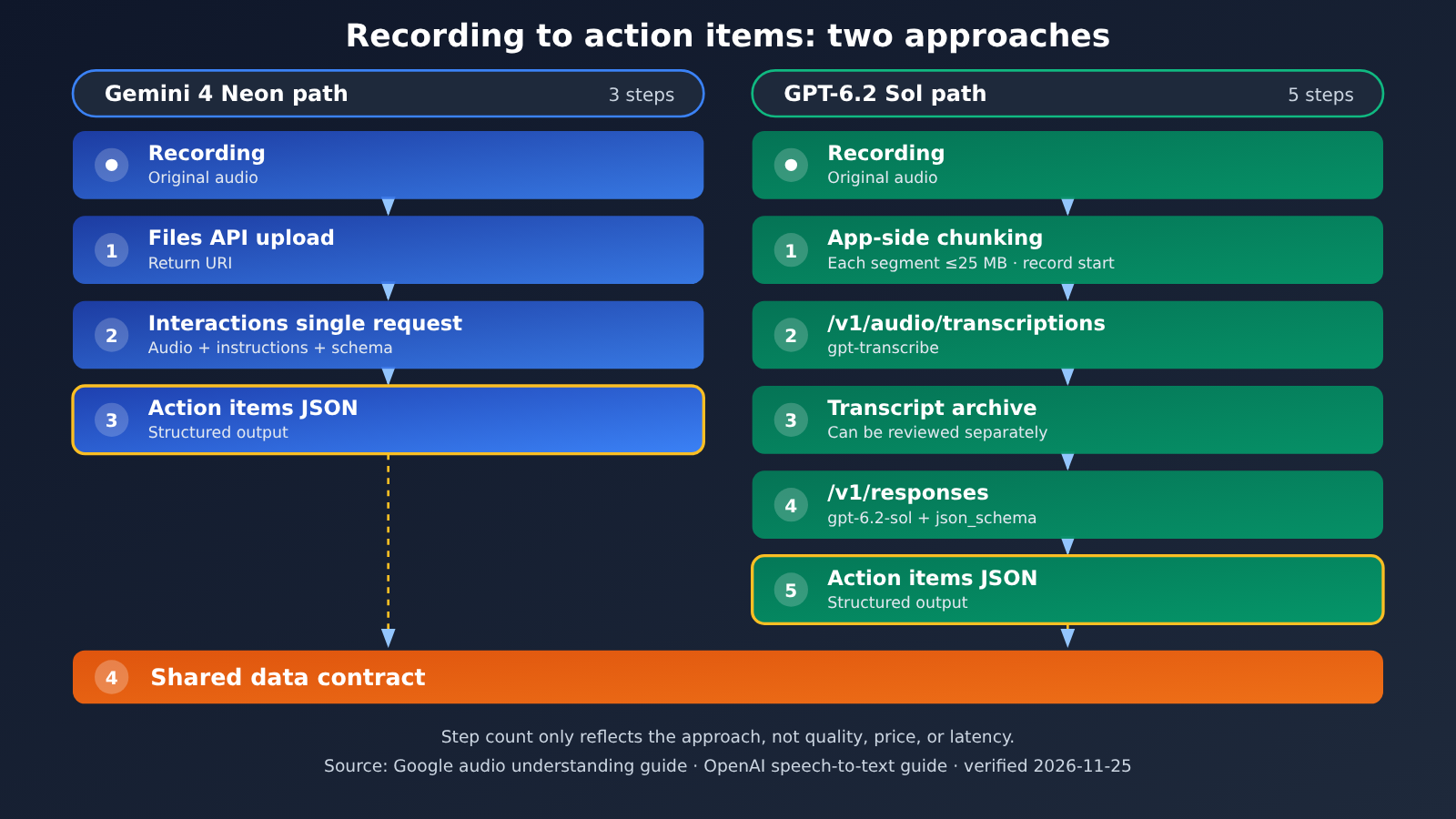
The flow comparison only shows how the wiring differs. Neon skips one intermediate step; Sol adds a transcript you can proofread on its own. Which path produces more accurate action items is a question for Section 5, once we’ve manually annotated the same batch of recordings.
2 How to Integrate the Gemini 4 Neon Native Audio Path
This path is all about putting the recording into the same request as the text instructions and output format, then sending everything to the model together. You need to get three things right: how the file gets in, how to write the request fields, and whether the recording length and channel count fall within what the model can handle.
2.1 Uploading Recordings and Referencing Files in Gemini 4 Neon
Use the Gemini SDK’s client.files.upload(file=...) to upload a recording you’re authorized to use, then save the returned uri, mime_type, and file resource name. The resource name is used later to check or delete the file.
from google import genai

client = genai.Client()  # Read the official provider API key from environment variables

audio = client.files.upload(file="meeting-2026-11-24.m4a")

# Persist all three values: uri for the request, name for checking and deletion
record = {
    "file_uri": audio.uri,
    "mime_type": audio.mime_type,
    "resource_name": audio.name,
}
print(record)
The official audio page recommends using the Files API for audio larger than 20 MB. The general Files API documentation requires file upload when the total request exceeds 100 MB. The first is a conservative recommendation for audio integration; the second is a general constraint on overall request size. In practice, you can standardize on the upload path. It’s safer when recording lengths vary a lot, or when the request also includes a long block of text. For short recordings, you can also use inline data as the official guide suggests, but make sure to specify the actual MIME type.
Uploaded files are not stored permanently. The Files API documentation states a maximum of 2 GB per file and 20 GB total per project. Files are automatically purged after 48 hours, and you can also delete them manually. So treat the uri as a temporary reference only. When resuming after an interruption, check whether that reference is still valid first. If it has expired, re-upload from the source recording you’re authorized to keep.
2.2 Gemini 4 Neon Interactions Requests and Structured Output
When you use the Interactions endpoint, pass model: "gemini-4-neon" and place your text instructions and audio objects in the input array. The audio object contains type: "audio", uri, and mime_type. Structured output goes in the top-level response_format: set type to text, mime_type to application/json, and let schema describe the structure of the action items. Below we only show how the request body fields are organized — for the exact invocation method, refer to the official Interactions documentation.
request_body = {
    "model": "gemini-4-neon",
    "input": [
        {
            "type": "text",
            "text": (
                "会议日期 2026-11-24,时区 Asia/Shanghai。"
                "提取已确认的行动项与待定议题;负责人或期限不明时填 null;"
                "每条必须附原话短摘和大致时段,时段标记为模型估计。"
            ),
        },
        {
            "type": "audio",
            "uri": record["file_uri"],
            "mime_type": record["mime_type"],
        },
    ],
    "response_format": {
        "type": "text",
        "mime_type": "application/json",
        "schema": ACTION_ITEM_SCHEMA,  # see section 4.1
    },
}
If your existing client uses the GenerateContent endpoint, stick with that endpoint’s audio part format. The fields of the two endpoints can’t be mixed, so don’t put the Interactions input structure and the GenerateContent part structure into the same request.
2.3 Gemini 4 Neon: Duration, Token, and Channel Limits
Google’s audio guide lays out the technical specs for audio. When recordings are long, you need to check these numbers against the context limit of the specific model — both have to hold before you can submit everything in one go.
| Parameter | Published value | Notes |
|---|---|---|
| Audio token conversion | 32 tokens per second, 1,920 tokens per minute | By this math, 60 minutes comes to roughly 115,200 tokens (calculated estimate) |
| Maximum audio per prompt | 9.5 hours | Still bounded by the Neon model’s context limit |
| Multichannel handling | Merged into mono | Channel information isn’t retained on the model side |
| Recommended upload threshold | Audio larger than 20 MB | The audio guide’s conservative recommendation |
| Required upload threshold | Total request larger than 100 MB | Per the general Files API documentation |
| Per-file limit / project total | 2 GB / 20 GB | Auto-deleted after 48 hours; can also be deleted manually |
Channel merging has a direct impact on speaker identification. If your team relies on left and right channels to tell speakers apart — the host on the left channel, a remote guest on the right, for example — that information is lost once it reaches the model. You should store an identity mapping for each channel on the application side, or split the channels and process them separately. With native audio, you can ask the model to return the relevant time ranges, but until those timestamps are checked against the original recording or dedicated alignment data, they should only be labeled as estimates.
3 How to Wire Up the GPT‑6.2 Sol Transcribe-First Path
This path splits into two independent stages: transcription and extraction. Each stage should store its own state and use its own idempotency key. The payoff: if either stage fails, you only re-run the part that broke.
3.1 GPT‑6.2 Sol Pre-Transcription and Segmentation
The first step is submitting a multipart file to /v1/audio/transcriptions. For ordinary files, use model=gpt-transcribe as shown in the vendor’s current example. The standard response includes text and the detected language.
curl https://api.openai.com/v1/audio/transcriptions \
  -H "Authorization: Bearer $OPENAI_API_KEY" \
  -F model=gpt-transcribe \
  -F [email protected] \
  -F prompt="会议涉及项目:北辰报价单、仓库回执"
This endpoint accepts files up to 25 MB each and supports WAV, MP3, MP4, MPEG, MPGA, M4A, OGG, FLAC, and WebM. For long recordings, you can compress or segment them first — try to cut at natural pauses so you don’t split a sentence down the middle. Give each segment a stable ID and save its start time within the original meeting; the evidence location step in Section 4 relies on both of these values.
The vendor’s docs let you pass industry terminology or multilingual hints through prompt, keywords, and languages. Writing project names into the prompt does help recognition, but you still need to verify the final spelling against the transcription evidence — don’t assume it’s right just because you put it in the prompt.
3.2 Structured Extraction with GPT‑6.2 Sol Responses
The second step sends model: "gpt-6.2-sol" to /v1/responses, combining each transcript segment, segment number, start time, and instructions into a text input. In text.format, set type: "json_schema", name, and schema; in supported modes, you can also set strict: true.
{
  "model": "gpt-6.2-sol",
  "input": [
    {
      "role": "user",
      "content": "会议日期 2026-11-24,时区 Asia/Shanghai。以下为分段转录,格式为 [段号|起点秒]。提取行动项与待定议题,负责人或期限不明时填 null,每条附原话短摘与段号。\n[seg-001|0] ……\n[seg-002|412] ……"
    }
  ],
  "text": {
    "format": {
      "type": "json_schema",
      "name": "meeting_action_items",
      "strict": true,
      "schema": { "$ref": "见 4.1 节 ACTION_ITEM_SCHEMA" }
    }
  }
}
Before storing the returned results, the application should run four checks in sequence: whether generation completed, whether the model refused, whether the JSON passes validation, and whether the segment numbers cited as evidence actually exist. Once transcripts and extraction results are stored separately, a failed transcript segment only needs that segment rerun; if extraction fails, you can rerun from the saved text without resubmitting the entire recording.
3.3 Speakers and Timestamps on the GPT‑6.2 Sol Path
If you need to distinguish speakers or get word-level timing, you’ll need to separate general transcription output from the fields offered by specialized endpoints. The standard gpt-transcribe response doesn’t include the speaker and timestamp fields that older endpoints promised.
| Endpoint / model | Key parameters | Available fields | Status (as of 2026-11-25) |
|---|---|---|---|
gpt-transcribe |
Standard multipart | text, detected language |
Current first-party example |
gpt-4o-transcribe-diarize |
response_format=diarized_json |
speaker, start, end |
Deprecated, scheduled to stop on 2027-02-26; requires a segmentation strategy for audio over 30 seconds |
whisper-1 |
verbose_json + timestamp_granularities |
Word- or segment-level timestamps | Deprecated, scheduled to stop on 2027-02-26 |
gpt-4o-transcribe |
Standard | General transcription | Deprecated, scheduled to stop on 2027-02-26 |
gpt-4o-mini-transcribe |
Standard | General transcription | Deprecated, scheduled to stop on 2027-02-26 |
Existing systems that depend on the fields from diarize or whisper-1 need to plan their migration before the shutdown date. New integrations can use application-side segment boundaries for coarse-grained positioning. Fields that can’t provide exact timestamps can be left blank, with the time source marked as “application segmentation.”
4 Shared Action Item Data Contract for Gemini 4 Neon and GPT‑6.2 Sol
The two paths wire up their upstream side differently, but downstream they have to land on the same data structure. That’s what lets Section 5 compare them with a single set of annotations, and it makes switching paths later a lot easier.
4.1 Action Item Fields and JSON Schema
Each action item stores six fields: task, owner, due_raw, due_date, evidence, and status. The top level wraps the array in an object so we can bolt on an overall review flag. Both providers support only a subset of standard JSON Schema, so the structure below needs its nullable-field syntax adjusted per each vendor’s docs — you can generate two request descriptions for the same business type.
ACTION_ITEM_SCHEMA = {
    "type": "object",
    "properties": {
        "needs_review": {"type": "boolean"},
        "items": {
            "type": "array",
            "items": {
                "type": "object",
                "properties": {
                    "task": {"type": "string"},
                    "owner": {"type": ["string", "null"]},
                    "due_raw": {"type": ["string", "null"]},
                    "due_date": {"type": ["string", "null"]},
                    "status": {"type": "string",
                               "enum": ["confirmed", "assigned", "pending",
                                        "cancelled", "unconfirmed"]},
                    "evidence": {
                        "type": "array",
                        "items": {
                            "type": "object",
                            "properties": {
                                "quote": {"type": "string"},
                                "segment_id": {"type": "string"},
                                "start_sec": {"type": ["number", "null"]},
                                "end_sec": {"type": ["number", "null"]},
                                "time_source": {"type": "string",
                                                "enum": ["app_split", "diarize_meta",
                                                         "model_estimate"]}
                            },
                            "required": ["quote", "segment_id", "start_sec",
                                         "end_sec", "time_source"],
                            "additionalProperties": False
                        }
                    }
                },
                "required": ["task", "owner", "due_raw", "due_date",
                             "status", "evidence"],
                "additionalProperties": False
            }
        }
    },
    "required": ["needs_review", "items"],
    "additionalProperties": False
}
| Field | Meaning | Nullable | Filling rules |
|---|---|---|---|
task |
What needs to be done | No | Rewrite it in the speaker’s own words, without adding speculative detail |
owner |
Owner | Yes | Must be a person; a delivery channel like “the group chat” can’t act as the owner |
due_raw |
Deadline as stated | Yes | Keep the original phrasing, e.g. “by Friday” |
due_date |
Normalized date | Yes | Convert only when the meeting date and time zone are explicitly provided; otherwise leave it blank |
evidence |
Short quote + segment ID + time range | No | The time range must declare its source: app segmentation, dedicated metadata, or model estimate |
status |
Current status | No | See Section 4.2 |
Schema can constrain structure, not facts. Before writing to the database, the app also has to validate empty arrays, fields that exist but hold empty values, whether segment IDs actually exist, and the boundaries of the evidence quotes. When it comes to verifying facts, the final authority is still the evidence and the original recording.
4.2 Determining Action Item Status: Discussion, Commitment, and Cancellation
When determining status, you need to distinguish discussion, proposals, commitments, denials, and cancellations. Take the synthetic excerpt “林悦,你周五前整理报价,发到群里。——可以。另一个版本让谁来审,我们下周再定。” as an example. The first sentence, together with the other person’s response, forms a confirmed action item. The second half can only be recorded as a pending topic, with both the owner and due date left blank.
{
  "needs_review": false,
  "items": [
    {
      "task": "整理报价并发到群里",
      "owner": "林悦",
      "due_raw": "周五前",
      "due_date": "2026-11-27",
      "status": "confirmed",
      "evidence": [{"quote": "林悦,你周五前整理报价……——可以。",
                    "segment_id": "seg-001", "start_sec": null,
                    "end_sec": null, "time_source": "app_split"}]
    },
    {
      "task": "确定另一个版本的审核人",
      "owner": null, "due_raw": "下周再定", "due_date": null,
      "status": "pending",
      "evidence": [{"quote": "另一个版本让谁来审,我们下周再定。",
                    "segment_id": "seg-001", "start_sec": null,
                    "end_sec": null, "time_source": "app_split"}]
    }
  ]
}
The example above assumes the meeting date is 2026-11-24 (Tuesday), so “周五” maps to 2026-11-27. If the reference date is unknown, due_date should be left blank.
Cases where someone changes their mind need an even stronger evidence chain. Below is a synthetic transcript split into three segments:
- The first segment, “先请小周联系仓库,” contains only a form of address and no corresponding formal identity mapping. Record this as assigned, keep the original form of address, and leave Xiao Zhou’s account identifier blank.
- The second segment, “算了,昨晚已经问过了,周四前把回执发给我,” cancels the old task and creates a new one at the same time. From the text alone, it’s impossible to determine who “我” and the recipient are, so the owner is marked as unconfirmed.
- The third segment, “我来发回执,周五上午之前可以.” If this segment has a known speaker, update the owner and the new due date, and use segments two and three as evidence to record the change process. If the ordinary transcript provides no identity, this segment can still be used to update the due date, while responsibility is left for the reviewer to confirm.
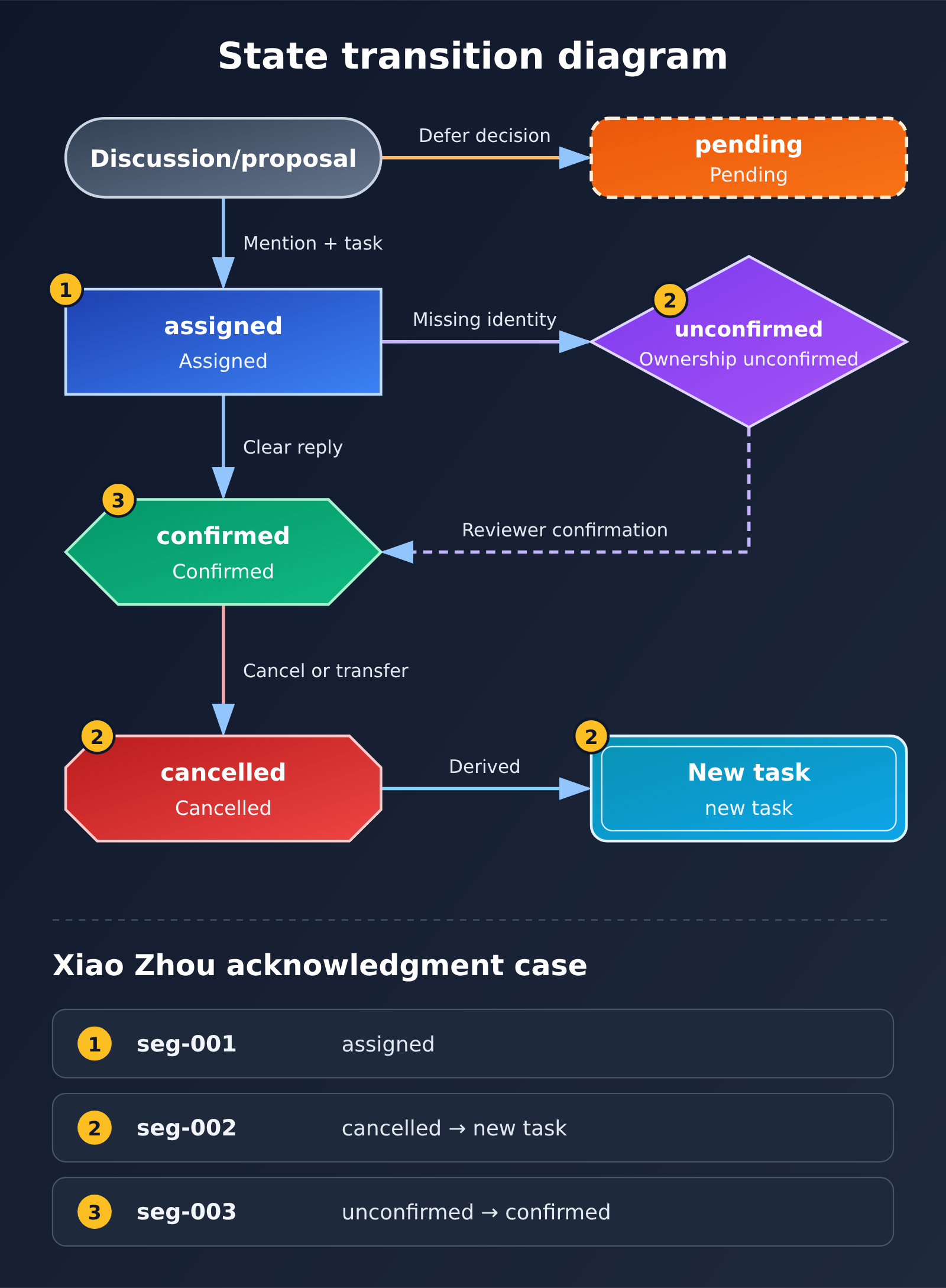
Segment overlap can cause the same commitment to be extracted twice. Merge them by task, owner, time range, and quote. When you encounter the same name, multiple people speaking over one another, or unclear audio, keep the unknown values and reflect the limits of the evidence in the review status. Don’t let the model guess a definite name.
4.3 Handling Dropped Segments, Duplicates, and Silence
Dropped segments, duplicates, and silence are three distinct states — you can’t treat all of them as “no action items.”
- Dropped segments: use the total segment count and the success count to determine whether coverage is complete. When segments are missing, keep the entries already extracted and mark them as partial coverage; once the missing segments are filled in, re-merge and then recheck whether anything said later revises an earlier statement.
- Duplicates: when multiple results come back duplicated, dedupe by source file version, start time, and segment number.
- Silence: when an entire segment is silent and the system confirms the processing succeeded, record it as a normal “no action items” state, kept separate from a failure state.
These conditions apply equally to the native audio path. If the Neon path also segments on the application side for traceability, you can use the same batch of human annotations to check whether the output maps back to the source segments.
5 Acceptance Testing and Selection: Gemini 4 Neon vs GPT‑6.2 Sol
The two paths suit different use cases. A single structured call is good for quickly getting a readable draft of the minutes. The transcribe-first path gives you an extra piece of text you can proofread on its own, which makes it easy to correct vocabulary and re-extract after updating the transcript version. When reviewers need to trace things item by item, the Neon path can add application-side segmentation and source positions, while the Sol path can store the text version number and segment index. Either design lets you redo only the step that went wrong while keeping the verbatim commitment wording mapped to the structured fields.
Three main conditions would change the choice:
- If you must have vendor-native speaker or word-level timestamp fields, the OpenAI-side interfaces that provide them are all deprecated and scheduled to shut down on 2027-02-26, so you’ll need to factor in the migration cost.
- If you rely on multi-channel audio to distinguish speakers, Neon merges the channels into mono, so you’ll need to handle that on the application side first.
- If compliance requires the transcript to be reviewable and editable on its own, the transcribe-first path has that step built in.
Price, latency, and accuracy: none of the sources cited in this article provide data on a comparable basis, so we won’t rank them here. You can run your own acceptance test like this: pick a batch of authorized real meeting recordings, have humans annotate the task, owner, deadline, and evidence location for each action item, then process them with both paths, count attribution errors, omissions, and false positives, and spot-check whether each output’s evidence can be located in the original recording. The path that performs better on this batch is the one that fits your team.
References
- Gemini 4 Neon model specs: input modalities, structured output, Live API support
- Link:
aistudio.google.com/docs/models/gemini-4-neon
- Link:
- Google audio understanding guide: upload methods, token conversion, duration and channel notes
- Link:
aistudio.google.com/docs/audio
- Link:
- Google Files API: file size limits, automatic cleanup, and deletion
- Link:
aistudio.google.com/docs/files
- Link:
- Google structured output:
response_formatand the schema subset- Link:
aistudio.google.com/docs/structured-output
- Link:
- GPT‑6.2 Sol model specs: modalities and endpoints
- Link:
developers.openai.com/api/docs/models/gpt-6.2-sol
- Link:
- OpenAI speech-to-text and transcription workflows: file limits, speaker diarization, timestamps, deprecation plans
- Link:
developers.openai.com/api/docs/guides/speech-to-text - Link:
developers.openai.com/api/docs/guides/transcription
- Link:
- OpenAI structured outputs guide:
text.formatandjson_schema- Link:
developers.openai.com/api/docs/guides/structured-outputs
- Link:


