

Summary: This article answers whether MAI Code 2 and MAI Code 2 Flash can be assigned to GitHub Copilot for automatic PR review, and explains how teams can control review outcomes using review intensity, trigger rules, and approval policies when the model isn’t selectable.
Bottom line first: No, you can’t. GitHub’s official billing reference lists Copilot code review as an exception — the model used for review is automatically chosen by the service, and the model identity isn’t disclosed. MAI Code 2 and Flash appear in the model selectors of entry points like VS Code, Copilot CLI, and Copilot cloud agent; selecting them there only affects interactions within that entry point and doesn’t change the model used for the built-in PR review. Teams can tune three things: review intensity (Lite, Balanced, Max, and Adaptive in public preview), automatic trigger conditions (rulesets, personal settings, re-review and draft toggles), and whether Copilot approvals count toward merge requirements.
The public information in this article was verified as of Beijing time 2026-11-25, and the scope is limited to the Pull Request workflow of GitHub.com’s built-in Copilot code review.
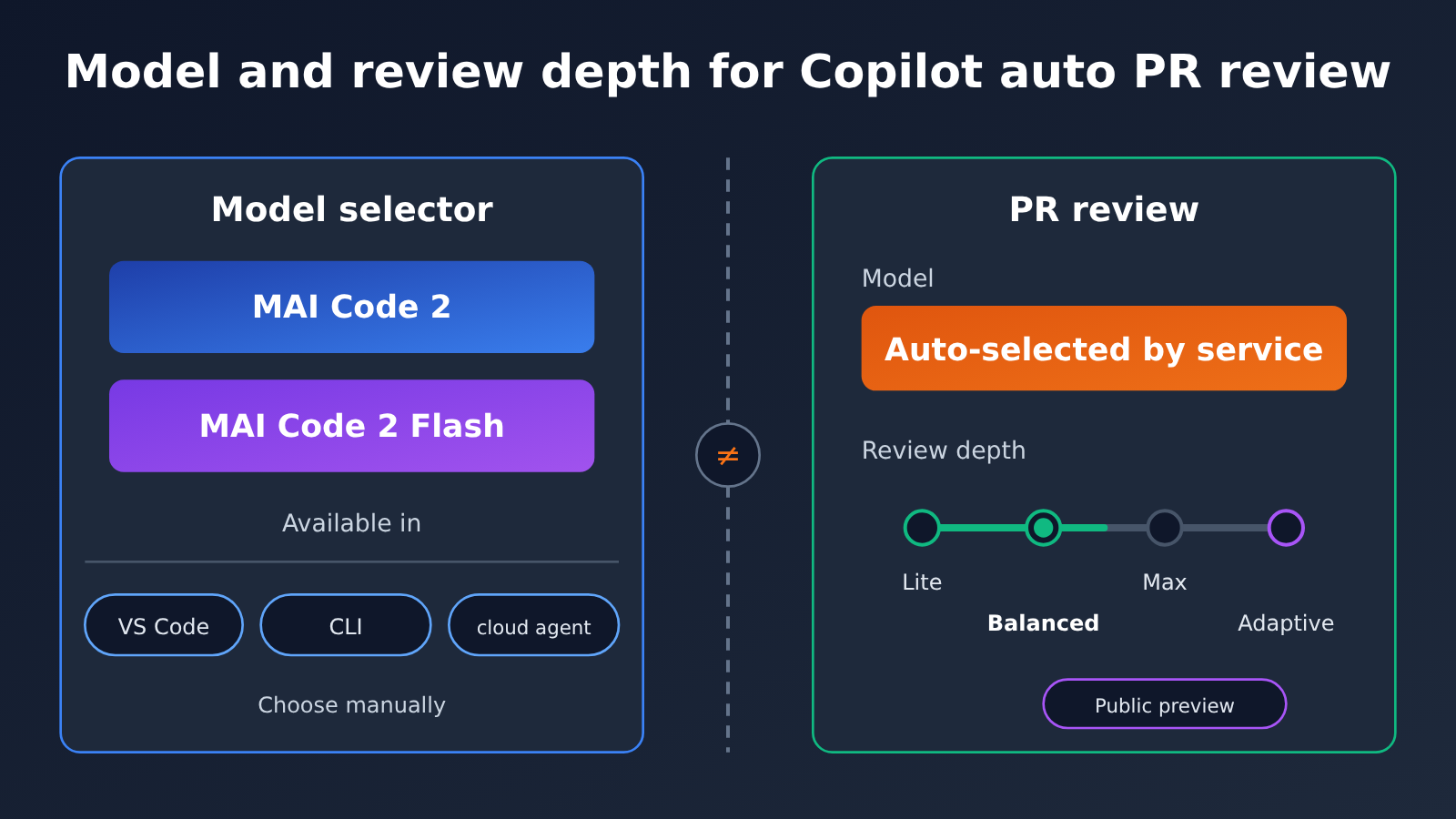
Knowledge Map: Models and Review Intensity in Copilot’s Automatic PR Review
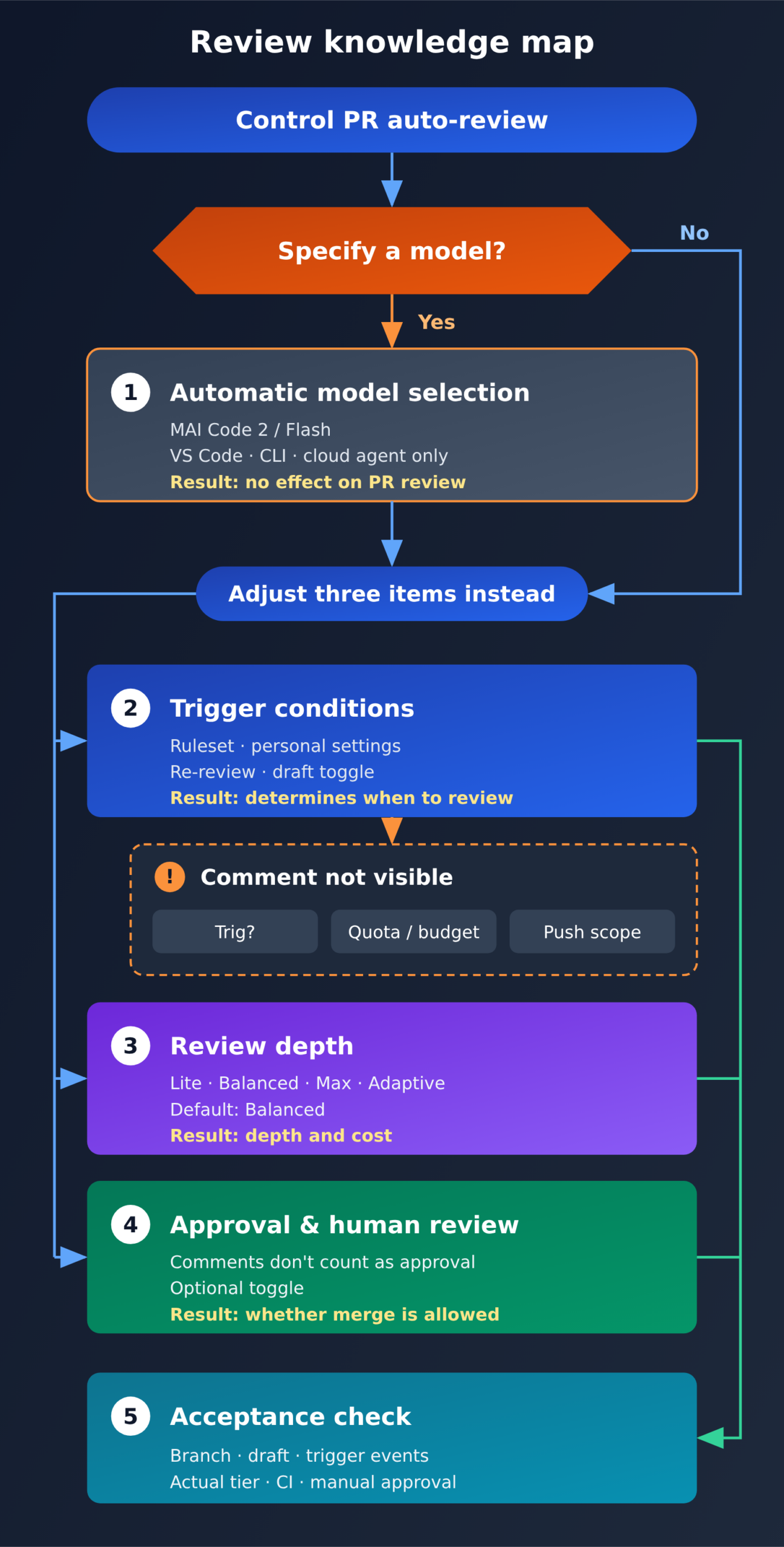
Figure caption: The decision at the top answers “Can you choose the model?”, and the answer points to Section 1. The three side-by-side cards then correspond to Sections 2, 3, and 4, controlling when review happens, how deep it goes, and whether the result counts toward merging. Finally, they all converge on the validation record in Section 5. “Didn’t see any comments” is the troubleshooting branch in Section 2.
Index: Reading Order for Copilot’s Automated PR Review
I’d recommend reading in numbered order, since each section builds on the one before it:
- Section 1: Who Chooses the Model: rule out the “specify MAI Code 2 or Flash” path first, then we can focus on what’s actually configurable.
- Section 2: Trigger Conditions: the review has to be triggered before intensity and approvals mean anything.
- Section 3: Review Intensity: this is the main lever in place of “choosing a model,” covering default-value precedence and REST usage.
- Section 4: Approvals and Human Review: determines how much weight the review result carries in the merge workflow.
- Section 5: Rollout Acceptance: turns the first four sections into recordable, reviewable evidence.
Check the FAQ at the end as needed to cross-reference a few common misconceptions.
To Know: Copilot Review Terminology
| Term | Short Explanation |
|---|---|
| PR | Pull Request — the unit of review when submitting code to be merged |
| Copilot code review | The Copilot PR review feature built into GitHub.com |
| review effort | Review intensity — the depth of analysis invested in a single review |
| Branch ruleset | A set of rules scoped to a branch, configurable at the repository, organization, or enterprise level |
| Requester | The person who initiates this review; for a new PR, usually the author |
| Overview comment | The summary comment Copilot posts on each review, which records the intensity actually used |
1. Can Copilot’s automatic PR review specify MAI Code 2 and Flash?
1.1 Official position: Copilot review models are chosen automatically
GitHub lists Copilot code review as a separate exception in its models and billing reference: the service decides which model the review uses, and the specific model identity is not disclosed. That means whether you’re an individual user, a repository admin, or an organization admin, there’s no “review model” dropdown where you can choose MAI Code 2 or Flash.
What admins and requesters can adjust is review effort and trigger conditions. So when you see a change in review quality in the overview comment, look at the actual setting first rather than guessing the model from the output style.
1.2 Which entry points does the MAI Code 2 selector apply to?
The GitHub release notes from 2026-11-17 announced that MAI Code 2 and MAI Code 2 Flash are coming to GitHub Copilot and listed the entry points where the model selector applies. The two official documents describe different things: the release notes cover general Copilot interactions, while the billing reference covers the built-in review.
| Entry point | Can you select MAI Code 2 / Flash? | Scope of impact after selection |
|---|---|---|
| Copilot in VS Code | Yes (named in the release notes) | Chat and other interactions in that editor |
| Copilot CLI | Yes (named in the release notes) | Command-line sessions |
| Copilot cloud agent | Yes (named in the release notes) | Tasks executed by the cloud agent |
| Built-in Copilot code review | No; the service selects the model automatically | Not affected by selections in any of the entry points above |
A common misconception is “I selected MAI Code 2 in Chat, so automatic review should use it too.” Per the official position, the two don’t affect each other, and the Chat selection doesn’t carry over to review.
1.3 The community request for model selection is just a proposal
On 2026-03-12, GitHub community discussion #189369 proposed allowing a model to be specified when starting a review with gh pr. The example parameters in the post are a proposal, not a shipped feature. It explains why many people associate model selection in the coding assistant with model selection in the reviewer, but actual practice should follow the review configuration docs and REST endpoint parameters—and the current parameters include only intensity, not model.
2. How to Configure Trigger Conditions for Copilot Automatic PR Review
2.1 Enabling Copilot Automatic Review with Repository Rulesets
Here’s the configuration path for repository admins:
- Go to the repository’s Settings → Rulesets → New branch ruleset.
- Select the target branch and set the ruleset status to Active.
- Turn on Automatically request Copilot code review.
- Optionally check Review new pushes: once enabled, every subsequent push to a PR already in review scope automatically triggers a re-review according to the rules.
- Optionally check Review draft pull requests: once enabled, draft PRs also enter review.
Organization-level or enterprise-level branch rulesets can further limit target repositories and branches. When troubleshooting why a particular review did or didn’t happen, first check whether the PR’s target branch falls within the ruleset scope, then look at the two switches for drafts and subsequent pushes.
2.2 Personal Settings and Merging Multiple Sources
Individual accounts can access Copilot settings → Code review from the avatar menu, so PRs they open get automatically reviewed in eligible repositories. The conditions listed in the docs include Pro, Pro+, Max, or holding a Business or Enterprise license; managed user accounts don’t have this personal configuration entry point.
Rules at the personal, repository, and organization levels each independently determine whether to trigger, but even if the same event matches multiple sources, only one review is posted. This leads to an easy-to-miss pitfall: if an admin disables re-review in their personal settings, they’ve only disabled that one trigger source—rules already enabled at other levels still take effect. In addition, organizations can, by policy, let members without a personal Copilot license use review, so when determining eligibility you need to look at both organization and enterprise controls.
2.3 Troubleshooting Order When Copilot Automatic Review Doesn’t Post Comments
After a trigger, you can see Copilot’s requests and re-review records in the Reviewers area of the PR’s right sidebar. When expected comments are missing, it’s recommended to troubleshoot in this order:
- Did it actually trigger: check whether there’s a Copilot request record in Reviewers.
- Was it not executed because of an unavailable budget or quota.
- Whether subsequent pushes fall within the ruleset scope, and whether Review new pushes is enabled.
One more thing to keep straight: when an organization chooses whether to bill licensed members against organizational benefits or personal benefits, that’s only about billing attribution—it doesn’t give users any additional usage eligibility.
3. How Copilot Review Intensity Is Tiered: 4 Tiers and Defaults
3.1 Differences Between Lite, Balanced, Max, and Adaptive
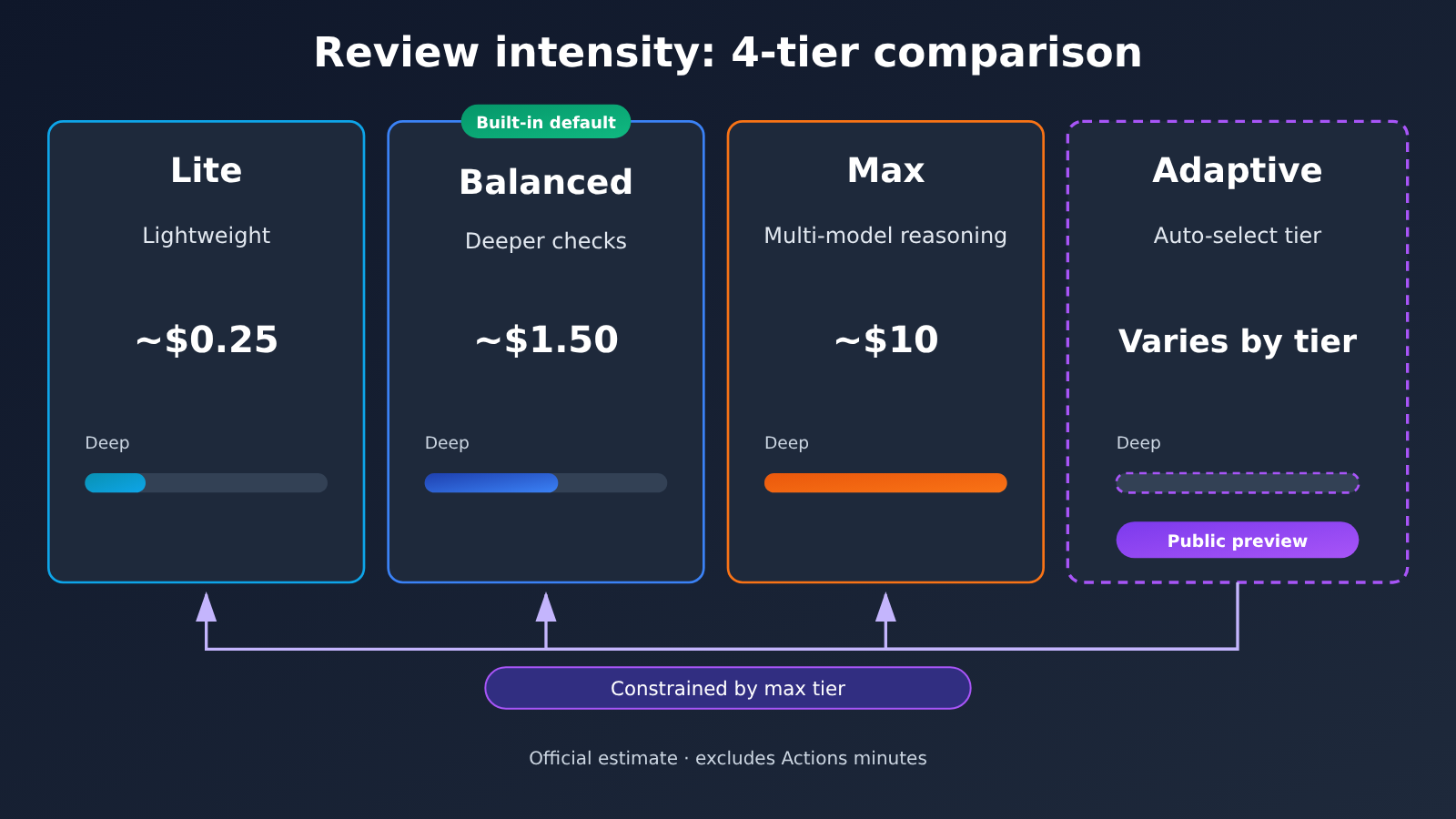
Since you can’t choose the model, review intensity is the main way to control review depth and cost. The costs below are GitHub’s public estimates. They vary with PR size, context, custom instructions, and tier, and don’t include Actions minutes. Actual amounts may fall outside these ranges.
| Tier | Purpose | Estimated average per run | Typical range |
|---|---|---|---|
| Lite | Lighter routine review | About $0.25 | $0.05–$1 |
| Balanced (built-in default) | Deeper checks for complex logic and cross-service changes | About $1.50 | $0.25–$5 |
| Max | Uses multiple high-reasoning models | About $10 | $1.50–$25 |
| Adaptive (public preview) | Chooses among the first three tiers based on the current PR’s complexity and risk | Varies with the tier selected for that run | Varies with the tier selected for that run |
Adaptive’s selection is constrained by the maximum tier set at the enterprise, organization, or repository level, and it won’t go above that cap. Also, an earlier official release on 2026-06-02 used Low and Medium to describe repository review intensity. If the docs reference older screenshots, include the date from that time, while instructions should use the current tier names.
3.2 Priority order for review intensity defaults
“I changed the repository default, so why didn’t it take effect?” More often than not, this comes down to priority order. GitHub’s current documentation says the value is resolved in the following order, and the first match wins:
- The intensity explicitly specified in this request.
- The intensity used in the previous round of review for that PR.
- The requester’s personal preference.
- Repository settings.
- Organization or personal repository owner settings.
- Enterprise settings.
- The built-in default, Balanced.
For a new PR, the requester is usually the author; whoever marks a draft as ready for review is the requester for that trigger. So right after you change the repository default, the next round on an old PR may still inherit the “previous round’s intensity” from item 2. To verify that the repository default actually takes effect, pick a brand-new PR with no review history at all, confirm the requester hasn’t set a personal preference, then check the intensity shown in the overview comment for this run.
3.3 Specifying Copilot review intensity manually and via REST
When requesting manually, you can pick the intensity directly from the PR’s Reviewers entry point. If you need to script it, you can use the REST endpoint POST /repos/{owner}/{repo}/pulls/{pull_number}/copilot-code-review with review_effort in the request body; if you omit it, the default applies. Below is an example that sends a request with GitHub CLI — replace OWNER, REPO, and the PR number with a repository you have permission to access:
# Manually request a one-off Copilot review at Balanced intensity for the specified PR
gh api --method POST \
  -H "Accept: application/vnd.github+json" \
  /repos/OWNER/REPO/pulls/123/copilot-code-review \
  -f review_effort=balanced
The endpoint only accepts intensities that are actually available to the current repository and the operator. Passing an unavailable value returns 422 with INVALID_REVIEW_EFFORT, which is convenient to handle explicitly in scripts:
import subprocess, json

def request_review(owner: str, repo: str, pr: int, effort: str = "balanced"):
    cmd = [
        "gh", "api", "--method", "POST",
        "-H", "Accept: application/vnd.github+json",
        f"/repos/{owner}/{repo}/pulls/{pr}/copilot-code-review",
        "-f", f"review_effort={effort}",
    ]
    result = subprocess.run(cmd, capture_output=True, text=True)
    if result.returncode != 0:
        if "INVALID_REVIEW_EFFORT" in result.stdout + result.stderr:
            print(f"Intensity {effort} is currently unavailable; query the repository's available intensities first")
        else:
            print("Request failed:", result.stderr.strip())
        return None
    return json.loads(result.stdout or "{}")

request_review("OWNER", "REPO", 123, "balanced")
The repository-level review settings endpoint lets you query available_review_efforts, set review_effort, or use inherit to clear the repository override and fall back to the parent settings. For the exact paths and fields, refer to GitHub’s REST review settings documentation. Regardless of how the request is made, the intensity actually used each time is written into the PR overview comment — that’s the only reliable way to confirm it.
4. Copilot auto-review of PRs: approvals and human oversight
By default, Copilot submits Comment-type reviews, which don’t count toward the approvals required for merging. The current documentation provides two conditional switches: one allows Copilot to submit approvals, and the other makes that approval count toward merge requirements. The availability of both is governed by enterprise, organization, and repository policies. On 2026-10-28, GitHub announced that the Max tier and Copilot approvals are generally available.
Repositories can also use path wildcards to limit which PRs’ approvals count. When matching is enabled, every changed file in the PR must match at least one wildcard. Once approvals count toward merges, any new commit to a PR revokes the previous Copilot approval, and the review must be requested again. For critical changes, you can still require human or code-owner approval in branch protection or rulesets.
A safer approach is this: treat Copilot’s comments as input that needs confirmation; leave the judgment of the change’s purpose, blast radius, and rollback plan to the repository’s existing governance processes, along with status gates and CI checks. For issues that can’t be reliably reproduced, the code author handles them with tests and the actual change.
5. Copilot auto-review of PRs: rollout and acceptance
5.1 Example workflow with tier-based routing
Here’s a risk-free example that doesn’t represent an officially recommended configuration: use a lighter tier for documentation PRs and a deeper tier for cross-service interface changes. You can also configure custom review instructions at the team level, asking Copilot to focus on compatibility and test coverage, then check the review results to confirm whether those points actually show up.
For each review, record the following fields to make later retrospectives easier:
| Record item | Source | Purpose |
|---|---|---|
| Target branch | PR page | Compare against ruleset scope |
| Draft status | PR page | Compare against the Review draft pull requests toggle |
| Trigger event | Reviewers record | Distinguish first open, re-push, manual request |
| Existing review record | PR timeline | Determine whether the previous tier will be reused |
| Actual tier | Overview comment | The only reliable evidence of review intensity |
| CI status and human approval | Checks and review records | Determine whether merge gates are met |
The model name isn’t in the record table because its evidence boundary is always GitHub’s published policy on automatic model selection.
5.2 Three distinct use cases
- First-time auto-review enablement: Suppose a repository has a rule covering only the default branch, and the organization has another rule covering release branches with re-review enabled. For a PR targeting a release branch, check the organization rule scope first, then observe “opening the PR” and “re-pushing” separately. When multiple sources trigger at once on the default branch, confirm whether they’re merged into a single review, and save the matched rule names and trigger events.
- Changing tiers on an existing PR: The previous round used Lite, and an admin then changed the repository default to Max. Looking only at repository settings would mislead you here; instead, check the overview for the old PR’s next round and the overview for the new PR’s first review separately. If needed, manually request a higher available tier, then check which tier the overview actually states. Treat comment count, duration, and actual intensity as independent observations—don’t infer the model from them.
- Organization retains human review: After enabling Copilot approvals and counting them toward merges, any new commit revokes the approval. CI, status gates, and human judgment are still verified through the repository’s existing governance.
FAQ: Copilot Automatic PR Review and MAI Code 2
Q1: I picked MAI Code 2 in VS Code — will automatic PR review use it too?
No. The selector only affects the entry points it explicitly names, such as VS Code, the CLI, and the cloud agent. The model used for the built-in PR review is decided by the service.
Q2: Why did my ruleset only review once?
Most likely you didn’t check Review new pushes, so later pushes won’t be automatically re-reviewed. The other possibility is that several sources hit the same event and got merged into a single review.
Q3: Which tier did Adaptive actually use?
Check the overview comment for this run — it records the effort that was actually used, and it never exceeds the maximum tier set at the higher level.
Q4: Why didn’t the repository default tier take effect?
Check the three items that rank ahead of repository settings in the priority order: the explicitly requested tier, the tier from that PR’s previous round, and the requester’s preference.
Finally, here’s a check you can run directly: create a test PR with no review history, confirm the requester has no personal preference, wait for the automatic review, then read the tier from the overview comment and compare it with the repository settings. If the two match, both the triggering and the default value are configured correctly. If they don’t, work through the priority order in Section 3.2 item by item.
References
- GitHub Release Notes — MAI Code 2 and MAI Code 2 Flash come to Copilot
- Link:
github.blog/changelog/2026-11-17-mai-code-2-and-mai-code-2-flash-in-github-copilot - Notes: Which entry points the model selector applies to
- Link:
- GitHub Docs — Copilot models and billing (code review exception)
- Link:
docs.github.com/en/copilot/reference/copilot-billing/models-and-pricing - Notes: The official word on automatic review model selection
- Link:
- GitHub Docs — Configuring Copilot code review
- Link:
docs.github.com/en/copilot/how-tos/copilot-on-github/set-up-copilot/configure-code-review - Notes: Rulesets, personal settings, approval toggle
- Link:
- GitHub Docs — Copilot code review concepts (review effort and estimated usage)
- Link:
docs.github.com/en/copilot/concepts/agent-capabilities/agent-powered-workflows-and-operations/code-review - Notes: Tier priority order, cost estimates, approval revocation rules
- Link:
- GitHub REST docs — Requesting Copilot review and review settings
- Link:
docs.github.com/en/rest/pulls/copilot-code-review - Notes: The
review_effortparameter and error codes
- Link:
- GitHub Release Notes — Adaptive effort and Max, approvals now generally available
- Link:
github.blog/changelog/2026-11-17-copilot-code-review-adaptive-effort-secret-detection-and-more - Notes: Adaptive in public preview; the 2026-10-28 Max and approvals release is in the changelog on the same site
- Link:
- GitHub Community discussion 189369
- Link:
github.com/orgs/community/discussions/189369 - Notes: A feature proposal for model selection in review — not a shipped feature
- Link:


