

Summary: chat-latest is a rolling alias — the underlying snapshot gets updated on a regular basis, so the model name stays the same but the output can still change. This article answers one question: how production systems can detect changes like this, and how to roll them out or roll them back using steps you can review afterward.
Conclusion up front: If your business depends on a stable output structure, response time, or tool behavior, don’t put chat-latest directly in your production config. Use an official model ID that has passed your own regression, for example gpt-6.2-astra. When the docs provide a dated snapshot, you can pin the snapshot instead, for example gpt-5.5-2026-04-23. chat-latest is best kept in a separate experiment config for trying out the latest chat experience.
To make this conclusion hold up in practice, you need three more things. First, a fixed test set, with logs saved from every run to serve as a regression baseline. Second, candidate configs should first go through shadow evaluation and a small-traffic validation, and only be rolled out once they clear the preset thresholds. Third, save the last acceptance-passed config version in advance, so you can switch back in one step if something breaks. One more caveat: a fixed snapshot only locks the requested model version — the generation itself still has random variation, so regression has to run continuously; one pass isn’t enough.
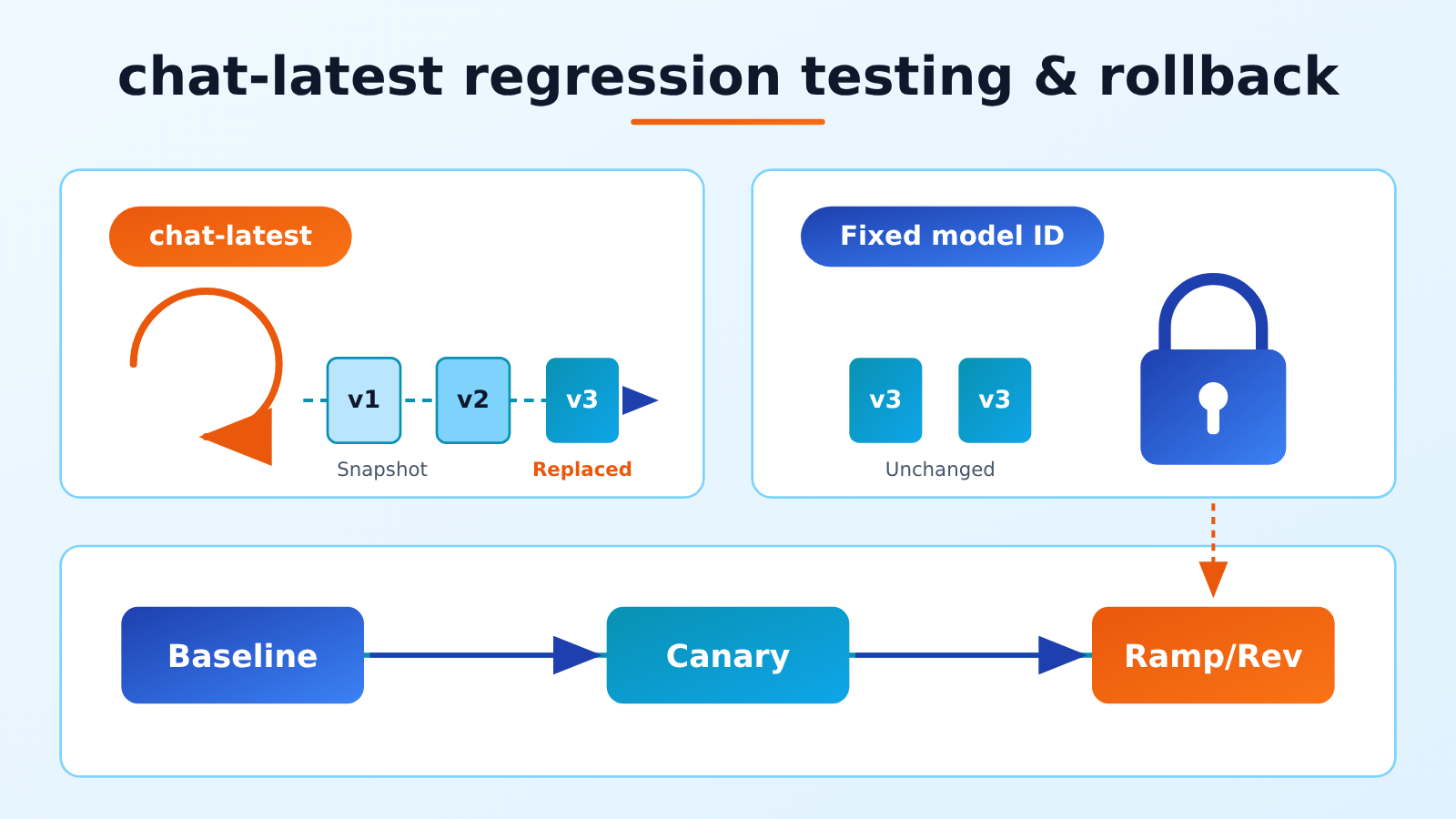
Knowledge Map: The Complete chat-latest Regression Testing and Rollback Workflow
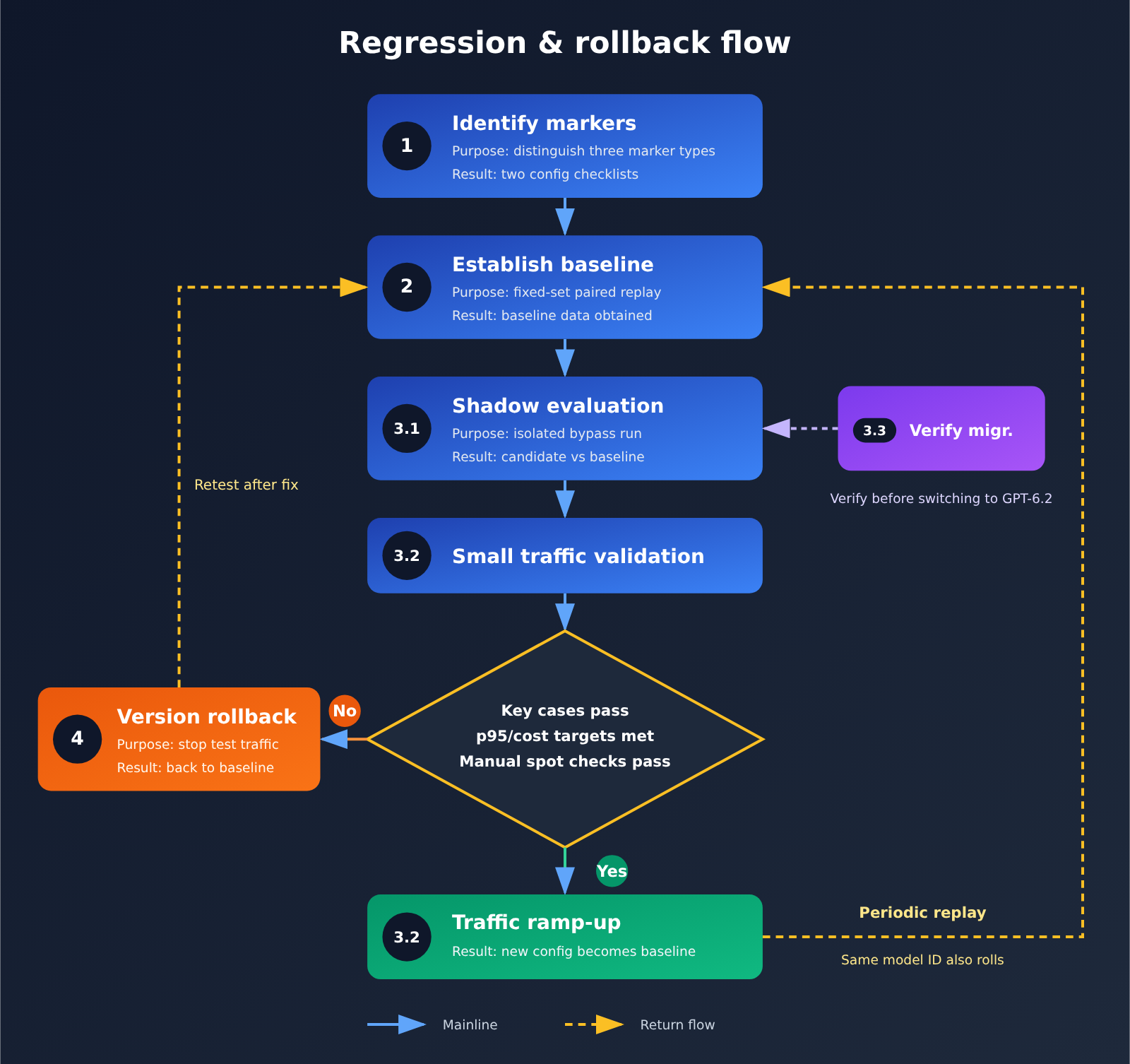
Figure note: The main line starts at “1 Identify Identifiers”, runs through “2 Establish a Baseline” and “3 Canary Rollout”, and splits into two paths at the decision node. Meet the bar and you roll out, recording the new config as the baseline; miss it and you go to “4 Version Rollback”, fix things up, and return to step 2 to retest. After rollout, you also replay on a schedule, because the underlying snapshot of a rolling alias gets updated — and the same model ID can behave differently over time.
Index: how to read each section of the chat-latest regression workflow
- 1 Identify the identifier (starting point): first figure out which layer the string in your config belongs to, so the tests and rollbacks that follow have a clear target.
- 2 Establish a baseline (depends on Section 1): use a fixed test set and log fields to take a “snapshot” of the current production config, giving Section 3 a comparison standard.
- 3 Gradual rollout (depends on Section 2): the candidate config runs in bypass first, then takes a small share of traffic, and a preset threshold decides whether it can be scaled up. Section 3.3 only needs reading when you’re migrating to GPT-6.2.
- 4 Version rollback (pairs with Section 3): explains what you need to prepare in advance for a rollback, plus the rollback risks in multi-turn conversations and tool flows.
- 5 Acceptance check: one checklist to confirm the whole workflow actually runs end to end.
If you just want to catch changes in production output right away, start with the code in Section 2.2. If something is already broken, jump straight to Section 4.2.
To Know: essential terms for chat-latest regression testing
| Term | Quick explanation |
|---|---|
| Rolling alias | The name stays fixed, but the underlying model snapshot it points to changes periodically, e.g. chat-latest |
| Snapshot | A named model version with a date suffix, e.g. gpt-5.5-2026-04-23 |
| Paired replay | Sending the same prompt, the same simulated tool results, and the same truncation settings to both the baseline config and the candidate config |
| Shadow evaluation | The candidate config receives copies of real requests, but its output never reaches users, and the tools it calls are isolated from real business systems |
| p95 latency | With all request latencies sorted from smallest to largest, the value sitting at the 95th percentile |
| Reasoning item | Reasoning-related entries returned by the Responses API, which may be dropped when switching models, among other cases |
1 Understanding the Hierarchy Between chat-latest and Fixed Model IDs
1.1 What Happened to chat-latest on 2026-11-24
Let’s get the timeline straight first. On 2026-05-05, OpenAI announced GPT‑5.5 Instant, and the API entry point at the time was chat-latest. On 2026-11-17, OpenAI released GPT‑6.2 Astra and Sol, and the API changelog listed gpt-6.2-astra and gpt-6.2-sol. OpenAI positioned the two differently: Astra targets complex reasoning and coding, while Sol targets routine coding and agent workflows.
On 2026-11-23, the Chat tab in ChatGPT began rolling out GPT‑6.2. OpenAI said it is powered by a version of GPT‑6.2 Sol and tuned for everyday conversation. The next day, 2026-11-24, the OpenAI API updated the snapshot that chat-latest points to. The changelog described it this way: the ID points to the latest ChatGPT model across the Plus, Pro, Business, and Enterprise plans, and the underlying snapshot is updated periodically. OpenAI did not provide the named API ID of the underlying base model this time, nor did it announce the exact switch time.
That’s the direct reason for “the model name didn’t change, but the output did.” The official documentation recommendation is also clear: use chat-latest to experiment with the latest chat experience, and use the GPT‑6.2 series in production; the model description page specifically recommends GPT‑6.2 Astra.
1.2 chat-latest Replacement IDs You Can Put in Production Config
Product panel names, model family names, official model IDs, and dated snapshots are four different levels of identifier. Only IDs that can be submitted to the API should appear in your config. The table below lists only strings already published on the official model page.
| Model ID | Type | Usage in production config |
|---|---|---|
chat-latest |
Rolling alias | Put it in experimental config to try the latest chat experience |
gpt-6.2-astra |
Official model ID | Officially recommended production direction; must first pass your own business regression tests |
gpt-6.2-sol |
Official model ID | Suitable for routine coding and agent workflows; also requires regression testing |
gpt-5.5-2026-04-23 |
Named snapshot | Used to demonstrate version locking; lifecycle is subject to official deprecation records |
gpt-5.3-chat-latest |
Historical rolling ID | A pointer update was recorded on 2026-03-16; useful as a case for understanding rolling behavior |
Older materials have used both gpt-5.5-instant and gpt-5.5-instant-2026-05-05. Neither string appears in the ID column published on the official model page, so they shouldn’t be put into config. Before calling through APIYI apiyi.com, we recommend first confirming in the platform’s model list that the target ID is available, then adding it to your test matrix.
1.3 Differences Between the chat-latest Specs and Channel Documentation
According to OpenAI’s model page, chat-latest has a 400,000-token context window and a maximum output of 128,000 tokens. It supports text and image input, text output, streaming output, function calling, and structured output. Its knowledge cutoff date is listed as 2026-04-20; any newer information must come from context provided in the request or from enabling web tools. The official price list’s standard tier is priced per million tokens: $5 for input, $0.50 for cached reads, and $30 for output.
When checked on 2026-11-25, both APIYI’s public model master list and pricing endpoint listed chat-latest, with the endpoints marked as Chat Completions and Responses and pricing matching the official standard tier. However, APIYI’s model detail page still described what model it points to and its knowledge cutoff date as GPT‑5.5 Instant and 2025-08 on that day, which is inconsistent with OpenAI’s latest position. The statements from each side should be treated as records in their own respective documentation. As for which base model requests are actually routed to, defer to platform announcements and the request logs in your account. This discrepancy itself is a reason to run environment regression: the same ID passing through different channels can behave differently, so its behavior needs to be verified separately.
2 Establishing a Regression Baseline for chat-latest
2.1 How to Choose a Regression Test Set
The test set comes from real business samples, with personal identifiers removed and then frozen. It needs to cover at least five scenario types: multi-turn context, strict JSON output, tool call arguments, image input, and very long input. For each category, pick the few cases that best represent business risk, prioritizing samples where “getting it wrong causes an incident” and putting “how good it reads” samples later.
Scoring needs to be layered. Content like dates, amounts, and tool parameters gets checked by a program against fixed answers; tone and voice go to manual spot checks. Take a customer service system as an example — you can prepare three mutually conflicting refund policy samples, with fixed effective dates, citation sources, and conditions for escalation to a human. That way the tests can distinguish several different kinds of errors: citing the wrong clause, missing a link, or getting the parameter format right but calling the wrong tool.
2.2 chat-latest Paired Replay and Log Fields
Paired replay has three requirements: the same prompt, the same set of tool simulation results, and the same truncation settings. Repeat each question at least three times to observe the fluctuation range. Let’s start with a minimal request to see which fields in the response are worth recording:
from openai import OpenAI

client = OpenAI(
    api_key="YOUR_API_KEY",
    base_url="https://api.apiyi.com/v1",  # APIYI OpenAI-compatible interface
)

resp = client.responses.create(
    model="chat-latest",
    input="Explain in one sentence which materials are needed to process a refund.",
)
print(resp.id, resp.model, resp.status)
print(resp.output_text)
print(resp.usage.input_tokens, resp.usage.output_tokens)
This request only carries model and input, with no sampling parameters added. For the other fields, check the target model’s parameter documentation first, confirm they’re supported, then add them one by one. The log fields you need to save include: the requested model, the model returned in the response, the request identifier, the timestamp, the termination status, input and output usage, the error code, the latency to first content, and total elapsed time. Save response fields exactly as the vendor returns them, so troubleshooting and long-term trend tracking are easier.
View the full regression script (paired replay + threshold judgment)
import json, time, statistics
from datetime import datetime, timezone
from openai import OpenAI

client = OpenAI(
    api_key="YOUR_API_KEY",
    base_url="https://api.apiyi.com/v1",  # APIYI unified endpoint — switching models only means changing model
)

# Every config version needs a complete record; roll back by switching the whole group
CONFIGS = {
    "baseline": {
        "version": "prod-v12",
        "endpoint": "responses",
        "model": "gpt-5.5-2026-04-23",
        "extra": {},
        "price_in": None, "price_out": None,  # Fill in the channel's price list for the day (per million tokens)
    },
    "candidate": {
        "version": "exp-v13",
        "endpoint": "responses",
        "model": "gpt-6.2-astra",
        # The migration guide suggests starting new integrations at medium; whether it's supported depends on the model page
        "extra": {"reasoning": {"effort": "medium"}},
        "price_in": None, "price_out": None,
    },
}

def check_json(text, required_keys):
    try:
        data = json.loads(text)
    except json.JSONDecodeError:
        return False
    return all(k in data for k in required_keys)

CASES = [
    {
        "id": "refund-json-01", "critical": True,
        "input": [
            {"role": "developer", "content": "只输出 JSON,字段为 policy_id、effective_date、escalate。"},
            {"role": "user", "content": "订单在 2026-07-01 后签收,能否退款?"},
        ],
        "check": lambda t: check_json(t, ["policy_id", "effective_date", "escalate"]),
    },
    {
        "id": "policy-fact-02", "critical": True,
        "input": "依据政策 B,退款时限是多少天?请注明条款编号。",
        "check": lambda t: "B-3" in t,  # Compare against the fixed answer
    },
]

def run_once(cfg, case):
    t0, ttft, final, parts, err = time.perf_counter(), None, None, [], None
    try:
        stream = client.responses.create(
            model=cfg["model"], input=case["input"], stream=True, **cfg["extra"]
        )
        for event in stream:
            if event.type == "response.output_text.delta":
                if ttft is None:
                    ttft = time.perf_counter() - t0
                parts.append(event.delta)
            elif event.type in ("response.completed", "response.incomplete", "response.failed"):
                final = event.response
    except Exception as e:
        err = type(e).__name__
    total = time.perf_counter() - t0
    text = "".join(parts)
    usage = getattr(final, "usage", None)
    return {
        "ts": datetime.now(timezone.utc).isoformat(),
        "config_version": cfg["version"],
        "requested_model": cfg["model"],
        "response_model": getattr(final, "model", None),
        "response_id": getattr(final, "id", None),
        "status": getattr(final, "status", None),
        "error": err,
        "input_tokens": getattr(usage, "input_tokens", None),
        "output_tokens": getattr(usage, "output_tokens", None),
        "ttft_s": ttft, "total_s": total,
        "case_id": case["id"], "critical": case["critical"],
        "passed": err is None and case["check"](text),
    }

def replay(cfg, repeats=3, path="regression.jsonl"):
    rows = [run_once(cfg, c) for c in CASES for _ in range(repeats)]
    with open(path, "a", encoding="utf-8") as f:
        for r in rows:
            f.write(json.dumps(r, ensure_ascii=False) + "\n")
    return rows

def p95(xs):
    xs = [x for x in xs if x is not None]
    return statistics.quantiles(xs, n=20)[18] if len(xs) >= 2 else None

def unit_cost(rows, cfg):
    if cfg["price_in"] is None:
        return None
    cost = sum(((r["input_tokens"] or 0) * cfg["price_in"] +
                (r["output_tokens"] or 0) * cfg["price_out"]) / 1e6 for r in rows)
    return cost / len(rows)

def gate(base_rows, cand_rows, ratio=1.2):
    ok_critical = all(r["passed"] for r in cand_rows if r["critical"])
    lat_ok = p95([r["total_s"] for r in cand_rows]) <= ratio * p95([r["total_s"] for r in base_rows])
    cb = unit_cost(base_rows, CONFIGS["baseline"])
    cc = unit_cost(cand_rows, CONFIGS["candidate"])
    cost_ok = True if cb is None or cc is None else cc <= ratio * cb
    return {"critical_pass": ok_critical, "p95_ok": lat_ok, "cost_ok": cost_ok,
            "ready_for_manual_review": ok_critical and lat_ok and cost_ok}

if __name__ == "__main__":
    base = replay(CONFIGS["baseline"])
    cand = replay(CONFIGS["candidate"])
    print(gate(base, cand))
🚀 Quick start: The script above needs just one API key. Through APIYI apiyi.com, you can use the same OpenAI-compatible interface to run paired replays of baseline and candidate configurations. The free trial quota for new users is enough to get through a full round of the key test cases.
2.3 Making the baseline traceable
Every log entry should carry the local config version number and the traffic group. That way, when you’re chasing down an anomaly, you can reconstruct what actually happened along the exact path the request took — instead of conflating “the model changed” with “the prompt changed.” A baseline isn’t a one-off artifact; the same model ID should also be replayed on a regular schedule. For rolling aliases like chat-latest, scheduled replay is the primary way to catch snapshot updates outside of production.
3 Staged Rollout of the chat-latest Candidate Configuration
3.1 Shadow Evaluation
The candidate configuration first runs in shadow mode: it receives copies of real requests, and its output isn’t returned to users. Tools called by the shadow side must be isolated from real business operations—for example, database writes, message sends, and charges should all be replaced with mock implementations to avoid writing actual business data twice. At this stage, you mainly check formatting, tool calls, and error rates, while collecting enough latency samples.
3.2 Canary Validation and Rollout Thresholds
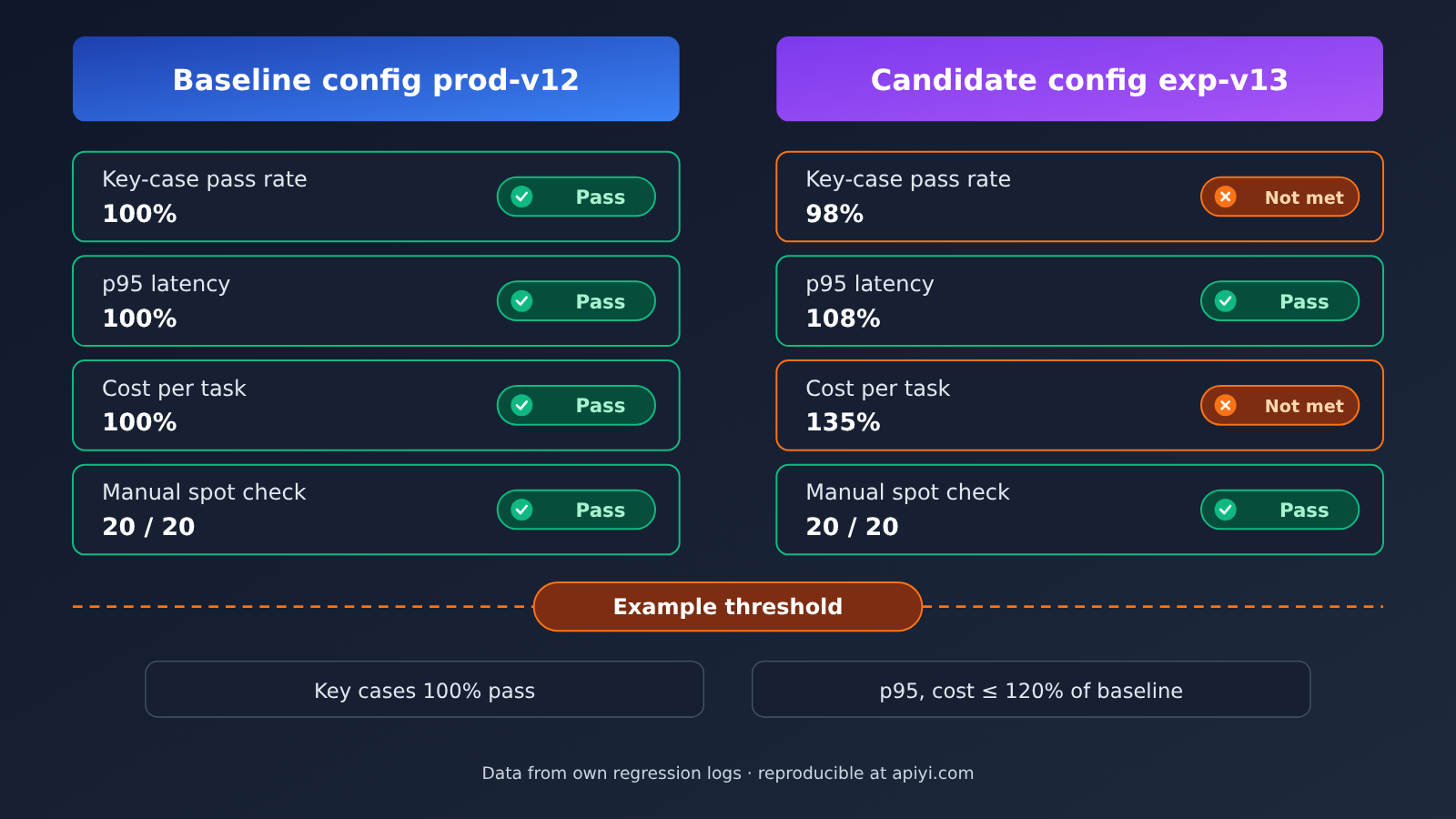
After shadow evaluation passes, route a small share of real traffic to the candidate configuration. The table below shows a set of example thresholds. The exact values are your application’s decision and should be adjusted based on business risk.
| Check | Example Threshold | How It’s Determined |
|---|---|---|
| Critical structural and parameter test cases | All pass | Program compares against fixed expected answers |
| End-to-end p95 latency | No more than 120% of baseline | Log statistics |
| Cost per task | No more than 120% of baseline | Usage multiplied by channel pricing |
| Tone and wording | Meets product requirements | Manual spot checks |
Only when all four pass do you ramp up traffic. Once rollout is complete, the candidate configuration becomes the new baseline, and the old configuration is kept as a rollback target. If any one item fails, go to the rollback process in Section 4.
3.3 Parameters to Check Separately When Migrating to GPT‑6.2
When switching from chat-latest or an older model to GPT‑6.2, re-check the request parameters for the target endpoint. According to the official migration guide: for new integrations, start by testing reasoning effort at medium; if it was previously set to none or minimal, change it to low; for Chat Completions, switch to the reasoning_effort parameter and remove sampling fields that are no longer supported.
Instruction placement also needs to be managed separately. Put stable developer instructions in a developer message at the beginning of the Responses API input; instructions that apply only to the current turn can go in the top-level instructions. Write the two into separate configuration items, and during regression check instruction priority, input truncation, and cache hit behavior separately. This helps you avoid troubleshooting “changes from the model switch” and “changes from request structure modifications” as if they were the same failure.
4 Version rollback after a failed chat-latest regression
4.1 Config versions you need to prepare before rolling back
Whether a rollback takes minutes depends on whether you’ve already recorded the full configuration combination as switchable versions. Jotting down a single model name isn’t enough.
| Config field | Example | Why it needs to be recorded |
|---|---|---|
| Provider and base_url | APIYI apiyi.com | Routing and documentation conventions can differ across channels |
| Endpoint | Responses / Chat Completions | Tool calls and instruction structure differ by endpoint |
| Model ID | gpt-5.5-2026-04-23 |
The core object of the rollback |
| Service tier | Standard tier | Affects price and latency |
| Prompt and tool list versions | prompt-v12, tools-v7 | Rules out non-model factors |
| Reasoning and output limits | effort, max output | Affects result length and cost |
| Regression baseline number | baseline-2026-11-20 | Used for comparison and verification after rollback |
💡 Recommendation: If production needs to keep rollback targets among several model IDs, you can manage them all under the same APIYI apiyi.com key. When rolling back, you then only change the
modelfield in your config, avoiding the extra variable of switching channels at the same time.
4.2 Rollback steps
- Pull back the experiment traffic and drop the canary percentage to zero.
- Switch the whole group to the previously accepted config version — endpoint, model, parameters, and prompt version included. Changing just one of these doesn’t count as a rollback.
- Rerun the key test cases using that version’s baseline number, and confirm the results are back to baseline level.
- Mark the rollback timestamp and config version in the logs so you can compare them during the post-mortem.
- After fixing the candidate config, go back to Section 2 and retest. Don’t just ramp up traffic again right away.
4.3 Rollback risks in multi-turn conversations and tool flows
Multi-turn conversations are where rollbacks most often go wrong. The official migration guide notes that GPT‑6.2’s Responses API discards reasoning items when the prefix is changed mid-conversation or when the model is partially switched, which can change the old thread’s state and cache hit rate. So multi-turn conversations need to recover from structured history or summaries that the application stores itself, and you should specifically test the “cross-model continuation” scenario.
Tool flows deserve their own section too. GPT‑6.2’s tool calls require the Responses endpoint. If your tool flow was migrated from Chat Completions, you need to design separate regression cases and confirm that the rollback target’s endpoint matches the original flow. Otherwise, after the rollback, tool calls may fail outright due to an endpoint mismatch.
5 Acceptance: Is the chat-latest Regression and Rollback Flow Workable?
Use the following set of checks to confirm the whole flow can actually run in practice — it’s only done when all of them are met:
chat-latestisn’t in the production config; it only shows up in the experiment config.- Each critical test case is repeated at least three times, and the logs let you see both the requested model and the response model at once.
- The rollout threshold is written as a script you can run repeatedly, so it doesn’t depend on someone’s gut feeling.
- A rollback drill has been run once: from switching the config to critical test cases recovering, the whole thing is logged.
- There’s at least one dedicated regression test for cross-model continuation and at least one for the tool flow.
If you don’t have your own regression environment yet, start by using the script above on APIYI apiyi.com to do a paired replay of chat-latest against a fixed ID. See whether the differences fall inside what the business can accept, and then decide how to write the production config.
References
- OpenAI API changelog: the
chat-latestand GPT‑6.2 entries from November 2026- Link:
developers.openai.com/api/docs/changelog
- Link:
- OpenAI chat-latest model page: specs, snapshot section, production recommendations
- Link:
developers.openai.com/api/docs/models/chat-latest
- Link:
- GPT‑6.2 migration guide: reasoning effort, instruction structure, reasoning item handling
- Link:
developers.openai.com/api/docs/guides/latest-model
- Link:
- OpenAI evaluation practices: test sets and scoring methods
- Link:
developers.openai.com/api/docs/guides/evaluation-best-practices
- Link:
- GPT‑5.5 model page: named snapshot
gpt-5.5-2026-04-23- Link:
developers.openai.com/api/docs/models/gpt-5.5
- Link:
- OpenAI deprecations: snapshot lifecycle
- Link:
developers.openai.com/api/docs/deprecations
- Link:
Author: APIYI Technical Team
Technical discussion: Feel free to reach us from the APIYI apiyi.com homepage. For more integration resources, check out the docs.apiyi.com documentation center.


