

Author’s note: the same Qwen3.8-27B can run locally with OpenVINO or be called through an API. This article uses five criteria to draw the boundary between the two, and gets your local service and the cloud endpoint sharing a single OpenAI client.
If you’re working on an Intel laptop, or a machine with no discrete GPU, you’ve probably already opened the OpenVINO repo to see whether a Large Language Model can be moved onto your own hardware. The 2026.4.0 release notes mention Qwen3.8 27B support on CPU and GPU, and OpenVINO Model Server lists it among its supported agent models. The question follows immediately: once it’s wired up, is it good enough? And compared with calling an API directly, which one comes out ahead?
This is not a “your laptop can replace a cloud flagship” pitch, and it’s not a version-by-version changelog either. There are no real benchmark runs here — every speed-related number is explicitly marked as an assumption. We answer only three things: which work belongs on the local machine, which should go through the API, and how much the code differs between the two.
The takeaway: by the end of this article you’ll have a five-criteria comparison table, a set of steps for standing up a local OpenAI-compatible service with Docker, and a cost estimate based on 1,000 questions per day.
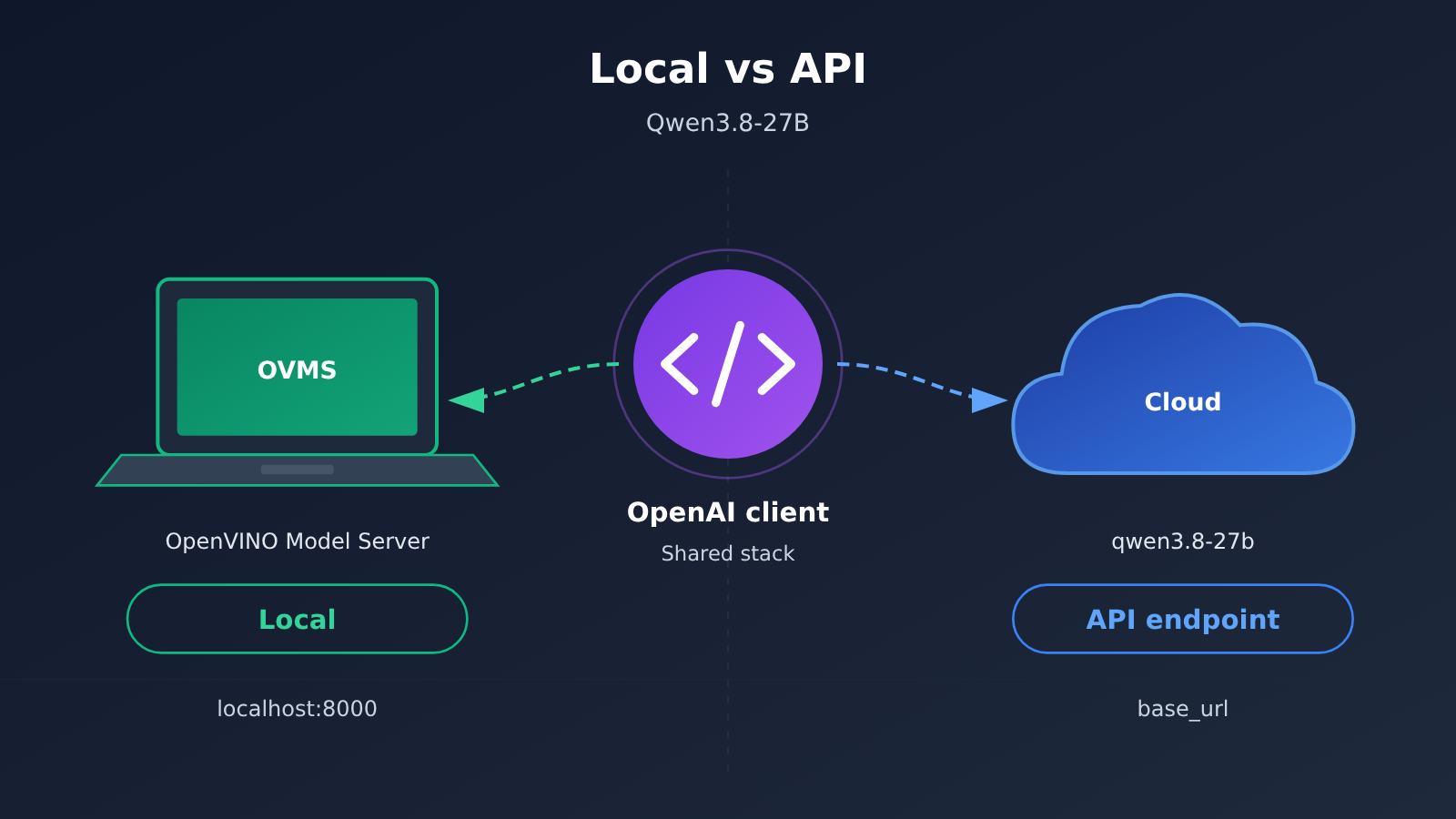
Large Language Model: Local or API? Five Key Decision Criteria
Here’s the conclusion table first. To decide whether a task belongs on your own machine or behind an API, don’t ask which side is more advanced—look at these five hard requirements.
| Criterion | Local run (OpenVINO + Qwen3.8-27B INT4) | API call (qwen3.8-27b) | Leans toward |
|---|---|---|---|
| Context length | CPU/GPU can handle somewhat longer contexts, but prefill time for long prompts stretches noticeably; NPU default prompt limit is 1024 tokens | Platform lists a 262,144-token context window | Long documents and long conversations → API |
| Memory | INT4 model file is about 15.97 GB; loading and KV cache add extra overhead | Doesn’t use local memory | Machines tight on memory → API |
| Concurrency | Single-machine compute is fixed; multiple simultaneous requests queue up | Scales on demand; concurrency is handled by the platform | Multi-user services → API |
| Privacy and offline use | Data never leaves the machine; works without internet | Data must be sent to the cloud | Sensitive data and offline scenarios → local |
| Cost | No usage-based fees, but it consumes electricity and machine time | Billed per token, with cache-read discounts | Low-frequency batch jobs that can wait → local |
Context and Memory: The First Two Walls a Local Large Language Model Hits
If you calculate 27B parameters at 2 bytes per parameter, the original FP16 version’s weights alone are about 54 GB, which a typical laptop simply can’t fit. The OpenVINO/Qwen3.8-27B-int4-ov model provided by OpenVINO uses NNCF to apply INT4_ASYM weight quantization, and the repository files total about 15.97 GB. That includes 13.9 GB for the language model weights, 1.27 GB for text embeddings, 458 MB for the vision embedding merge layer, and 264 MB for the MTP model. That size means a machine with 16 GB of memory will be very tight, because during runtime, besides the weights, it also has to hold the KV cache and the system itself.
The longer the context, the larger the KV cache, and the slower the prefill stage. So getting it to run locally and comfortably processing long documents with tens of thousands of tokens locally are two different things. For tasks that need long context, the cloud’s 262K context window is an advantage that’s hard for a local machine to match.
The NPU’s Hard Limits: What the OpenVINO Documentation Actually Says
Many people see that Core Ultra has an NPU and want to put the Large Language Model directly on it. The following points come straight from the official OpenVINO documentation; be sure to check them before evaluating:
| Item | Key points from the OpenVINO documentation |
|---|---|
| Shape strategy | LLMs on the NPU use static shapes. By default, the input prompt is at most 1024 tokens (MAX_PROMPT_LEN), the output is at least 128 tokens (MIN_RESPONSE_LEN), and the context upper limit is the sum of the two |
| Dynamic prompting | Supported since OpenVINO 2025.3; granularity is controlled by NPUW_LLM_PREFILL_CHUNK_SIZE, default 1024 |
| Export parameters | Must use --sym, --weight-format int4 or nf4, --group-size -1 or 128, --ratio 1.0 |
| Memory note | On Core Ultra Series 2, models larger than 7B handling prompts over 1024 tokens may require more than 16GB of memory |
| NF4 | Only supported on NPUs in Core Ultra Series 2 and later |
A quick comparison shows the mismatch: the off-the-shelf Qwen3.8-27B INT4 package uses asymmetric quantization (INT4_ASYM), while the NPU requires --sym; the release notes also list Qwen3.8 27B only on CPU and GPU. So the local route in this article defaults to CPU or Intel GPU, and we don’t force this 27B model onto the NPU. The NPU is better suited to the small models called out in the release notes, such as FLUX.2-Klein 4B and Kokoro-82M.
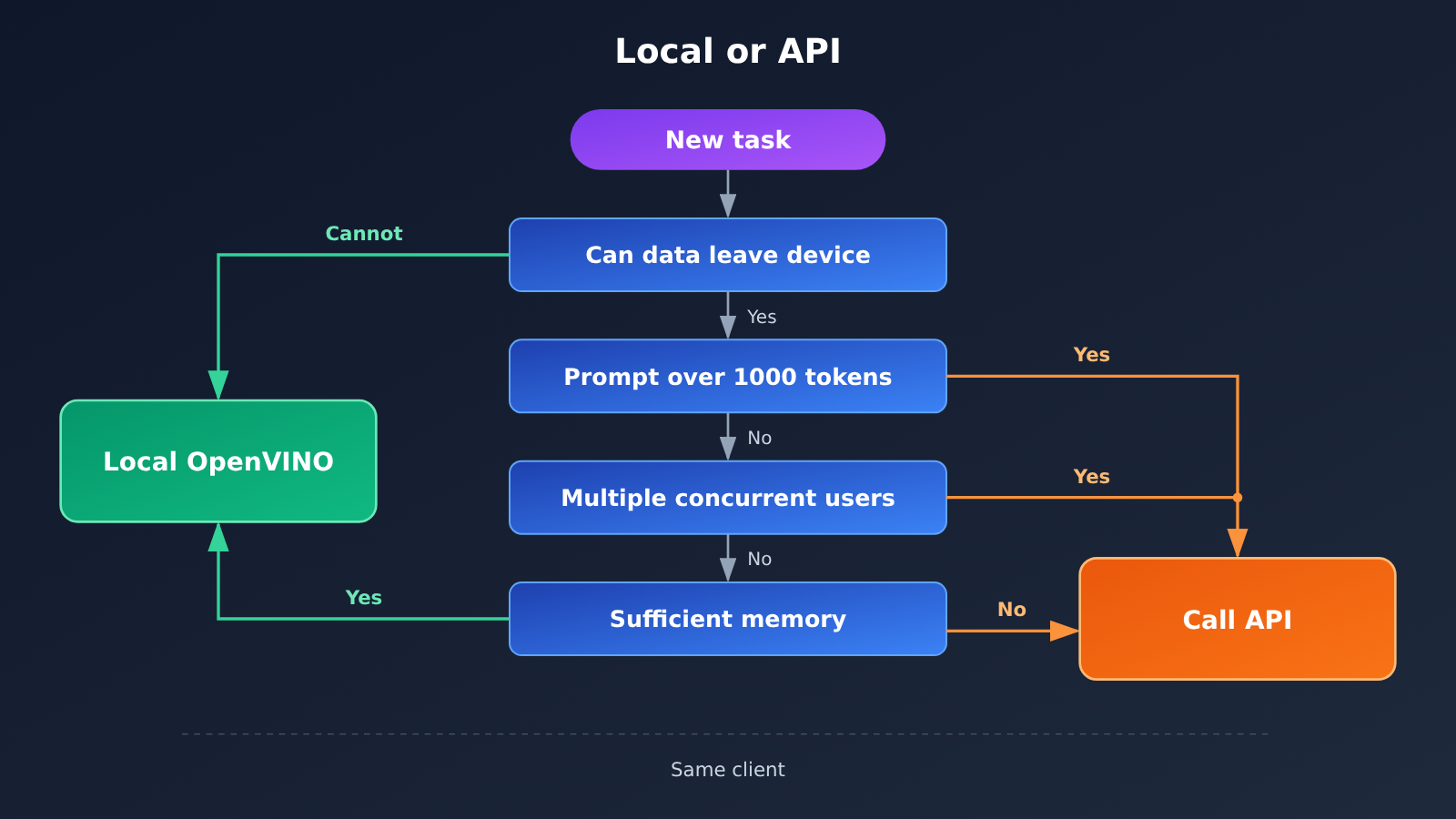
Which Large Language Models Can OpenVINO 2026.4 Run Locally?
The table below is compiled from the original 2026.4.0 release notes, not from our own testing. 2026.4.0 was released on 2026-09-16; the follow-up 2026.4.1 is primarily a bug-fix release.
| Category (as listed in the release notes) | Model | Device |
|---|---|---|
| Newly supported | Qwen3.8 27B, Muse Glimmer 30B, Gemma 4 12B, Qwen3-VL-4B (with EAGLE-3), Qwen3-ASR, Kokoro-82M, Hy-MT2-1.8B, DeepSeek OCR-2, Granite 4.0 H Micro | CPU and GPU |
| Newly supported | Gemma-3n | CPU |
| Newly supported | FLUX.2-Klein 4B, Kokoro-82M | NPU |
| Earlier versions | Qwen-Image, Z-Image-Turbo, Granite 4.0 H Tiny, Fun-ASR-Nano, LFM2.5-8B-A1B, MiniCPM5-2B, RF-DETR, BGE Reranker-V2-M3, BGE M3 | CPU and GPU |
On the generative side, this release adds MTP speculative decoding for Gemma 4, Qwen3.5, and Qwen3.6, and EAGLE-3 now supports Tree Drafting (Top-K). The OpenVINO package for Qwen3.8-27B also includes openvino_mtp_model.xml, so it can use MTP speculative decoding. That can help with local generation speed, but how much faster depends on the chip—we won’t give numbers here.
Two compatibility requirements to keep in mind: the CPU plugin requires the AVX2 instruction set at minimum, and support for Python 3.10 will end in 2026.5. Also, if you’re on a Core Ultra Series 3 machine and run into application crashes caused by NPU driver versions 32.0.100.4300, 4509, or 4512, or hit GPU memory issues related to sliding-window KV cache, you should upgrade straight to 2026.4.1.
Running Qwen3.8-27B Locally: Quick Start to an OpenAI-Compatible Service with Model Server
The Qwen3.8-27B model card lists three ways to run it: Optimum Intel, OpenVINO GenAI’s VLMPipeline, and OpenVINO Model Server plus an OpenAI client. To share a single codebase between local runs and API calls, we went with the third option. Model Server exposes an OpenAI-compatible chat/completions endpoint and supports continuous batching, streaming, structured output, speculative decoding, and VLMs.
Steps 1 through 4: Bring Up the Service with Docker
- Check your machine’s requirements: the CPU must support AVX2, leave roughly 16 GB or more of disk space free for the model files, and have as much memory as you can spare. What you’ll see: without these, loading will either fail or crawl along later. Once confirmed, move on to the next step.
- Prepare a model directory: create a
modelsfolder in the current directory to mount into the container. You’ll see an empty directory, and the service will download the model into it at startup. Next, prepare to launch the service. - Start the service: on Linux, run the
openvino/model_server:latestimage with Docker. The core command isdocker run --rm -p 8000:8000 --user $(id -u):$(id -g) -v $(pwd)/models:/models openvino/model_server:latest --source_model OpenVINO/Qwen3.8-27B-int4-ov --model_repository_path /models --rest_port 8000. Here--source_modelnames the model on Hugging Face,--model_repository_pathpoints to the mounted model directory, and--rest_portis the port exposed to the outside. You’ll see the container first download roughly 16 GB of model files, then log that the service is ready. Windows users can useovms.exefrom the binary package with the same arguments. - Connect to the local address: once the service is ready, point the client at
http://localhost:8000/v1. You can put any placeholder string in the Key field, and setmodelin the request to the name you passed to--source_model. Next, write the client code.
If you’d rather use an Intel GPU than the CPU, you’ll need to map the device into Docker and specify the target device; consult the OpenVINO Model Server docs for the exact syntax.
Minimal Example: Connecting a Client to the Local Machine
This code connects to the local service, and it’s also the foundation for switching over to the API later:
from openai import OpenAI

# Local OpenVINO Model Server
client = OpenAI(base_url="http://localhost:8000/v1", api_key="unused")
model = "OpenVINO/Qwen3.8-27B-int4-ov"

# To switch to APIYI, just change these two lines and fill in the Key from the console
# client = OpenAI(base_url="https://api.apiyi.com/v1", api_key="YOUR_APIYI_KEY")
# model = "qwen3.8-27b"

resp = client.chat.completions.create(
    model=model,
    messages=[{"role": "user", "content": "用三句话解释什么是 KV cache"}],
)
print(resp.choices[0].message.content)
View the full implementation: switching between local and API via environment variables
import os
from openai import OpenAI

PROFILES = {
    "local": {
        "base_url": "http://localhost:8000/v1",
        "api_key": "unused",
        "model": "OpenVINO/Qwen3.8-27B-int4-ov",
    },
    "api": {
        "base_url": "https://api.apiyi.com/v1",  # APIYI OpenAI-compatible endpoint
        "api_key": os.getenv("APIYI_API_KEY", ""),
        "model": "qwen3.8-27b",
    },
}

def get_client(profile: str):
    cfg = PROFILES[profile]
    return OpenAI(base_url=cfg["base_url"], api_key=cfg["api_key"]), cfg["model"]

def ask(prompt: str, profile: str = None, stream: bool = True) -> str:
    profile = profile or os.getenv("LLM_PROFILE", "local")
    client, model = get_client(profile)
    messages = [
        {"role": "system", "content": "你是一名简洁的技术助手。"},
        {"role": "user", "content": prompt},
    ]
    if not stream:
        resp = client.chat.completions.create(model=model, messages=messages)
        return resp.choices[0].message.content

    chunks = []
    for event in client.chat.completions.create(
        model=model, messages=messages, stream=True
    ):
        delta = event.choices[0].delta.content or ""
        print(delta, end="", flush=True)
        chunks.append(delta)
    print()
    return "".join(chunks)

if __name__ == "__main__":
    # Sensitive data: keep it on the local machine
    ask("总结这份内部会议纪要的要点", profile="local")
    # Long documents or many concurrent users: go through the API
    ask("对比两种缓存淘汰策略的优缺点", profile="api")
🚀 Quick start: Once your local service is up and running, I’d suggest also signing up at APIYI apiyi.com to grab the free trial credits, then run your real prompts through both setups with the same code. Compare output quality and latency side by side, and then decide which tasks stay local.
When Should You Switch Qwen3.8-27B to the API?
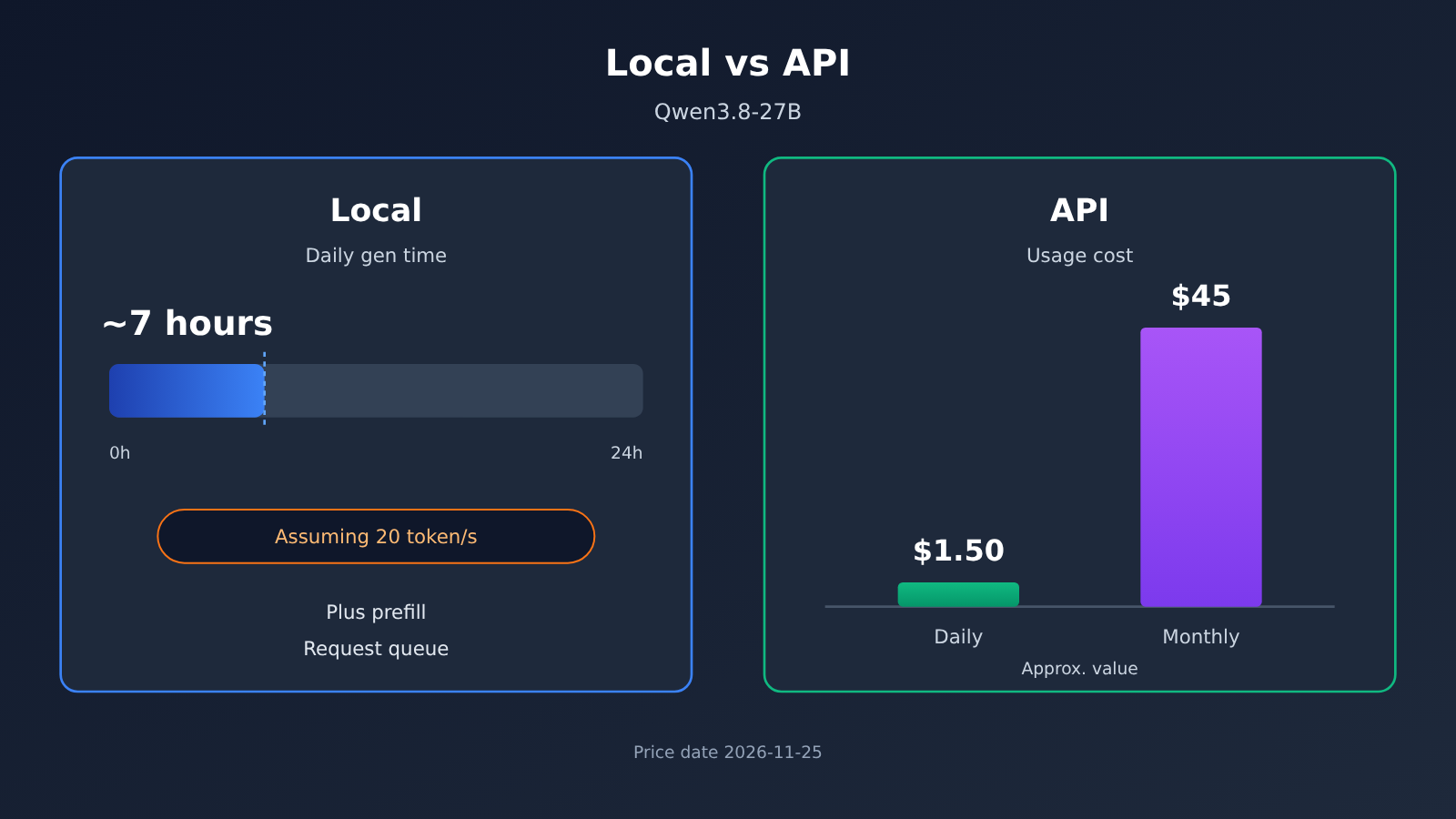
Just because it runs locally doesn’t mean every task should stay local. Let’s run the numbers with a concrete scenario: 1,000 queries per day, each with 3,000 input tokens—2,000 of which are a cacheable fixed prefix (such as the system prompt and document template)—and 500 output tokens.
On APIYI, qwen3.8-27b pricing is: input $0.44, output $1.76, cache read $0.088 per million tokens (pricing data as of 2026-11-25). For the model and pricing, refer to the platform’s model list. This model has a context window of 262,144 and supports streaming, tool calling, structured output, vision understanding, and prompt caching. The endpoint is OpenAI Chat Completions at https://api.apiyi.com/v1.
| Item | Call API (calculated at 2026-11-25 pricing) | Run locally (estimated with a 20 tokens/sec assumption) |
|---|---|---|
| Uncached input 1M tokens/day | 1M × 0.44 = $0.44 | Counted in prefill time |
| Cache reads 2M tokens/day | 2M × 0.088 = $0.176 | Counted in prefill time |
| Output 0.5M tokens/day | 0.5M × 1.76 = $0.88 | About 7 hours of pure generation time |
| Daily total | About $1.50 | About 7 hours of generation, plus 3M tokens of prefill |
| 30-day total | About $45 | No usage-based fee, but the machine runs at full load for long periods |
Once again, the right column isn’t measured data: 20 tokens per second is just an assumption for easy estimation. Real speed depends on your CPU or GPU, memory bandwidth, and whether MTP speculative decoding is enabled. Even under this assumption, 0.5M output tokens per day still means about 7 hours of pure generation, plus prefill for 3 million input tokens. A laptop will basically be tied up for a full workday, and requests can only be handled in a queue.
The conclusion is straightforward: about $45 per month buys back idle machine time and concurrency, which is usually a better deal for services shared by multiple people. Conversely, if data must stay on the local machine, usage is very low, or it’s a batch job that can run slowly overnight, the local route is more suitable.
💰 Cost optimization: The prices in this calculation come from the model pricing table at APIYI apiyi.com. If your prompts have a fixed prefix, be sure to use prompt caching. The cache-read unit price is only one-fifth of the uncached input price, so long-term usage can save a meaningful amount.
How to switch on the client side: same code, just a new address and model name
Both sides expose OpenAI-compatible APIs, so switching doesn’t require touching your business logic. Only the three items in the table below need to change:
| Config item | Local OpenVINO Model Server | APIYI |
|---|---|---|
base_url |
http://localhost:8000/v1 |
https://api.apiyi.com/v1 |
api_key |
Any placeholder string, e.g. unused |
The key you get from the apiyi.com console |
model |
OpenVINO/Qwen3.8-27B-int4-ov |
qwen3.8-27b |
I’d suggest putting these three items into environment variables or a config file, and turning them into two profiles like in the full code above. That way sensitive tasks always go through local, while long-context and high-concurrency tasks go through api — and once you’re live, you can rebalance the split based on cost whenever you need to. The same idea applies to other models too: run BGE M3 locally for embeddings, BGE Reranker-V2-M3 for reranking, or FLUX.2-Klein 4B on the NPU for image generation, and on the API side there are matching bge-m3, bge-reranker-v2-m3, and flux-2-klein-4b you can switch to. One thing to note: Model Server’s reranking goes through the Cohere-compatible interface, and image generation goes through the images endpoint, so make sure the endpoint types match on both sides before you switch.
Frequently Asked Questions (FAQ)
Q1: What’s the fundamental difference between running a Large Language Model locally and calling an API?
Running locally means downloading the weights to your own machine and letting the CPU, GPU, or NPU handle inference. Your data never leaves the machine, but speed, memory, and concurrency are limited by your hardware. Calling an API means sending requests to the cloud and paying per token, in exchange for long context windows, concurrency, and zero maintenance. When both use the same OpenAI client, the only differences are the endpoint, the key, and the model name.
Q2: Is the local Qwen3.8-27B the same model as qwen3.8-27b on the API?
Both come from Qwen3.8-27B. The local `OpenVINO/Qwen3.8-27B-int4-ov` is a version converted to OpenVINO IR and quantized to INT4 weights, shrinking it from roughly 54 GB in FP16 to about 16 GB. Quantization can introduce some output differences. For important tasks, it’s best to run both sides and compare results before deciding.
Q3: Which OpenVINO version first supported Qwen3.8-27B?
The 2026.4.0 release notes (published 2026-09-16) list Qwen3.8 27B as newly supported on CPU and GPU, with Model Server adding support at the same time. The model card requires OpenVINO 2026.4.0 or later and OpenVINO GenAI 2026.4.0.0 or later. The latest stable release is currently 2026.4.1, so it’s best to use that version directly.
Q4: Which kinds of work are best suited to running locally?
– **Text processing involving sensitive information**: Summarizing and rewriting internal meeting notes, contract drafts, and customer materials
– **Offline environments**: Coding assistance while traveling, on an isolated internal network, or when disconnected
– **Low-frequency batch jobs**: Tasks that can wait, like organizing documents overnight or generating tags
– **Local IDE assistants**: The Model Server docs include examples of pointing tools like Continue and Cline at a local service
Q5: How can I quickly call qwen3.8-27b through an API for comparison?
1. Go to APIYI apiyi.com to register an account, then get your API key and free trial quota from the console
2. Change the client’s `base_url` to `https://api.apiyi.com/v1` and `model` to `qwen3.8-27b`
3. Rerun the same batch of prompts you used locally, and compare outputs and latency
Q6: Can a laptop without a discrete GPU run 27B?
Given AVX2 support and enough memory, you can get it running on CPU, but generation will be fairly slow, and prefill for long prompts will stretch out noticeably. This article has no real-machine benchmarks, so we can’t give specific speeds. Try it with short prompts first and see whether the wait time is acceptable. If it isn’t, hand these tasks to an API.
Q7: What are the known limitations of the local route?
– **The NPU isn’t suited to this 27B package**: The ready-made package uses asymmetric quantization, while the NPU docs require `–sym`, and the default prompt limit is 1024 tokens
– **Weak concurrency**: A single machine’s compute is fixed, so multiple users have to queue
– **Maintenance overhead**: You have to track version fixes yourself, such as the NPU driver crash and KV cache issues fixed in 2026.4.1
Running Large Language Models Locally vs. Calling an API: Key Takeaways
- Start with five criteria: context, memory, concurrency, privacy/offline needs, and cost determine which tasks belong where
- The 27B threshold: the INT4 package is about 15.97 GB, while the original FP16 version is about 54 GB
- Don’t force it onto an NPU: this 27B package only supports CPU and GPU, and the NPU default prompt limit is 1024 tokens
- One shared client: Model Server exposes an OpenAI-compatible endpoint — just swap the base URL, API key, and model name
- Do the cost math: 1,000 queries a day costs roughly $1.50 via API, versus about 7 hours of local compute at the assumed throughput
- Hybrid routing is the safest bet: keep sensitive tasks on your own machine, and send long-context and concurrent workloads to APIYI apiyi.com
Summary
Running a Large Language Model locally or calling an API isn’t an either/or choice — it’s about routing each task to the right place:
- Local handles privacy and offline work: OpenVINO 2026.4 gets Qwen3.8-27B running on CPU and GPU, which makes it a good fit for data that can’t leave your machine
- The API handles long context and concurrency: a 262K context window and on-demand scaling are things a single machine struggles to provide
- One client, two paths: thanks to Model Server’s OpenAI-compatible endpoint, switching over only means changing the base URL, key, and model name
Our advice: get it running locally first, then compare against the cloud using the same batch of prompts, and put real latency and cost side by side before deciding. We recommend grabbing free trial credits through APIYI apiyi.com to run that comparison.
📚 Reference Materials
-
OpenVINO GitHub Repository: Source code, release notes, and version history
- Link:
github.com/openvinotoolkit/openvino - Details: Read the original release notes for 2026.4.0 and 2026.4.1
- Link:
-
OpenVINO Official Documentation: Parameters and limitations for running LLMs on NPU
- Link:
docs.openvino.ai - Details: The original source for
MAX_PROMPT_LEN, export parameters, and more
- Link:
-
Qwen3.8-27B-int4-ov Model Card: Quantization parameters, file size, and three ways to run it
- Link:
huggingface.co/OpenVINO/Qwen3.8-27B-int4-ov - Details: Compatible version requirements and notes on the MTP model
- Link:
-
OpenVINO Model Server: OpenAI-compatible API and Docker startup method
- Link:
github.com/openvinotoolkit/model_server - Details: Includes integration examples for OpenWebUI, Continue, Cline, and other tools
- Link:
Author: APIYI Technical Team
Technical discussion: Feel free to reach out to us on the APIYI website homepage for more model integration and switching solutions


