

Author’s note: How the three design skills divide the work, how to write a single instruction, why DeepSeek is cheap for this, and the four pitfalls you’re most likely to hit.
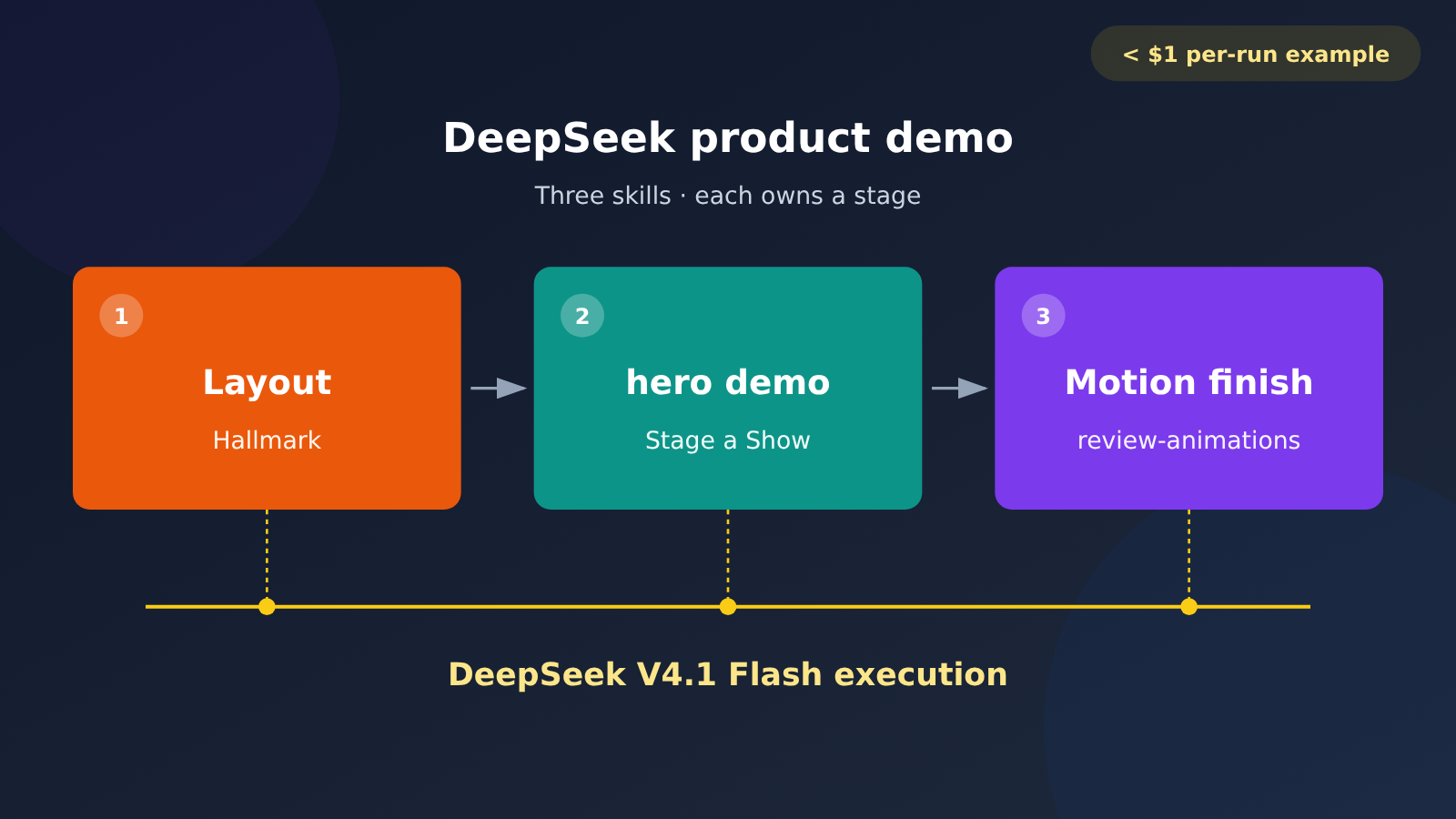
You’ve probably had a coding agent throw together a hero animation for a product landing page on the side. The usual result: everything slides in at once, the screen is piled with fake data, and the cursor drifts around the frame with no purpose. This kind of demo looks busy, but after watching it a reader can’t say what the product actually does. This post introduces a more controllable approach: three design skills—one for layout, one for the hero demo, and one to polish the animation—executed by DeepSeek V4.1 Flash.
This isn’t a “one-click landing page” tutorial. The original case comes from a single-run record posted by a third-party blogger, Remy, on 2026-11-25. He built a landing page and hero demo for a shared-expense app called Halves, and reported that the whole round cost well under a dollar. That’s the result of one run on a small app—your project may not come in under a dollar.
What you’ll get out of this: By the end, you’ll know which segment each of the three skills handles, how to install them, how to write the instruction, how to estimate the bill, and where things tend to fall apart.
Key Points for Building Product Demos with DeepSeek
Let’s start with the bottom line. The key to this workflow is having each of the three skills own one part of the job while DeepSeek handles execution. The low cost comes mainly from cheap cache reads.
| Key point | What it means | Why it matters |
|---|---|---|
| Clear division of labor | Hallmark handles the full-page layout, Stage a Show handles the hero demo, and review-animations handles motion details | Keeps one agent from doing everything and making “everything move” |
| One-sentence instruction | “Use Hallmark to build the landing page, then use Stage a Show to make a hero demo from the real interface” | No need to write a long prompt |
| Built-in checks | Browser checks and frame-by-frame self-review; redo anything that doesn’t pass | Reduces obvious AI tells |
| Cost stays under control | In long-running tasks, most tokens are cache reads, and cache reads are extremely cheap | A small app usually runs a round for under about a dollar (not a guarantee) |
| The demo is drawn, not recorded | Stage a Show produces simplified UI illustrations or scripted animation, not a screen recording | Clean visuals, loopable, and mobile-friendly |
How the Three Design Skills Divide the Work
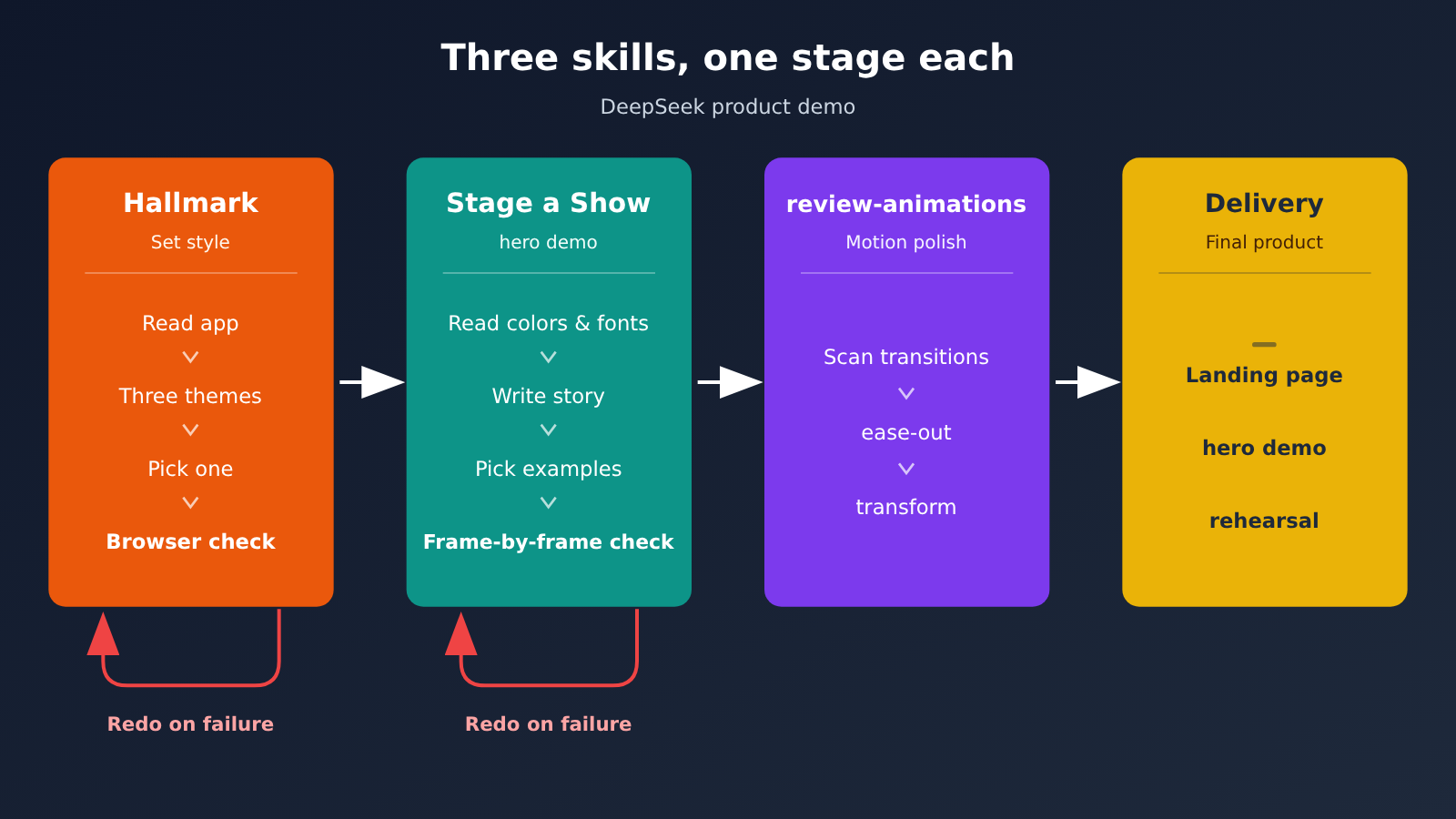
Hallmark owns the full-page layout. It was built by Nutlope at Together AI, is MIT-licensed, and works in Claude Code, Codex, Cursor, and OpenCode. It ships with 50 themes; each one combines a texture, typeface, and color palette. It doesn’t write page copy — it only decides layout and visual direction: it reads your app, proposes three themes, you pick one, and finally it checks the result in a real browser. If common AI tells show up — like “a line of small caps above every heading” or “overuse of purple gradients” — the check fails immediately.
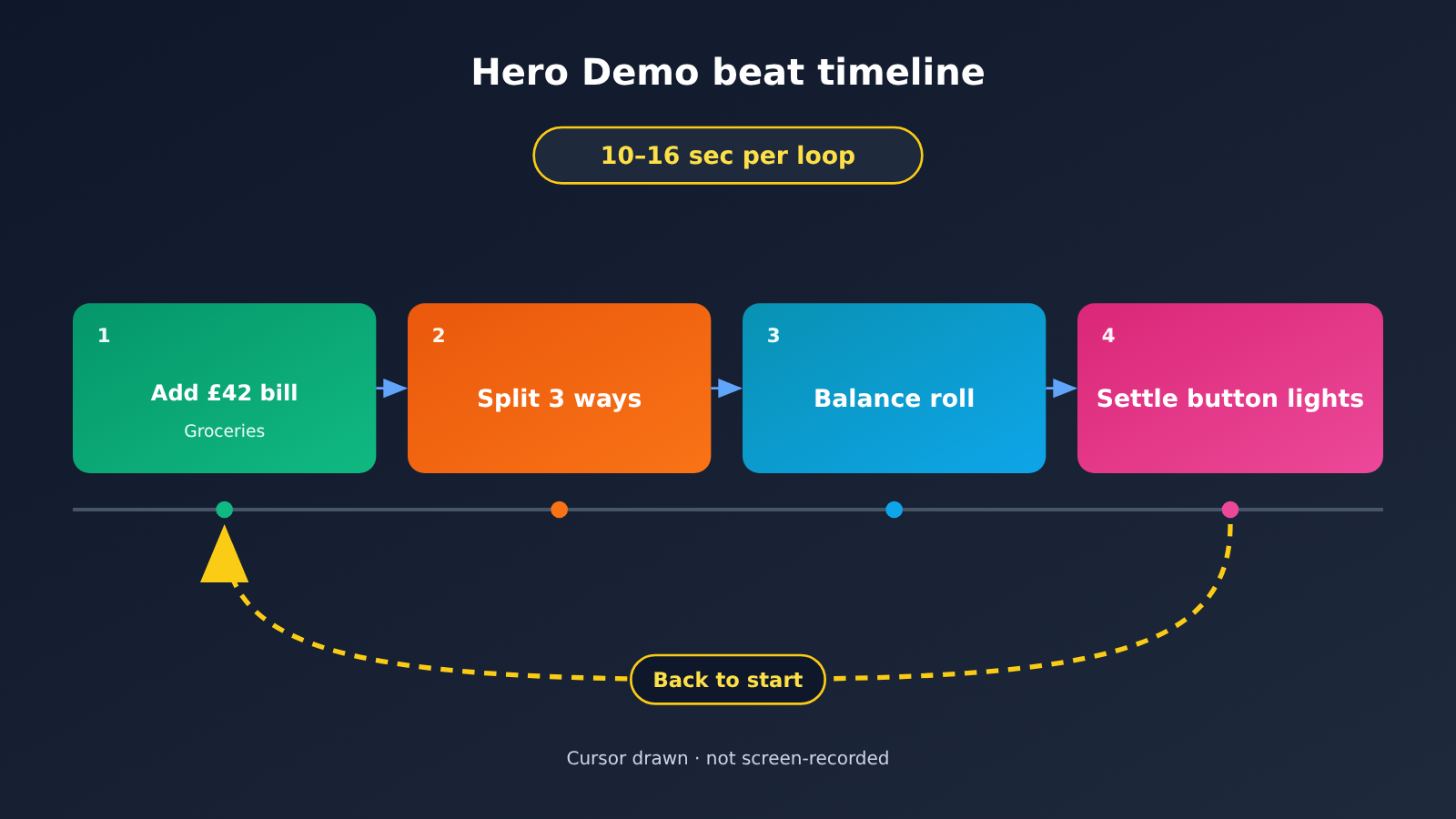
Stage a Show owns the hero demo. It was created by Benji Taylor, released on 2026-10-31, is MIT-licensed, and the demo used version 1.1. It requires a demo to show just one action, break it into 3 to 5 beats, deliver the payoff within 10 to 16 seconds, and return to the starting point when the loop ends. It picks the closest match from 71 examples as a starting point to modify; more than 40 of them are hand-built gold-standard examples from the author. Before delivery, it takes frame-by-frame screenshots and checks the contact sheet against the beats; it delivers only after passing.
Emil Kowalski’s review-animations handles the motion polish. Emil is the author of Sonner and Vaul; his repo emilkowalski/skills has 20 skills, and this case study uses only a few of them. review-animations has to be invoked manually through a slash command. It checks every transition on the page, one by one: entrance animations should use ease-out, don’t animate margin, and a button that’s clicked 50 times a day shouldn’t have a 400 ms transition.
One hard rule: don’t stack two style-setting skills. Both Hallmark and Taste decide what the page looks like; turning on both at once is like having two creative directors argue. The right combination is one style-setting skill, plus Stage a Show for the demo and review-animations for motion. The three have non-overlapping scopes.
DeepSeek Product Demo: Three Skills Compared
The table below lays out the responsibilities of the three skills side by side, so you can quickly tell which skill should handle a given problem.
| Skill | What it handles | Key rules | How it’s checked | Install source |
|---|---|---|---|---|
| Hallmark | Full-page layout and visual direction | 50 themes; show three options first, then choose one | Checked in a real browser; fails if AI-generated artifacts appear | nutlope/hallmark |
| Stage a Show | Hero demo illustration or animation | One action, 3–5 beats, and back to the starting point in 10–16 seconds | Frame-by-frame screenshots; check the contact sheet against the beats | benjitaylor/skills |
| review-animations | Transition and motion details | Use ease-out for entrances, don’t animate margin, and keep transitions short for frequently used buttons | Invoked via a slash command; scans each rule one by one | emilkowalski/skills |
How Stage a Show Draws the Demo
One thing to call out: Stage a Show does not record your screen. What it produces is a simplified product UI illustration or a short animation with a drawn cursor. The cursor path is scripted, and every move has to have a reason. That means there’s no real-desktop clutter in the frame, and the loop can return seamlessly to the start.
It works in seven steps:
- Set placement: Decide whether it’s a still image or an animation, where it goes, and how big it is. Make a separate 358-pixel-wide mobile version instead of squashing the desktop one.
- Read the code: Map your colors, fonts, and corner radii into the demo.
- Write the story: One action, 3 to 5 beats, and a payoff within 10 to 16 seconds.
- Pick an example: Choose the closest match from 71 examples as a starting point.
- Control the text: Keep only 3 to 7 real words on screen, and use placeholder bars for the rest.
- Add motion: Use curved paths, move parts instead of cutting directly, and return to the start when the loop ends.
- Self-check and hand off: Take frame-by-frame screenshots and check them. Once it passes, write a rehearsal file that explains which example you started from, what you changed, and which parts you didn’t check.
It also calls out five common failure modes: too much text, a UI that looks like wireframe color blocks, the entire window indented into a card, flat hierarchy, and dull window colors.
In the Halves case, the story Stage a Show wrote was: add a £42 grocery expense, split it among three people, have the balance number roll, and light up the “Settle up” button. It started from the “table editing” gold-standard example. Self-check found two problems: one number popped in directly instead of rolling into view, and the number jittered slightly when the font finished loading. It re-captured screenshots at both desktop and mobile widths, and only then passed the check.
DeepSeek Product Demo Quick Start
Step 1: Install Three Skills
- Hallmark: per the official README, run
npx skills add nutlope/hallmark -g. - Stage a Show and Emil’s skills: In the skills manager you’re using, enter the sources
benjitaylor/skillsandemilkowalski/skills, tick the agent you use (DeepSeek, Claude Code, or Codex all work), pick your project, and install. Emil’s repo has 20 skills in it — just check the ones you need, there’s no reason to install them all.
Step 2: Configure Model Invocation for DeepSeek Harness
The original tutorial runs everything with DeepSeek Harness (DSH), and the install command it gives is npm install -g @deepseek-ai/dsh. That package name comes from a third-party tutorial, so check it against DeepSeek’s official docs before you install anything.
Here’s how model invocation is configured:
- Put the key into the environment variable
DEEPSEEK_API_KEY; - Set base_url to
https://api.apiyi.com/v1and use an APIYI key to calldeepseek-v4.1-flash; - If you’re on Claude Code or Codex, APIYI’s version of this model exposes both chat and messages endpoints, with groups covering
ClaudeCode,CodexResponses,Default, andSVIP. In Claude Code you can likewise point the Anthropic-compatible address athttps://api.apiyi.comand putdeepseek-v4.1-flashas the model name.
Step 3: One Instruction Plus the Highest Thinking Level
The instruction is a single sentence: Use Hallmark to build a landing page for this app, then use Stage a Show to make a hero demo from the real interface. If you want a motion polish at the end, add one more line: run review-animations once. The English version of the original tutorial is also just these two sentences — no long style description tacked on.
Set the thinking level to the maximum. The original tutorial specifically calls out that you can’t skip this step, because on this model the thinking level makes a big difference in the output. Skipping it saves a few tokens but can cause checks to fail over and over, which ends up costing you more rounds anyway.
🚀 Quick-start tip: Pick a small app that already runs, or an outer page, and do a trial run first — confirm the flow works before you point it at a real product. You can claim free trial credits for new users through APIYI at apiyi.com, and the same key can switch over to other models for side-by-side comparison.
Why DeepSeek Is Cheap for Product Demos
These tasks are characterized by long runtimes. On every round, the agent has to re-read the same batch of long instruction files: skill descriptions, examples, the topic library, your code. Most of that repeated reading hits the cache, so cache reads make up the bulk of the bill. The lower the cache-read price, the cheaper these long-running tasks get.
The prices below come from the APIYI model price list, with data as of 2026-11-25:
| Model | Input (per 1M tokens) | Output (per 1M tokens) | Cache read (per 1M tokens) | Available platforms |
|---|---|---|---|---|
deepseek-v4.1-flash |
$0.3 | $1.2 | $0.006 | APIYI apiyi.com |
claude-opus-5-5 |
$4 | $20 | $0.2 | APIYI |
The cache-read price for deepseek-v4.1-flash is only one-fiftieth of its input price. That’s the main reason a whole round of design work can run for a single-digit dollar amount.
Cost math (an example at list prices, not an actual bill)
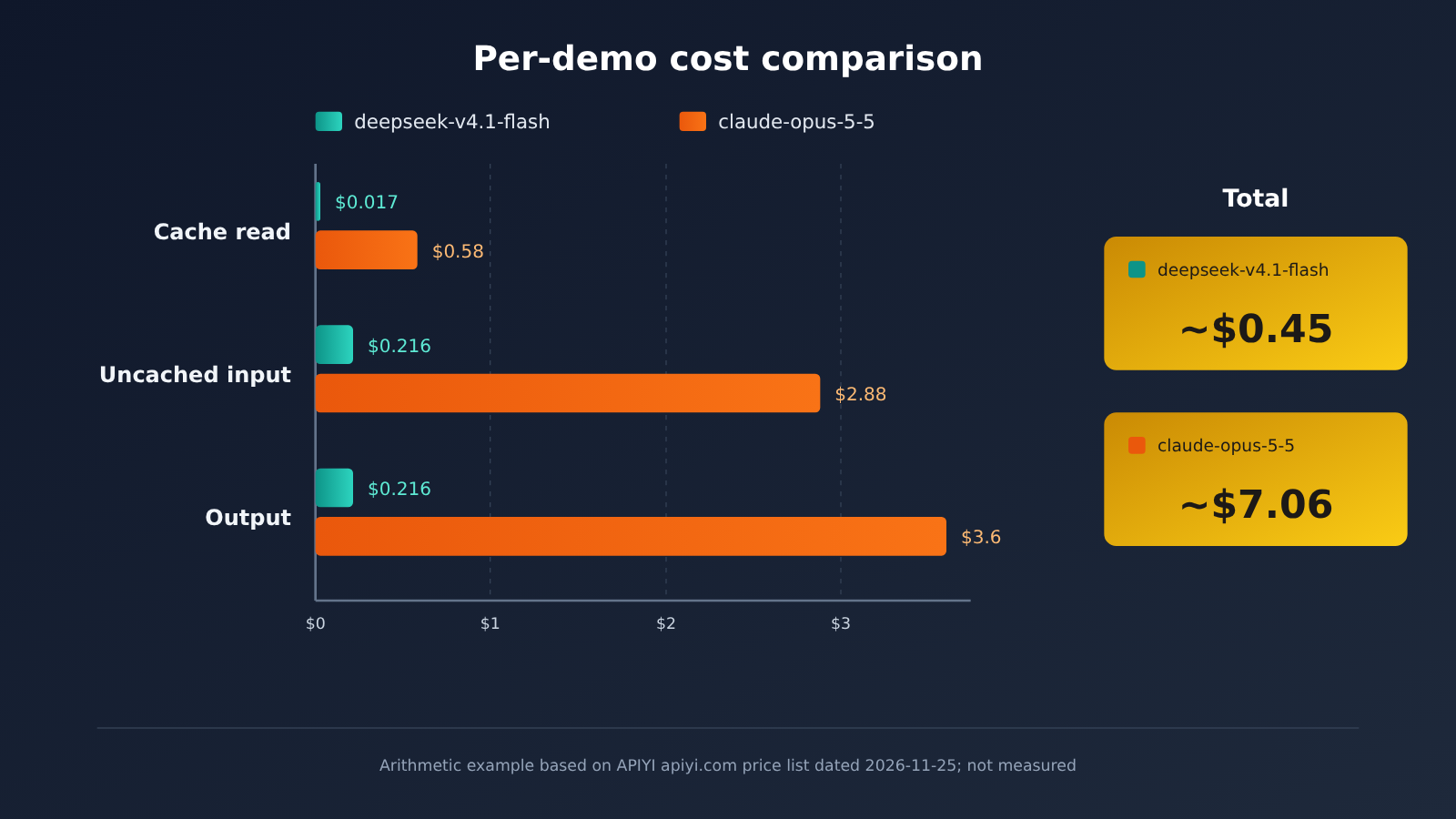
Assume a task runs 60 rounds, each round feeds in 60k tokens of input, 80% of which hits the cache, and each round produces 3k tokens of output:
| Item | Tokens | deepseek-v4.1-flash |
claude-opus-5-5 |
|---|---|---|---|
| Cache read | 2,880,000 | ~$0.017 | ~$0.58 |
| Uncached input | 720,000 | ~$0.216 | ~$2.88 |
| Output | 180,000 | ~$0.216 | ~$3.6 |
| Total | — | ~$0.45 | ~$7.06 |
Under these assumptions, even if you double the number of rounds, Flash still stays under a dollar. Running the same task on an opus-tier model, the uncached input and output alone come to more than $6, roughly a dozen times Flash’s total. That’s why long-running design tasks are a good fit for cheaper model tiers.
A note on the original blogger’s data: during his demo, DeepSeek was in an off-peak window. He recorded prices of 15 cents for input and 60 cents for output per million tokens, with only a small share of cache hits, and noted that off-peak pricing runs at roughly half of peak pricing. That’s one third-party record of a single run — not official pricing, and not APIYI’s pricing. Treat it as reference only.
💰 Cost tip: Before you start, estimate the token count per round based on your project’s code volume, then plug it into the formula above. You can check the current list prices in APIYI apiyi.com’s price list, and your billing details will also show the cache hit rate.
Four Gotchas in DeepSeek Product Demos
| Gotcha | What it looks like | How to handle it |
|---|---|---|
| Stacking style-defining skills | Hallmark and Taste are enabled at the same time, and the page styles clash | Keep only one style-defining skill, then add the demo and animation skills |
| It’s slow | Screenshots, checks, and redoing anything that doesn’t pass—it won’t give you results in a few minutes | Treat rework as part of the design process and run it in the background |
| Code upload | Your code gets sent to the model service | For private projects, check company policy first, or trial it using only outer pages and sample data |
| Checks only catch errors | Layout and motion pass, but the creative is mediocre | What story to tell and whether it’s worth doing still require human judgment |
On “slow.” In the Halves case, Hallmark failed its first browser check because the placeholder text contrast was too low and the spacing wasn’t on the scale it had defined. It passed on the second try after revisions. Stage a Show also went through another round of rework. review-animations found that a toast used a regular ease and was animating margin, while the primary button’s hover transition was 220 ms. In the end, it was changed to ease-out with transform, and the transition duration was shortened to 160 ms. Each fix means several more rounds, and that time is the cost of quality.
On “aesthetics.” The original author also admits that some aesthetic judgment still depends on the model itself. As task scale grows, more capable models do better at choosing direction. You can consider a layered approach: first use Flash to get a usable version, then use a stronger model to review the direction on key pages.
FAQ
Q1: What are the three design skills DeepSeek uses for its product demo?
Hallmark handles full-page layout and visual direction, Stage a Show handles the illustrations or animations for the hero demo, and Emil Kowalski’s review-animations checks and fixes the transition details. All three are installed as skills into the coding agent and executed by DeepSeek V4.1 Flash.
Q2: How is a Stage a Show demo different from a screen recording?
A screen recording captures your real desktop, fake data, and a cursor moving wherever it likes. Stage a Show draws a simplified interface, keeps only 3 to 7 real words, controls the cursor path via script, and loops back to the starting point after each action completes. It also produces a separate 358-pixel-wide mobile version.
Q3: When were these skills released, and can they still be used now?
Stage a Show was released on 2026-10-31, and the version used in the demo was 1.1; the original case was recorded on 2026-11-25. Both the Hallmark and Emil skill repositories are MIT-licensed. Before using them, it’s a good idea to check their respective repositories for the latest version.
Q4: Which scenarios is this workflow best suited for?
– **Independent developers**: you’ve already got a working app and need a single landing page plus one hero animation;
– **Product leads at small teams**: no design budget, and you don’t want to use a template;
– **Design engineers taking on freelance work**: get a rough direction draft out fast, then polish it by hand.
Q5: How do I run this workflow via the API using deepseek-v4.1-flash?
Sign up at APIYI apiyi.com, get a key, write it to `DEEPSEEK_API_KEY`, set base_url to `https://api.apiyi.com/v1`, and set the model name to `deepseek-v4.1-flash`. This model provides both chat and messages endpoints, so Claude Code and Codex can connect directly. New users can try it out first with the free quota.
Q6: Is it guaranteed to stay under one dollar?
No. Staying under one dollar is the result of running a small app once. Code volume, number of rounds, and cache hit rate all affect cost. I’d suggest estimating with the formula above, then checking the actual bill in the APIYI dashboard after the run.
Q7: Can Hallmark be used together with other style skills?
Not recommended. Hallmark and skills like Taste both decide what the page looks like, so enabling them at the same time makes them conflict. Pick just one style-defining skill, then layer on Stage a Show and review-animations.
Q8: Can I just run it on a private project?
Heads up: your code gets sent to the model service. Check your company’s data policies first; if you’re unsure, only try it on outer marketing pages and sample data rather than running it directly against core business code.
DeepSeek Product Demo: Key Takeaways
- Clear division of labor: Hallmark handles layout, Stage a Show handles the demo, and review-animations handles the final animation polish.
- Pick just one style skill: Don’t enable Hallmark and Taste at the same time.
- The demo is drawn, not recorded: illustrations or scripted animation with a drawing cursor — not a screen recording.
- One sentence of instruction is enough: first use Hallmark to build the landing page, then use Stage a Show to create a hero demo from the real interface.
- Turn the reasoning level to max: on this model, the reasoning level makes a big difference in the results.
- The savings come from cache reads: cache-read pricing for
deepseek-v4.1-flashis one-fiftieth of the input price, so you can check the listed rate at APIYI apiyi.com. - One dollar isn’t a promise: that’s just what one run of a small app costs — your actual bill is the real reference.
Summary
Building a product demo with DeepSeek comes down to three things:
- Split up the responsibilities: let each of the three skills own one stage, so the agent doesn’t touch everything and end up doing none of it well.
- Checkpoints: browser checks and frame-by-frame self-review can catch obvious problems, but whether the creative idea actually lands still takes human judgment.
- Cost structure: the main expense of long-running tasks is cache reads — pick a model tier with cheap cache reads, and you can keep the bill in the one-dollar range.
Start by running the whole workflow end-to-end on a small app, then roll it out to your real product. Using the same Key through APIYI apiyi.com, you can switch back and forth between deepseek-v4.1-flash and a stronger model, then decide which model tier to use at each stage based on your bill and the results.
📚 References
-
Remy Tutorial: The original case study, documenting the full process behind the Halves landing page and the hero demo
- Link:
goremy.ai/blog/articles/deepseek-v4-1-flash-design-skills-stage-a-show-pandacode - Notes: Includes the original prompt text, records of failed checks, and the cost accounting approach
- Link:
-
MindStudio Breakdown: An analysis of the three-skill workflow
- Link:
mindstudio.ai/blog/deepseek-design-skills-workflow - Notes: Breaks down the division of labor from a workflow perspective
- Link:
-
Hallmark Repository and Official Site
- Link:
github.com/Nutlope/hallmark,usehallmark.com - Notes: 50 themes and installation instructions
- Link:
-
Stage a Show Source
- Link:
github.com/benjitaylor/skills - Notes: A seven-step process, 71 examples, and validation rules
- Link:
-
Emil Kowalski Skills Repository
- Link:
github.com/emilkowalski/skills - Notes: 20 skills, including review-animations
- Link:
-
APIYI Model Price Overview
- Link:
docs.apiyi.com/models - Notes: Data as of 2026-11-25 12:49 UTC+8
- Link:
Author: APIYI Technical Team
Technical Support: Feel free to reach out via the APIYI website homepage — for more integration resources, check the docs center at docs.apiyi.com


