

Summary: This article helps you pick a primary and a backup among four AI video generation models — MAGI-2, Seedance 2.5, Kling 4.0, and Wan 3.0 — based on delivery constraints, access channels, pricing structure, and usage limits. It also lays out an acceptance method for same-spec test shoots. Evidence is current as of 2026-11-25, Beijing time.
The short answer: When choosing among these four, start with the material you have and the conditions the final video must meet; benchmark scores come later. The rough mapping from material to model looks like this:
- You already have approved product images or character designs, and you’re budgeting per second: try MAGI-2 first.
- You’re dealing with multiple characters or multiple assets, or you’ll need partial rework after delivery: try Seedance 2.5 first.
- You need to nail every storyboard beat, and the final video includes complex camera moves: try Kling 4.0 first.
- Your source material is product docs or web pages, and you plan to plug into cloud batch processing: try Wan 3.0 first.
The same model can have different resolutions, parameters, and billing across different API channels. So after you choose a model, choose a channel separately, then recalculate the price at the same specs.
Public leaderboard gaps mostly fall inside the margin of error, and rankings change with task type. That makes them useful for deciding what to try first, but not for making the final call. The final decision should come from test shoots that use the same prompt and the same number of attempts, plus the per-video cost calculated as “total bill ÷ number of accepted final videos.”
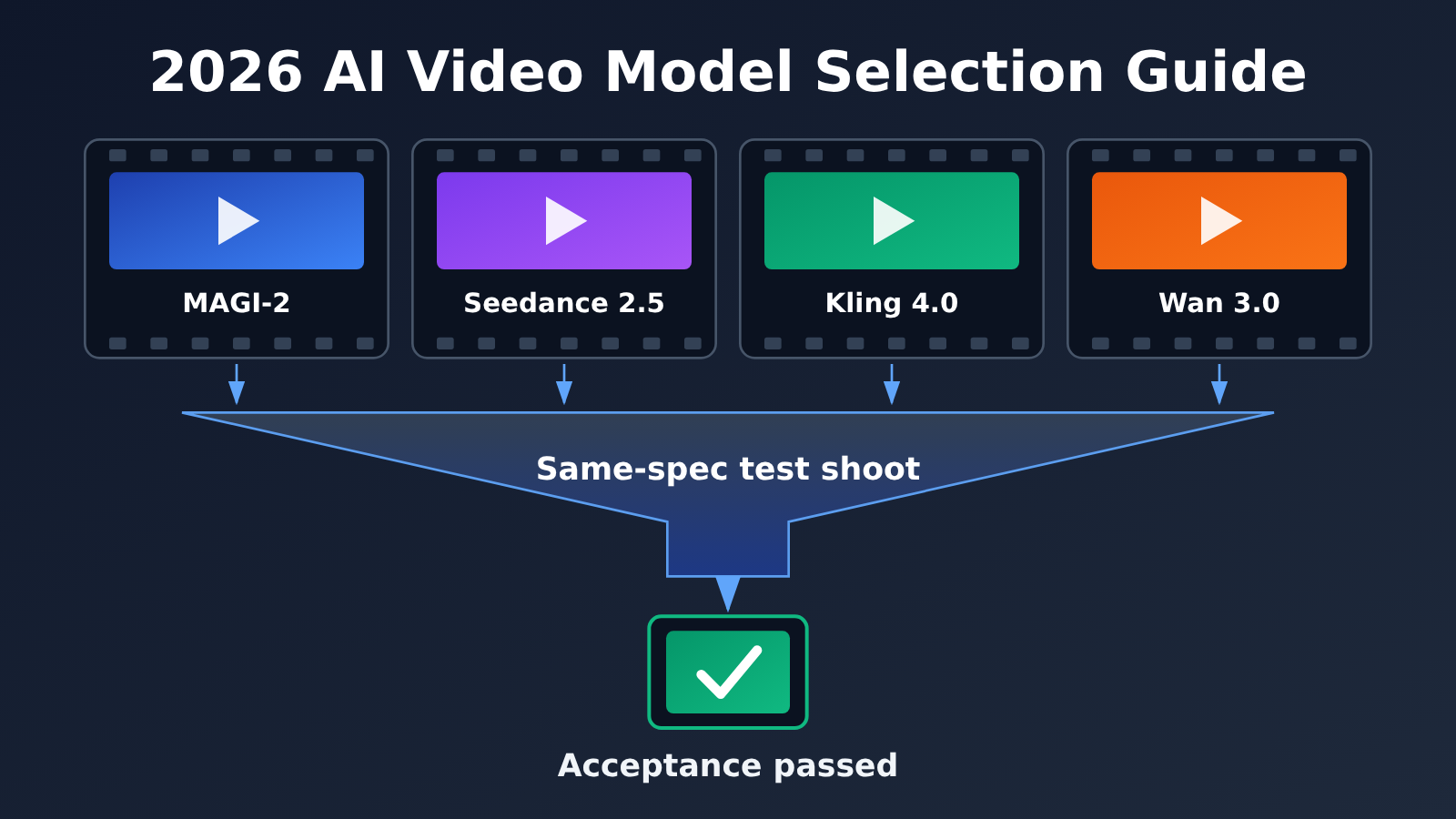
Knowledge Map: Choosing Among Four AI Video Generation Models
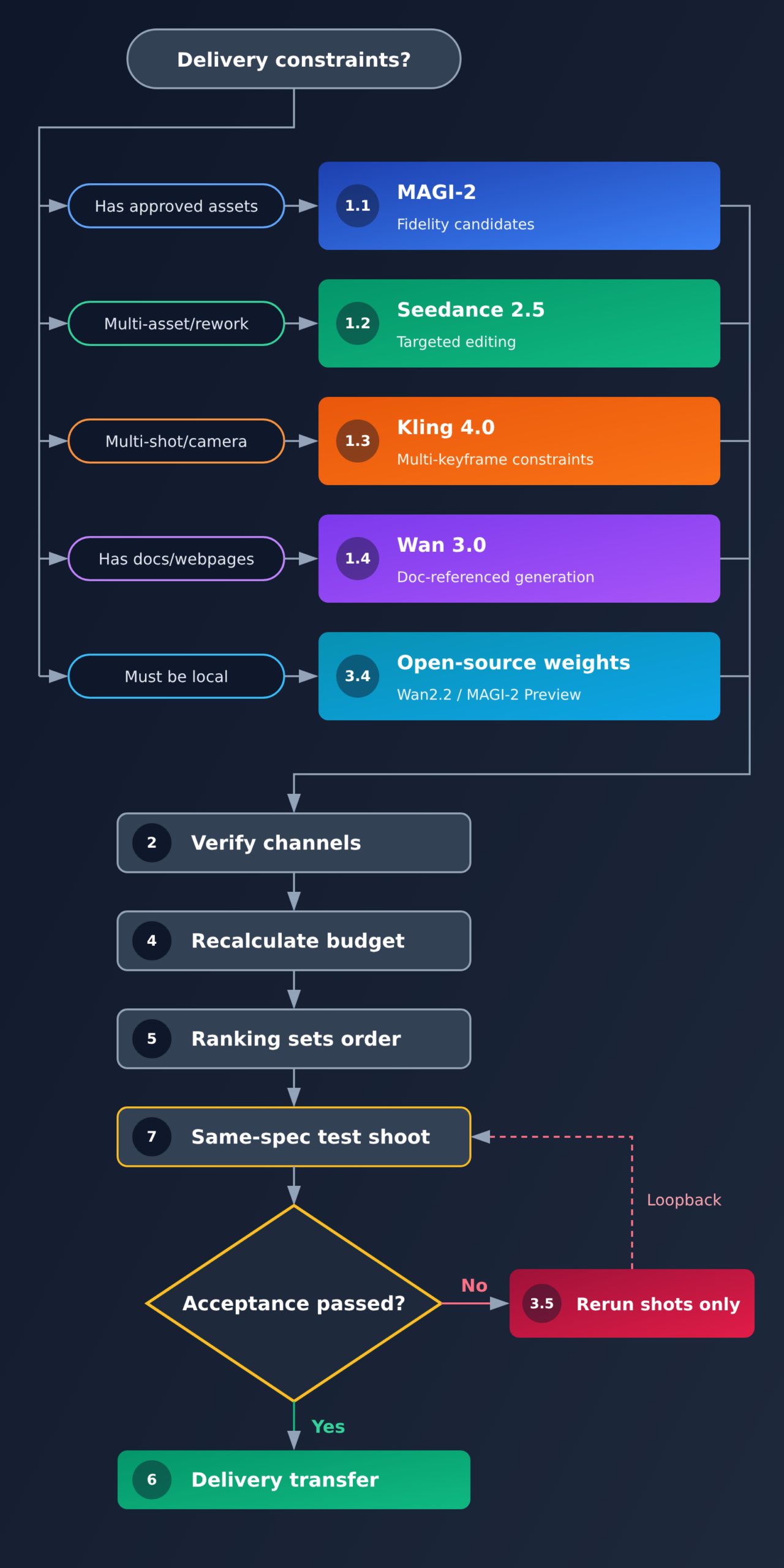
How to read the diagram: start at the top and branch by delivery constraint, then find your candidate model in Sections 1.1 through 1.4. Projects that must be deployed locally go to Section 3.4. All branches then feed into the same validation chain: access-channel check (2), budget recalculation (4), leaderboard ranking (5), and same-spec test shoot (7). If acceptance fails, rerun only the failing shot units (3.5)—there’s no need to redo the whole sequence.
Index:
- Section 1: Establishes the capability boundaries of the four models—the foundation for every decision that follows.
- Section 2: Explains how capabilities vary by access channel, which determines the parameters you can actually use.
- Section 3: Maps capabilities to specific tasks and gives a first choice and a fallback for each.
- Sections 4 and 5: Cover cost and leaderboards, respectively; read them as needed.
- Sections 6 and 7: Written for developers: batch integration and test-shoot preparation scripts.
To Know: AI Video Generation Model Selection Terminology
| Term | Concise Explanation |
|---|---|
| Omni-modal reference | Input images, videos, and audio as references in a single generation; each model has limits on the number and total duration of references |
| First/last frame / keyframe | Specify the image at the start, end, or a middle moment of a video to constrain the shot’s direction |
| Draft preview | Seedance 2.5 Standard’s 480p preview option; confirm the composition, then export at 1080p or 4K |
| 10-bit HDR | An output format with greater color depth and dynamic range, allowing more room for color grading in post |
| Concurrency | The number of generation tasks that can run simultaneously on the same account, directly affecting batch output speed |
| Bradley–Terry / Elo-style scoring | Infer model scores from wins and losses in pairwise matchups; the ± after the result indicates the statistical margin of error |
1 Selecting Four AI Video Generation Models Based on Delivery Constraints
1.1 MAGI-2: The Go-To When You Already Have Product Images or Character Designs
MAGI-2 was developed by Sand.ai. The developer’s stated specs are 480B total parameters with roughly 28B active parameters, while the launch post from partner Higgsfield says 400B — and the product page once again says 480B, matching the developer. So when you cite the numbers, note the source. Higgsfield’s product page lists output specs of 4–30 seconds, 1080p, 25 frames per second, and six aspect ratios, plus support for synchronized dialogue and audio, first and last frames, and three kinds of reference input. The native omni-modal reference ceiling is 10 images, 5 videos, and 5 audio clips — 20 items total.
The reason it’s worth test-shooting first comes down to post-processing. Sand’s 1080p post-processing calls the original reference images back in to rebuild detail, which makes it a good fit for a first round of testing on signage text, cup logos, and smaller faces in the frame. One limitation to keep in mind: Higgsfield’s API model page states that all MAGI-2 modes are counted together, giving each account a single concurrency slot — to raise that ceiling, you’ll need to go through the sales channel.
1.2 Seedance 2.5: Multi-Asset Work and Local Rework
The standard Seedance 2.5 comes from ByteDance Seed. It generates up to 30 seconds per run with audio and video, and supports multi-round extension. Its reference limits are the highest of the four: 30 images, 10 videos, and 10 audio clips. It can target by timestamp and perform local edits on audio and video, and the official docs also list green screen, viewpoint adjustment, and reference-driven editing.
Volcano Ark offers 1080p and 4K 10-bit H.265 output, and also supports a two-stage workflow: generate a 480p Draft sample first, then export at 1080p or 4K. The draft and the final render are billed separately. That lets a team confirm blocking and composition first, then decide whether to pay for the high-resolution export.
On access, regular creators can use Jimeng or Doubao Pro, while developers can use Volcano Ark or BytePlus. The Flash version tops out at 720p, and its reference capacity and preview workflow differ from the standard version — so don’t mix the specs of the two when choosing. And when reference assets involve real people, design your workflow according to the original vendor’s rules on using portrait materials.
1.3 Kling 4.0: Multiple Keyframes and Complex Camera Moves
Kuaishou’s announcement states that Kling 4.0 officially launched on October 15, with a native single-generation maximum of 30 seconds. Omni Reference accepts up to 15 references in total, and the model also supports up to 10 keyframe inputs. In multi-image scenarios, you can assign separate keyframes to the opening move, the key action, and the landing point, or use three-view sheets, wireframes, or depth material as supporting references.
The official showcase highlights high-speed action along with complex camera work such as pans, tracking shots, and orbit moves; 10-bit HDR is its headline selling point on the output side. Creators can simply use Kling. When you need batch processing, you can choose Runway Dev, whose public documentation already lists kling_4: that channel supports start, middle, and end frames, offers 720p, 1080p, and the 4K tier listed in the docs, and also exposes HDR parameters. The model specifications in Kuaishou’s press release and Runway’s API wrapper each apply on their own terms — when integrating, follow the field descriptions and pricing table of the channel you pick.
1.4 Wan 3.0: Cloud Batch Processing Driven by Documents or Webpages
Alibaba Cloud released the Wan 3.0 hosted API on August 24. The integration guide updated on November 23 gives the following specifications:
- Up to 1080P at 30 frames per second, with durations from 2 to 30 seconds.
- Dialogue, music, and sound effects are output by default; audio can be turned off.
- First/last frames, editing, forward and backward extension, and omni-modal references all live within the same product family.
The total cap for omni-modal references is 20 items, of which images can be up to 10; video and audio can be up to 5 clips each, and the total length per category must not exceed 15 seconds. You choose one of two options as the reference input: product documentation or a public webpage. There are a few hard limits in practice: first/last-frame mode and reference-input mode are mutually exclusive; if the input contains video, the combined input-plus-output duration must not exceed 30 seconds.
There are two versions, Standard and Prime — if inference-side wait time matters more to you, Prime is worth evaluating. Model availability and resource allocation vary by region; the console display is authoritative.
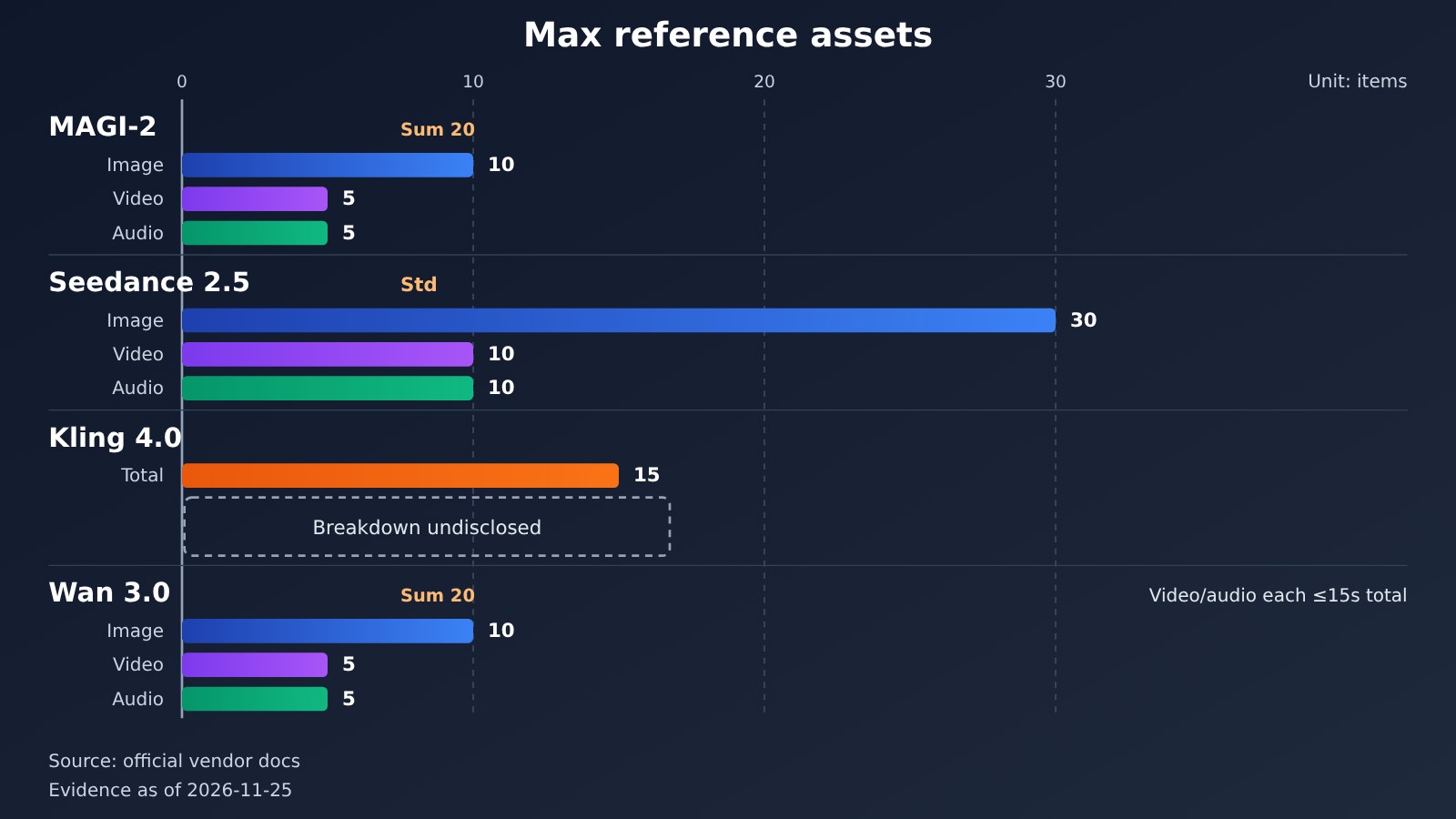
The chart above compares only the upper limits on reference material counts. Seedance 2.5 Standard has the largest capacity across all three material types. Kling 4.0 discloses only a combined cap of 15, plus 10 keyframe inputs, which is its unique constraint mechanism. Wan 3.0 additionally caps the total duration of video and audio references.
1.5 Specification Comparison of Four AI Video Generation Models
| Dimension | MAGI-2 | Seedance 2.5 Standard Edition | Kling 4.0 | Wan 3.0 |
|---|---|---|---|---|
| Duration per generation | 4–30 seconds | Up to 30 seconds, with multi-round extension | Native maximum of 30 seconds | 2–30 seconds |
| Maximum resolution | 1080p | 4K 10-bit H.265 (Volcengine Ark) | 4K tier (Runway Dev documentation) | 1080P |
| Frame rate | 25 fps | Not listed in the sources for this article | Not listed in the sources for this article | 30 fps |
| Frame controls | First and last frames, three types of references | Timestamp-specific editing, green screen, viewpoint | Up to 10 keyframes | First/last frames and reference images are mutually exclusive |
| Audio | Synchronized dialogue and sound | Audio and video generated together | Not listed in the sources for this article | Dialogue, music, and sound effects on by default; can be disabled |
| Known limitations | Higgsfield: one concurrent job per account | Flash only 720p | Field names vary by channel | Total length ≤30 seconds when input video is included |
Cells marked “Not listed in the sources for this article” mean the sources cited in this article did not provide that item; it does not mean the model doesn’t support it.
2 Verify the Entry Points and Channels for AI Video Generation Models
The basic text-to-video capabilities of all four models can be found in Higgsfield’s API catalog. This entry point is suitable for comparing final videos in the same account and under the same observation environment using the same short prompt. But it also makes one thing clear: a model’s capabilities can change depending on the interface.
| Model | Unified comparison entry point | High-spec delivery entry point | Key channel differences |
|---|---|---|---|
| MAGI-2 | Higgsfield API | Higgsfield API | All modes are combined into one concurrency slot per account |
| Seedance 2.5 | Higgsfield (text-to-video up to 1080p) | Volcano Ark / BytePlus (4K) | Draft sample videos are only available in the standard workflow |
| Kling 4.0 | Higgsfield (text-to-video up to 1080p) | Runway Dev (kling_4, including 4K and HDR) |
Frame positions and parameters are filled in according to the channel fields |
| Wan 3.0 | Higgsfield (basic text-to-video) | Alibaba Cloud Model Studio | For documented inputs, use Alibaba Cloud’s official API; regional availability varies |
Projects planning cross-channel migration should store the model version, mode, input mapping table, and all final-video specifications in the project checklist, then review each item after migration. This article does not confirm that APIYI apiyi.com has listed these four video models; please refer to the platform’s model list. APIYI is suited to text work outside the video pipeline, such as standardizing prompts, organizing documentation, and checking subtitle text.
3 Shortlisting and Backup Picks for AI Video Generation Models by Task
3.1 Making e-commerce main images move
When you only have one approved product main image, start with MAGI-2 to check whether the cup rim, labels, color shifts, and product proportions hold up in motion. If the same video needs four colorways, six accessories, and multiple display scenes—each with its own original image—add Seedance 2.5 to the shortlist for its larger asset capacity. Projects where approvals need to see motion and composition first are a good fit for its standard Draft workflow.
3.2 Key shots in brand videos
Once you’ve storyboarded the four nodes—character starting to walk, lateral tracking shot, orbit around the subject, and freeze frame—use Kling 4.0’s keyframe input to constrain each one. If the edited footage still needs an added line of dialogue or a change to just one section of the set, compare Seedance 2.5’s targeted editing with your existing post-production workflow. Focus on whether frames outside the specified time range get changed as a side effect.
3.3 Making short videos from manuals
When evaluating Wan 3.0’s document or web page reference, the first things to validate are names, numbers, units, version dates, and what the tables actually mean. Alibaba Cloud’s samples have shown a smart glasses ad generated from a PPT and a business report video generated from a table. These are official demos—they show the value of this entry point, but they can’t replace your own acceptance checks. For rigorous delivery, on-screen text still needs to be proofed against the source data. When necessary, overlay corrected numbers in the editing software for figures that are easy to get wrong.
Document quality directly determines the ceiling for this kind of finished video. Before feeding content to Wan, you can first call a Large Language Model through APIYI apiyi.com to turn the manual into a structured file with a clear hierarchy and numbers gathered in one place.
3.4 Balancing budget and stable output, or needing local execution
Prepare two tasks: a 16:9, 1080p short text-to-video task with audio, and a single-image task. Use the same number of attempts for every candidate model, review each clip for character and prop continuity, dialogue clarity, and delivery requirements, and record completion time and the number of passing clips.
If local execution is a hard requirement, consider Wan2.2, which has official ready-to-use weights, or the MAGI-2 Preview research branch. Recheck duration, visual quality, and compute requirements against the model card for the weights you plan to deploy—don’t just apply the specs from the hosted version.
3.5 Splitting one ad into acceptance units
Split an ad into three acceptance units: product close-up, character action, and voiceover. Pick one or two candidate models for each unit first. Set a separate gate for label clarity, shot nodes, and voiceover intelligibility—if any one fails, rerun only that shot.
If the entire video has to be delivered in one go, test a long take with the same prompt and compare how error frequency changes when you extend from 15 seconds to 30 seconds. For projects that need matching aspect ratios between shots, lock the editing timeline and uniform aspect ratio before generation. When the model’s output frame rate doesn’t match the editing frame rate, frame interpolation, transcoding, and audio-video sync checks all need to be factored into the time estimate—for example, MAGI-2 is 25 fps and Wan 3.0 is 30 fps.
4 Calculating the Same-Spec Budget for AI Video Generation Models
4.1 Five-Second List-Price Example
The public list-price sample is standardized as: 16:9, 1080p, with audio, 5 seconds, text-only input. Each item in the table below applies only to the specified API channel; limited-time discounts and free credits are subject to what your specific account shows.
| Model | Channel | Pricing Method | 5-Second List Price | Notes |
|---|---|---|---|---|
| MAGI-2 | Higgsfield API | $0.08 per second | $0.40 | Public list price |
| Seedance 2.5 Standard | BytePlus | By token usage | About $2.843 | Official same-spec example; actual billing is based on usage |
| Kling 4.0 | Runway Dev | 23.5 credits per second | 117.5 credits, about $1.18 | Promotional price 18.8 credits per second; 5 seconds = 94 credits, about $0.94; valid through November 30 (UTC) |
| Wan 3.0 Standard | Alibaba Cloud Singapore | $0.20 per second | $1.00 | Regional list price |
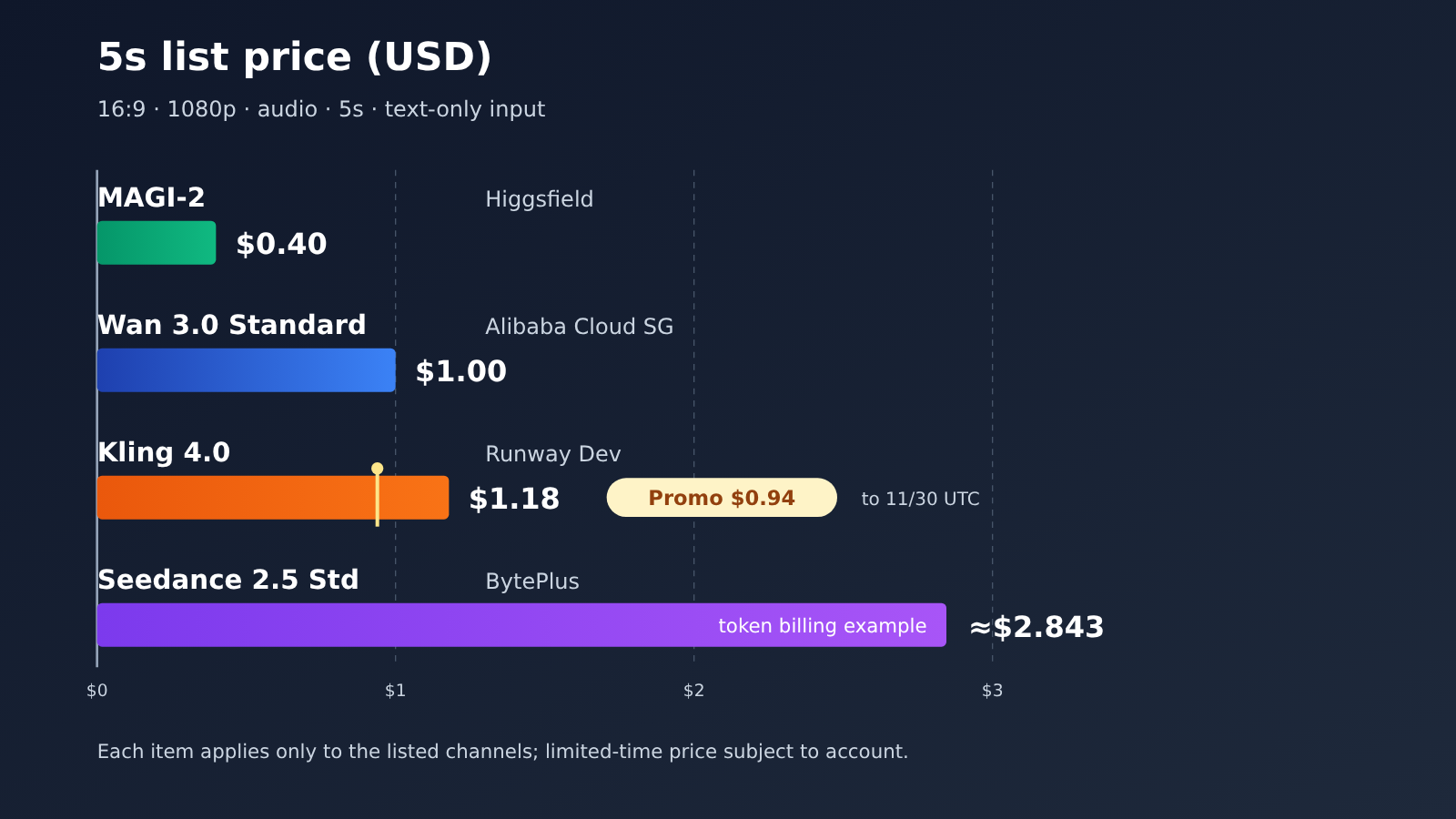
The chart above shows the list-price gap, which is not the same as the real cost of completing the same task. Seedance’s number is a token-based estimate; Kling’s promotional price has an expiration date; Seedance’s two-stage Draft workflow also incurs extra sample footage costs.
4.2 Recalculate Once You Add a Reference Video
As soon as you add a reference video, each provider’s billing logic diverges:
- Wan 3.0: bills the input video seconds plus the output video seconds.
- Seedance 2.5: chooses the token unit price based on whether the input includes video, and applies a minimum usage.
- Kling 4.0 on Runway: the billable duration is the output duration plus the larger of the input and output durations, then calculated at the with-video tier rate.
So the price ranking for pure text-to-video may change once you move to video editing tasks.
4.3 Use Per-Accepted-Video Cost for the Final Comparison
When comparing projects, use “total generation bill ÷ number of final videos that pass QC,” and separately track the time spent on text edits, lip-sync fixes, and transcoding. This formula is a production budgeting method, not a vendor-published metric. A model with a lower list price may not have a lower cost per accepted video if its pass rate is also low.
5 Making Sense of AI Video Generation Model Leaderboards
| Leaderboard snapshot | 1st | 2nd | 3rd | Notes |
|---|---|---|---|---|
| Artificial Analysis, text-to-video with audio | Wan 3.0 1175±12 | Seedance 2.5 1155±12 | MAGI-2 1150±13 | The Kling row corresponds to 3.0; 4.0 isn’t listed |
| Artificial Analysis, image-to-video with audio | MAGI-2 1165±14 | Seedance 2.5 1161±14 | Wan 3.0 1112±14 | Same as above |
| Higgsfield Bradley–Terry head-to-head | Seedance 2.5 | MAGI-2 | Seedance 2.0 | Followed by Wan 3.0, then Kling 4.0 |
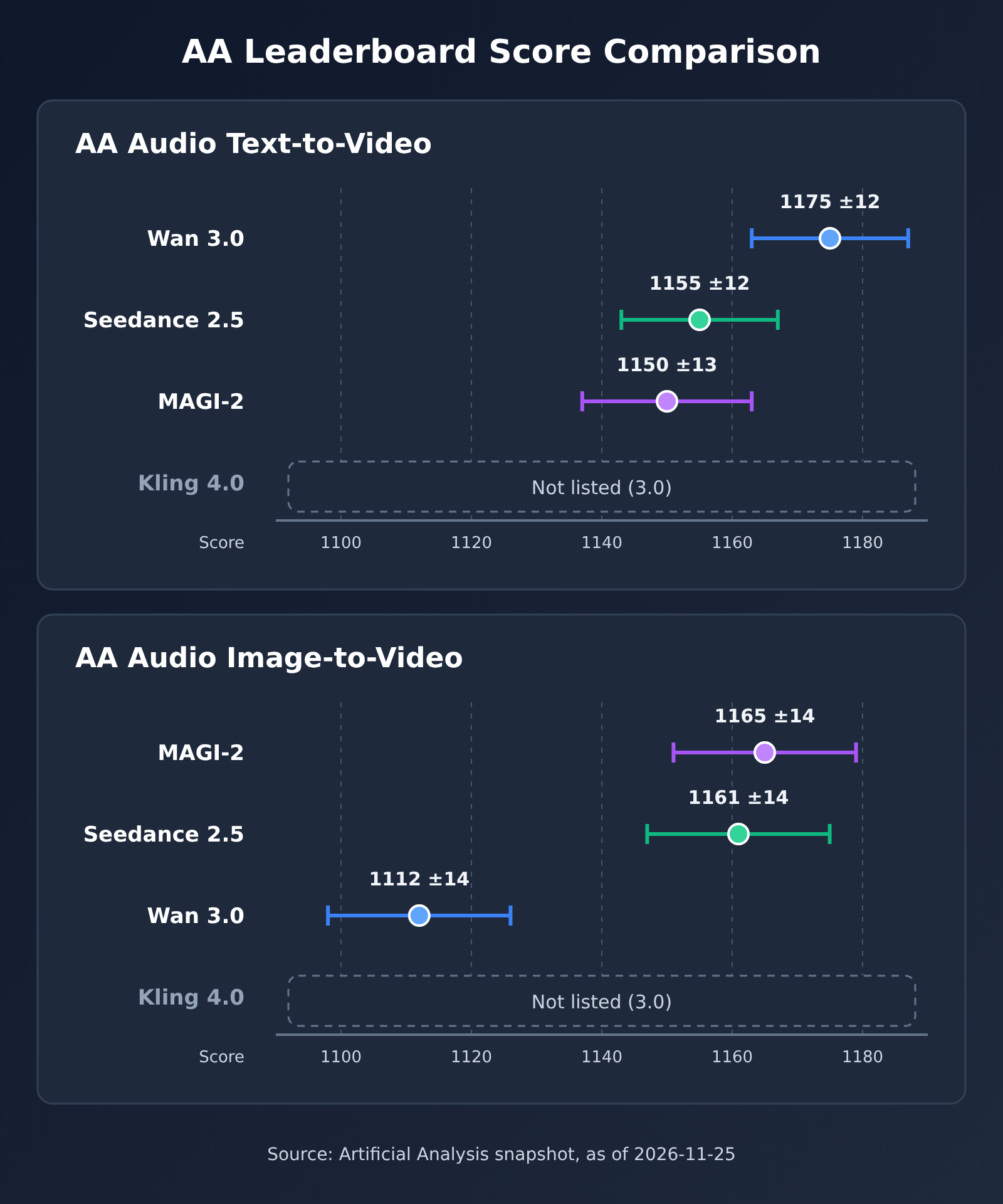
Looking at the error bars, Seedance 2.5 and MAGI-2 overlap on the text-to-video leaderboard, and MAGI-2 and Seedance 2.5 overlap on the image-to-video leaderboard — none of those rank gaps are wide enough to call it. On the image-to-video board, the gap between Wan 3.0 and the top two is a bit more clear-cut. All three flagships make both lists, and switching the task type shuffles the order.
If you want to see how Kling 4.0 stacks up against the other three, the same-platform snapshot from Higgsfield is worth a look. Just keep in mind that Higgsfield is also a co-launch partner for MAGI-2, so you should spell out that context whenever you cite this leaderboard.
The purpose of a leaderboard is to settle the order in which you run test shoots. The final pick still comes down to weighing four things: input capabilities, channel eligibility, delivery terms, and cost.
6 AI Video Generation Model Batch Access and Task Recovery
When setting up batch access, it’s a good idea to record the task ID, creation time, and channel name returned by each task on your business task, then use that same ID to track whether it completes or fails. Here’s how each provider handles result retention:
- Alibaba Cloud: The service region, workspace, and key must all be properly matched, and the resulting video link is retained for 24 hours.
- Volcengine Ark: The finished link is also valid for 24 hours, while the standard edition’s Draft ID has its own separate retention rules.
While the queue is still running, resubmitting will start another generation run and bill you again. When retrieving results, you should query the original task first, and once it’s done, promptly transfer the file to your own storage. This step directly affects real delivery wait times and disk archiving.
7 Quick Start: Preparing a Unified Test-Shot Card for AI Video Generation Models
For a fair, same-spec comparison, every model has to receive identical copy. The script below calls a Large Language Model through APIYI’s OpenAI-compatible endpoint and rewrites a creative brief into a test-shot card with fixed fields, so you can drop it straight into each vendor’s video API. Video generation itself still happens through the official channels listed in Section 2.
from openai import OpenAI

client = OpenAI(
    api_key="YOUR_API_KEY",
    base_url="https://api.apiyi.com/v1"  # APIYI OpenAI-compatible endpoint
)

brief = "咖啡杯产品特写,杯身标识清晰,镜头缓慢环绕,5 秒,16:9,有声"
resp = client.chat.completions.create(
    model="gpt-4o-mini",  # Swap in an available model from the platform's model list
    messages=[
        {"role": "system", "content": "把简报改写为 JSON 试拍卡:prompt、duration_s、aspect、resolution、audio、checks。"},
        {"role": "user", "content": brief},
    ],
    response_format={"type": "json_object"},
)
print(resp.choices[0].message.content)
View the full implementation: test-shot card generation + per-pass cost accounting
import json
from openai import OpenAI

client = OpenAI(
    api_key="YOUR_API_KEY",
    base_url="https://api.apiyi.com/v1"
)

# Book prices from Section 4.1 (USD/sec, text input only, 1080p, with audio); defer to what each provider's account shows
PRICE_PER_SEC = {
    "MAGI-2@Higgsfield": 0.08,
    "Wan3.0-Standard@Aliyun-SG": 0.20,
    "Kling4.0@RunwayDev": 1.18 / 5,   # Converted from list price; promotional rates are separate
}

def make_shot_card(brief: str) -> dict:
    resp = client.chat.completions.create(
        model="gpt-4o-mini",
        messages=[
            {"role": "system", "content": (
                "把简报改写为 JSON 试拍卡,字段:prompt、duration_s、aspect、"
                "resolution、audio、checks(验收项列表,如标识清晰、口播可懂)。"
            )},
            {"role": "user", "content": brief},
        ],
        response_format={"type": "json_object"},
    )
    return json.loads(resp.choices[0].message.content)

def cost_per_pass(ledger: list[dict]) -> dict:
    """Each ledger entry: model, seconds, bill_usd (optional), passed"""
    stats = {}
    for row in ledger:
        s = stats.setdefault(row["model"], {"bill": 0.0, "passed": 0, "runs": 0})
        bill = row.get("bill_usd")
        if bill is None:  # With no actual bill, estimate using the book price
            bill = PRICE_PER_SEC.get(row["model"], 0) * row["seconds"]
        s["bill"] += bill
        s["runs"] += 1
        s["passed"] += int(row["passed"])
    return {
        m: (round(v["bill"] / v["passed"], 3) if v["passed"] else None)
        for m, v in stats.items()
    }

if __name__ == "__main__":
    card = make_shot_card("咖啡杯产品特写,杯身标识清晰,镜头缓慢环绕,5 秒,16:9,有声")
    print(json.dumps(card, ensure_ascii=False, indent=2))

    # The data below is hypothetical, just to demonstrate the formula — not measured results
    demo_ledger = [
        {"model": "MAGI-2@Higgsfield", "seconds": 5, "passed": True},
        {"model": "MAGI-2@Higgsfield", "seconds": 5, "passed": False},
        {"model": "Wan3.0-Standard@Aliyun-SG", "seconds": 5, "passed": True},
    ]
    print(cost_per_pass(demo_ledger))  # Models with no passing clips return None and are left out of the ranking
🚀 Quick start: Sign up at APIYI apiyi.com to get free test credits. Start by standardizing the test shot cards for all candidate models using the script above, then submit tasks through each video channel. That way, your comparison reflects only differences between the models, not differences in the prompts.
8 FAQs About Choosing an AI Video Generation Model
Q1: If I can only pick one, how do I decide?
Follow Section 1 to find the model that best matches your footage, then run the two shared test tasks from Section 3.4 and let the per-accepted-shot cost make the decision. Don’t rely on any single leaderboard from Section 5.
Q2: Can I call these four video models directly through APIYI?
This article doesn’t confirm which models are available — check the model list in the APIYI apiyi.com console. What we can say for sure is that you can use APIYI to call Large Language Models or multimodal models for prompt standardization, document structuring, and checking text in extracted frames.
Q3: How do I verify the numbers and brand names that appear on screen?
First, compare each item against the original data. For batch projects, you can use a multimodal model accessed through APIYI apiyi.com to extract text from extracted frames, then have a human review it. Any incorrect numbers should be covered up and corrected in your editing software.
Summary: How to Determine the Final Selection
Here’s a judgment method you can put to use right away: first pick a primary and a backup option based on asset type and delivery constraints, confirm the actual channel in Section 2, then recalculate pricing for the same specs per Section 4. After that, run a test shoot using the same prompt and the same number of attempts, and use “total bill ÷ number of passing finished clips” plus rework hours as the final basis. Whenever the channel, promotional price, or input type changes, just run through this process again.
The copy alignment and document organization before the test shoot can all be handled through APIYI apiyi.com’s unified interface.
References
- Sand.ai MAGI-2 Technical Debut:
sand.ai/blog/magi-2/ - Higgsfield MAGI-2 Product Page and API Model Page:
higgsfield.ai/magi-2-intro,open.higgsfield.ai/models/sand/magi-2/text-to-video/playground - Higgsfield MAGI-2 Partnership Launch Article and Match Announcement:
higgsfield.ai/announcing-magi-2 - ByteDance Seed Seedance 2.5 Release:
seed.bytedance.com/en/blog/one-take-creation-flexible-referencing-introducing-seedance-2-5 - Volcano Ark Seedance 2.5 Specifications:
docs.volcengine.com/docs/ark/seedance-2-5 - BytePlus Developer Guide and Pricing:
docs.byteplus.com/en/docs/ModelArk/seedance-2-5,docs.byteplus.com/docs/en/modelark/model-pricing.md - Kuaishou Kling 4.0 Announcement:
ir.kuaishou.com/news-releases/news-release-details/kling-ai-officially-launches-next-generation-kling-40-raising/ - Runway Dev Kling 4.0 Integration and Pricing:
dev.runway.com/learn/kling-4-0-api,docs.dev.runwayml.com/guides/pricing/ - Alibaba Cloud Wan 3.0 Release, Integration Guide, and Regional Pricing:
alibabacloud.com/help/en/model-studio/wan3-video-generation-guide,alibabacloud.com/help/en/model-studio/model-pricing - Higgsfield Model Catalog:
open.higgsfield.ai/explore - Artificial Analysis Video Leaderboard:
artificialanalysis.ai/video/leaderboard/text-to-video,artificialanalysis.ai/video/leaderboard/image-to-video/ - Open-Source Weights Branch:
github.com/Wan-Video/Wan2.2,sand.ai/blog/magi-2-preview/
Author: APIYI Technical Team
Technical Discussion: Feel free to reach out to us on the APIYI apiyi.com homepage; more integration materials are available at the docs.apiyi.com documentation center.


