
Author’s note: This is a hands-on guide to multi-model orchestration for small and mid-sized team backends and indie developers. We’ll start with three typical collaboration scenarios, then lay out a five-step implementation sequence, and wrap up with a tool selection table.
You’ve probably already gotten a standalone Claude, GPT, or Gemini demo running. But the moment you try to put all three models into the same business pipeline, most of your time goes into three SDKs, three sets of API keys, three billing systems, three flavors of error codes, and a handful of protocol shapes — the actual business logic ends up being a small slice of the work. A lot of people assume that pointing base_url at a single gateway gives them automatic routing. In reality, swapping base_url only solves the integration problem; it doesn’t magically produce routing.
This isn’t an explainer on multi-agent concepts, and it’s not a ranking of which model is strongest. This article answers exactly one engineering question: how do you orchestrate Claude, GPT, and Gemini together — which layer gets handed off to a unified gateway, and which layer you have to write yourself.
What you’ll get: By the end, you’ll have three things you can put to work immediately: a responsibility table organized by role, a five-step implementation sequence, and a tool selection table showing which piece each of unified gateway, LiteLLM, OpenRouter Auto, and Vercel AI SDK actually covers.
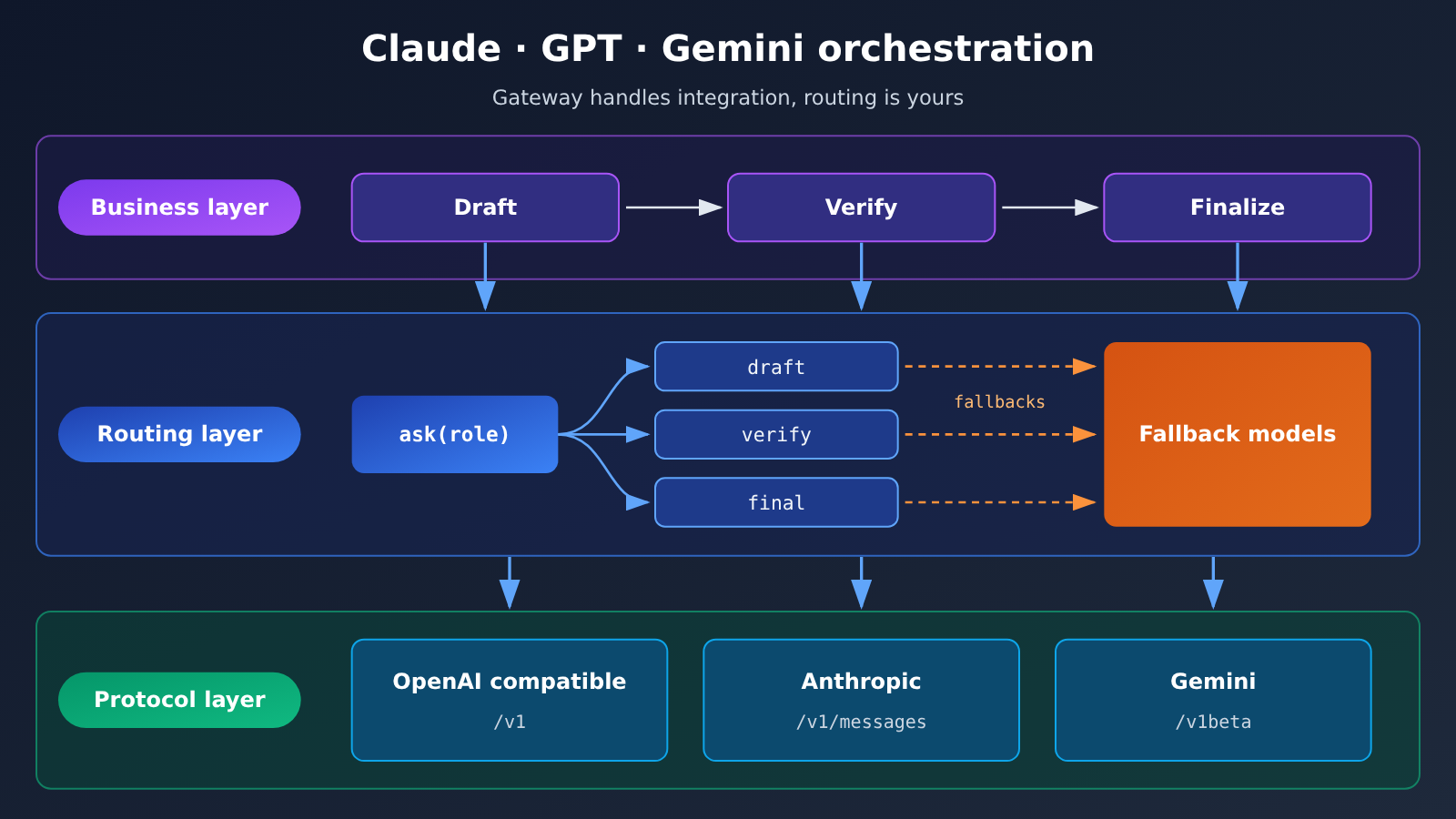
Claude, GPT, and Gemini: the core points of multi-model orchestration
In practice, multi-model collaboration in a business context usually takes only three shapes. Figure out which scenario you’re in first, then decide how to layer the code.
| Collaboration scenario | Approach | Problem it solves | Who writes the logic |
|---|---|---|---|
| Tiered drafting | A cheap, fast model produces the first draft; the flagship model only does the final pass | Cuts per-article cost across the whole chain | Your own role mapping |
| Cross-checking | Have a model from a different vendor review the previous step’s output | Reduces the blind spots and errors of same-source models | Your own pipeline orchestration |
| Switching vendors on failure | Switch to a fallback when the primary model rate-limits, times out, or trips content policy | Upstream failures don’t drag the business down | Home-grown fallback logic or LiteLLM |
A closer look at the three Claude, GPT, and Gemini scenarios
The idea behind tiered drafting is to separate “writing” from “signing off.” First drafts don’t need great prose, but they account for the most calls, so they’re a good fit for a low-cost model; the final pass runs only once, so it can use a flagship model. The premise is that your business flow can actually be split into several steps — if you only ever make one call, there’s no tiering to speak of.
The key to cross-checking is “use a different vendor.” Models from the same vendor share similar training data and preferences, so having one check its own work often misses the same class of mistakes. Having Gemini review GPT’s draft, or Claude re-check Gemini’s conclusion, is essentially borrowing the differences between models to do a second pass. This step doesn’t need a flagship tier — a mid tier is usually enough.
Switching vendors on failure is the one most often misunderstood. Many people assume that once they’ve wired up a unified gateway, requests to the primary model will automatically be routed elsewhere when something goes wrong. In reality, a gateway is a forwarding layer; it doesn’t host the models. Upstream rate limits, outages, and content-policy errors pass straight through. Who catches those errors, which model to switch to, and how many retries to attempt — all of that has to be decided by the routing layer.
Where the development cost of multi-model orchestration actually goes
When you bring three vendors’ models into one project, the extra work basically clusters around “integration,” and it falls into these five categories:
- Three SDKs: the OpenAI, Anthropic, and Google clients each have their own idioms and message structures.
- Three keys: secrets are managed separately, so rotation and permission control all have to be done three times.
- Three billing systems: three dashboards, three invoices — to get a per-article cost total, you’re reconciling by hand.
- Three sets of error codes: rate limiting, context overflow, and content blocking each come back in a different format from each vendor.
- Multiple protocol shapes: OpenAI has both Chat Completions and Responses endpoints, Anthropic uses Messages, and Gemini uses generateContent.
A unified gateway can collapse the first four categories into one, and the protocol layer can be funneled into a single entry point. But “which model to use when” is a business judgment — the gateway won’t make it for you.
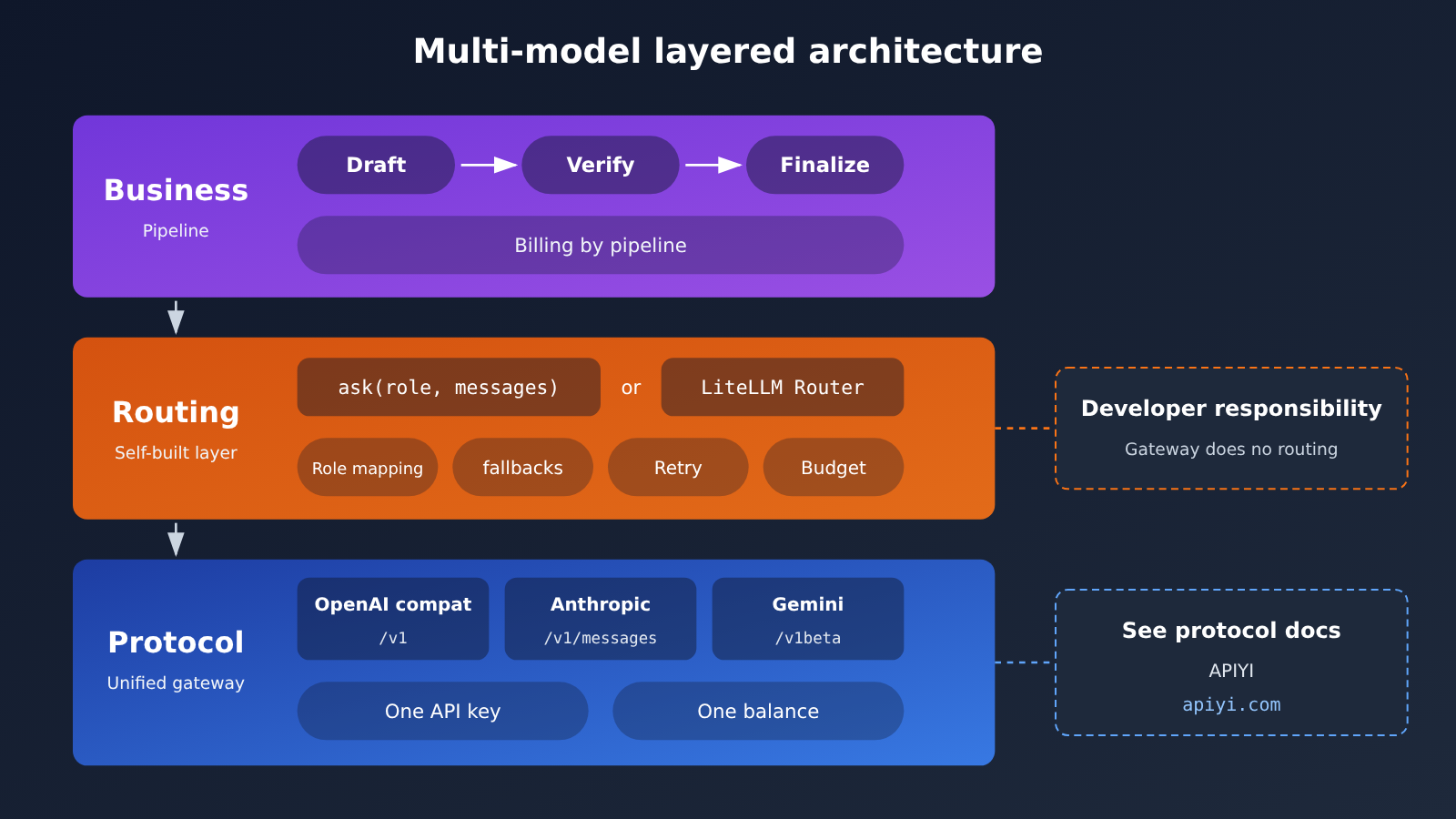
Assigning Roles to Claude, GPT, and Gemini
The first step in coordinated orchestration is to define the “roles,” not to pick models first. Here’s a role-based division-of-labor table, using the model IDs currently available on the platform as examples:
| Role | Positioning | Example model | Why this choice |
|---|---|---|---|
| draft (drafting) | Cheap, fast, highest call volume | gpt-6-luna |
Drafts can be rough; the main considerations are unit price and speed |
| verify (verification) | Another vendor, mid-tier | gemini-4-hydrogen |
It must come from a different source than the drafting model to provide meaningful cross-checking |
| final (finalization) | Flagship tier, run only once | claude-opus-5-5 |
Highest quality requirements, fewest invocations |
| fallback (backup) | Substitute for the same role | e.g. gpt-6.1-terra, gpt-6.1-sol |
Takes over when the primary model fails; must be configured in advance |
The verification step must use a model from another vendor—this is the most important rule in the entire table. If both drafting and verification come from the same vendor, the incremental value of the verification step shrinks noticeably, which means you’re paying twice to do duplicate work.
Check models, compare prices, and match protocols: one key for three providers
Once the division of labor is clear, there are three things to verify: whether the model is available, what the unit price is, and which protocol to use for calls. You can find all three in APIYI’s model list and documentation at apiyi.com. According to the model list data as of 2026-11-25 00:33, the platform has 278 models online, covering 16 providers. Of these, 221 are pay-as-you-go, and 57 are billed per request or per second. Each key maps to one balance, and usage is deducted from that balance at the unit price of the model being called.
When it comes to protocols, note that the base_url format differs across the three:
- OpenAI-compatible: use
https://api.apiyi.com/v1as thebase_url. The endpoints are/v1/chat/completionsand/v1/responses. For GPT-5 and newer models, prefer the Responses API. - Anthropic native: use the root domain as the
base_url, without/v1. The endpoint is/v1/messages. Prompt Cache billing only applies in the native format; if you call Claude through the OpenAI-compatible format, you won’t get the cache discount. - Gemini native: also use the root domain, and call
generateContentunder/v1beta. Features such asthinking_level, inline image/audio/video,code_execution, andcached_content_token_countare only supported in the native format.
Below are today’s list prices for three example models, in USD per million tokens, taken from the model list as of 2026-11-25 00:33:
| Model | Input | Output | Cache read |
|---|---|---|---|
gpt-6-luna |
0.1 | 0.5 | 0.01 |
gpt-6.1-terra |
1 | 5 | 0.05 |
gpt-6.1-sol |
2 | 10 | 0.1 |
gemini-4-hydrogen |
1.5 | 7.5 | 0.075 |
claude-opus-5-5 |
4 | 20 | 0.2 |
These are the default list prices; the console is the source of truth for actual pricing. The documentation also notes that Claude’s all-in cost is about 85% of the official price, and after factoring in top-up bonuses, it falls between 79% and 86%.
Tiered Collaboration Cost Estimate
The numbers below are estimates based on list prices, not actual bills. Assume a 6,000-character Chinese draft is about 9,000 tokens. The token counts for the three steps are assumed as follows:
- Drafting with
gpt-6-luna: 9k input + 3k output, about $0.0024. - Reviewing with
gemini-4-hydrogen: 12k input + 1.5k output, about $0.0293. - Finalizing with
claude-opus-5-5: 14k input + 3k output, about $0.1160.
The three steps add up to about $0.148 per article. If all three steps used claude-opus-5-5, under the same token assumptions, it would be about $0.29 per article. At 1,000 articles, that’s roughly $148 versus $290. Actual costs will also be affected by retry counts, cache hit rates, and fluctuations in output length, so this estimate is only good for getting a rough sense of direction—not as an exact basis for budgeting.
🎯 Pricing check recommendation: Before launch, check each model in the role table against the model catalog on APIYI apiyi.com for availability and unit price, then run a small sample with the free trial quota for new users and adjust the estimate above based on actual token counts.
Claude, GPT, Gemini Orchestration Quick Start: Five Steps to Ship
Execution order matters more than model selection. The five steps below are the shortest path from “writing config” to “reconciling costs”:
| Step | Deliverable | Key point | Owner |
|---|---|---|---|
| 1. Role table | draft / verify / final definitions | Define roles first, then models | Business |
| 2. Model config | Role → Model → Protocol → Fallback | Write the mapping into config, don’t hardcode it in code | Routing layer |
| 3. Unified invocation layer | ask(role, messages) |
Business code only knows roles | Routing layer |
| 4. Error classification | Rate limit / Timeout / Content policy / Context overflow | Different errors take different fallbacks | Routing layer |
| 5. Per-pipeline accounting | Step-by-step cost per article | Bill by pipeline, not by model | Business |
Step 1: Write the role table for Claude, GPT, and Gemini
The role table only answers “what capability does this step need, and how much cost can we accept”—for now, leave out specific model names. I recommend spelling out three things for each role: quality requirements, invocation frequency, and whether it must switch vendors from the previous step. The “must switch vendors” requirement for verify should be written down as a hard constraint, so that future config changes don’t accidentally switch it back to the same vendor.
Step 2: Split the Model Config into Its Own File
Put the mapping into a config file, something like draft: {model: gpt-6-luna, protocol: openai, fallbacks: [gpt-6.1-terra]}. Same idea for verify and final. For final, set protocol to anthropic so you can take advantage of native-format cache billing. For the OpenAI-compatible format, set base_url to https://api.apiyi.com/v1; for the Anthropic and Gemini native formats, use the root domain. When you switch models, you only edit this file — no release required.
Step 3: The Unified Call Layer Exposes Only ask(role, messages)
The call layer exposes exactly one function to the outside world, ask(role, messages), and handles things internally in this order:
- Read the role’s
model,protocol, andfallbacksfrom the config. - Pick the matching client based on
protocol. The OpenAI-compatible client initializes withapi_key="YOUR_API_KEY"andbase_url="https://api.apiyi.com/v1"; the Anthropic client goes through/v1/messages, and Gemini goes through/v1beta. - Normalize the responses from all three providers into one structure containing the text, input tokens, output tokens, cache-read tokens, and the model actually used.
- On error, hand it off to the error classification in Step 4.
Business code only calls ask("draft", msgs), ask("verify", msgs), and ask("final", msgs) — it never needs to know which provider is behind them. And since all three are accessed through the same key, Step 2 never turns into managing three sets of credentials.
Step 4: Classify Errors to Decide How to Fall Back
The unified gateway won’t do cross-vendor fallback, and the platform doesn’t support fallback fields like models, route, or provider — that logic has to live in your calling layer. I’d suggest splitting it into at least four categories:
- Rate limiting / 5xx: retry first with exponential backoff, and if the retry still fails, switch to the next model in
fallbacks. - Timeout: set a per-call timeout; switch immediately when it trips instead of sitting there waiting forever.
- Content policy block: switch to another vendor — retrying with the same vendor usually gives you the same result.
- Context limit exceeded: switch to a model with a larger context window, or truncate/summarize before sending.
If you’d rather not build this layer yourself, you can borrow LiteLLM’s approach. According to its official docs, LiteLLM maps these cases to content_policy_fallbacks, context_window_fallbacks, and the general fallbacks, written like fallbacks = [{"gpt-6-luna": ["gpt-6.1-sol"]}], which tries the next model_name in order.
Step 5: Bill by Pipeline
The billing unit should be “one article” or “one business request,” not “some model.” Every time you call ask, multiply the returned token count by the unit price in your config and attach it to the same pipeline ID. That way you can see at a glance what one article costs, which step is the most expensive, and how many fallbacks happened. Since all calls are deducted from a single balance, reconciliation only requires checking one dashboard.
🚀 Getting started tip: Start with just steps one through three — one model per role, get the pipeline running end to end. Once it’s stable, add the fallback logic from step four and the billing from step five. During onboarding, you can use a single API key from APIYI apiyi.com to call all three models at once, saving you the time of opening separate accounts.
How to Choose a Multi-Model Routing Tool
Every tool on the market covers one slice of the problem, so before mixing them you need to know where each one stops. Capabilities listed for third-party tools below are per their own official docs or vendor claims:
| Tool | What it solves | When to use it | When not to bother |
|---|---|---|---|
| Unified gateway (e.g., APIYI) | Protocol layer: one key, one balance, three native protocols | You want to skip three sets of SDKs, keys, bills, and error codes | You expect it to do cross-vendor automatic routing for you |
| LiteLLM Router | Routing layer: load balancing, cooldown, fallbacks, retries, timeouts | Your fallback rules are complex and you need several routing strategies | Nobody on the team can deploy and monitor one more service |
| OpenRouter Auto | Routing layer: picks the model and reasoning tier automatically on every request | You’re fine letting the platform choose models, and your key and balance live in OpenRouter | You need deterministic control over which model handles each step |
| Vercel AI SDK | Code layer: provider registry for uniform model access | TypeScript projects that want to manage models by string id | You need a cross-language backend or a standalone routing service |
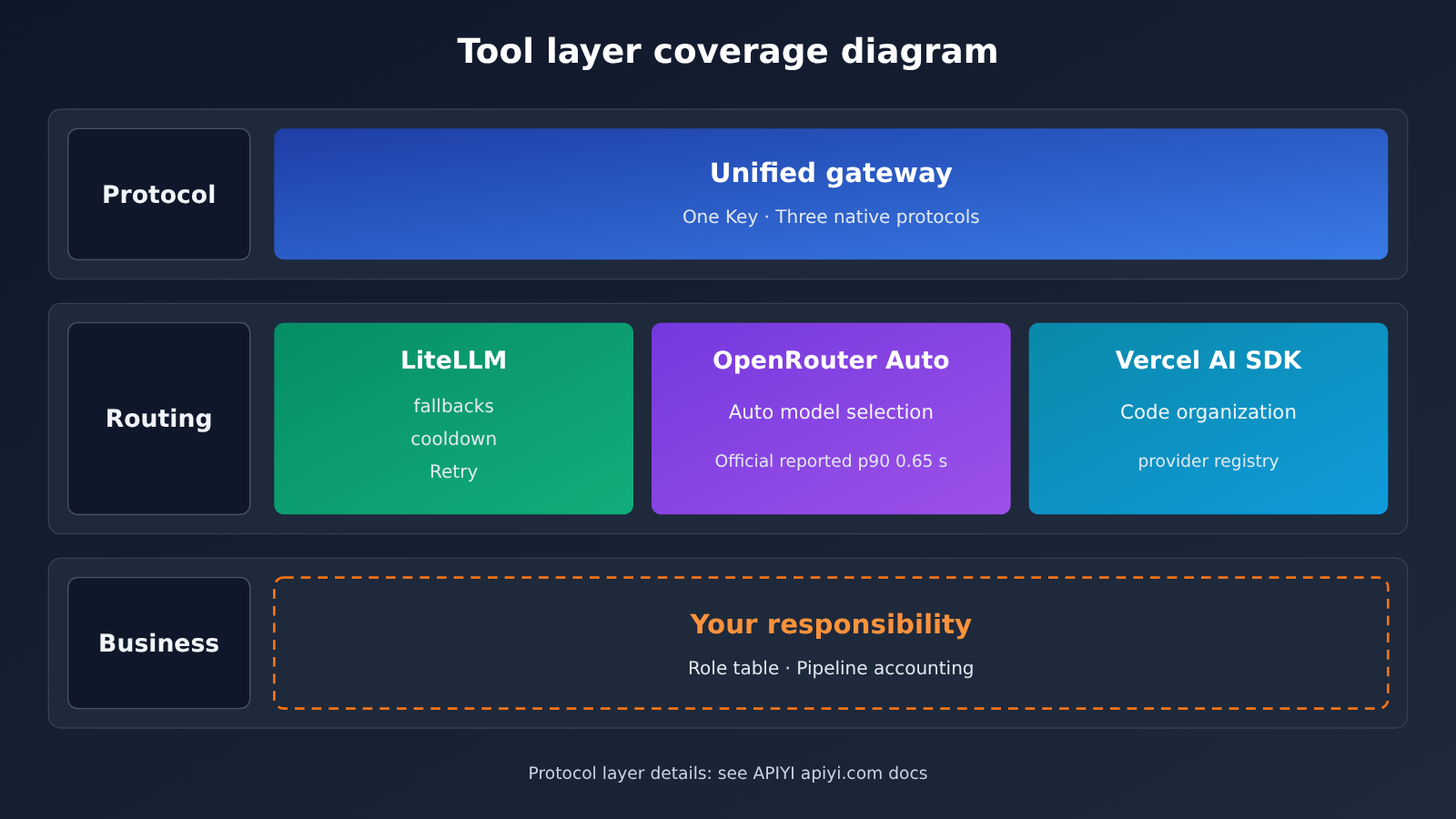
A Comparison of Four Multi-Model Routing Tools
LiteLLM stands out for its rich set of routing strategies. The official docs list simple-shuffle (the default, officially recommended for production), latency-based, least-busy, rate-limit-aware, cost-based, and custom strategies. Retries support fixed intervals and exponential backoff. The trade-off is that a self-hosted proxy means one more service to deploy and monitor. For a small team with only a handful of fallback rules, writing a few dozen lines in the call layer may be the better deal.
OpenRouter Auto takes the “platform picks for you” approach. According to the official announcement dated 2026-11-06, after the redesign, p90 routing decision latency is 0.65 seconds (down from 1.96 seconds in the old version), with benchmark results showing up to a 4x improvement. Both figures are self-reported by the vendor and have not been independently verified. Its decision model evaluates 11 features of a request—including task type, difficulty, and whether vision or codebase knowledge is needed—then combines real-time pricing, cache status, and benchmark performance to choose a model. There’s also openrouter/auto-code for coding agents. It’s a good fit when you don’t want to maintain a role table yourself, but deterministic constraints like “the verification must use a different provider” are harder to express.
Vercel AI SDK solves the code organization problem. According to the official docs, the provider registry can register multiple providers and models as string IDs. A custom provider can preset parameters, set aliases, restrict which models are available, and also layer middleware. It’s a great fit for implementing the ask(role, messages) layer, but it isn’t a gateway itself and doesn’t handle billing.
Unified gateway only handles the protocol layer. The conclusion is clear: what it saves you is three SDKs, three keys, three billing integrations, and three sets of error codes—not cross-vendor automatic routing. Routing and fallback are either something you write yourself or something you hand to LiteLLM.
Frequently Asked Questions (FAQ)
Q1: What is coordinated scheduling across Claude, GPT, and Gemini?
It means assigning tasks step by step to models from different vendors within the same business pipeline—for example, using GPT to draft, Gemini to check, and Claude to finalize—and switching to a backup model if one model fails. It focuses on engineering-level division of labor and fallback, not on the conceptual design of multi-agent systems.
Q2: If I switch everything to the same base_url, does that count as scheduling?
No. A unified base_url only solves integration; whichever model is written in the request gets called. The gateway doesn’t provide model routing like `auto`, and it doesn’t support cross-vendor fallback fields. Upstream rate limits and failures are passed straight through. The scheduling logic needs to live in your own invocation layer.
Q3: Why use another vendor’s model for the checking step?
Models from the same vendor are fairly similar in training data and output preferences, so when they’re used to check their own output, they tend to miss the same kinds of issues. Using a different vendor’s model for the check is a low-cost way to get a “second opinion.” The check step usually doesn’t need a flagship-tier model; a mid-tier one is enough.
Q4: Should I use the OpenAI-compatible format or the native format when calling Claude?
If you need Prompt Cache, use Anthropic’s native `/v1/messages`, because cache billing only applies to the native format. If you’re just doing temporary testing and don’t care about caching, the compatible format is more convenient. The same goes for Gemini: when you need `thinking_level` or multimodal inline input, use the native `/v1beta` format.
Q5: What’s the fastest way to connect the three models into the same project?
Register at APIYI apiyi.com to get an API key and the free trial allowance for new users. For the OpenAI-compatible format, set base_url to `https://api.apiyi.com/v1`; for the native format, use the root domain. Set up role configs as described in Step 2 of this article, and implement `ask(role, messages)` in Step 3, and you can invoke all three vendors’ models with a single API key.
Q6: When should I use LiteLLM instead of writing it myself?
Consider LiteLLM when you have more than a few fallback rules, need to dynamically select models by latency or cost, or multiple services share the same routing setup. If you only have three roles with one or two backups each, writing it yourself in the invocation layer is lighter and leaves you one less service to maintain.
Q7: What limitations does this approach have?
The gateway doesn’t host the models, so upstream vendors’ content policies, rate limits, and outages will all affect your service. That means you can’t skip the fallback step in Step 4. Cost estimates are based on list prices and assumed token counts; actual spend will vary with retries and output length. Also, each additional routing layer adds another layer of logic that needs testing. It’s a good idea to write separate test cases for the fallback paths.
Claude, GPT, Gemini Orchestration: Key Takeaways
- Three scenarios: tiered drafting, cross-checking, and vendor failover cover most of what you’ll need from multi-model orchestration.
- The cost is in integration: most of the overhead comes from three SDKs, three API keys, three billing accounts, and three sets of error codes — not from the business logic itself.
- Verify with a different vendor: the verify role must not share a source with the draft role. Treat that as a hard constraint and write it into your role table.
- Let the gateway handle protocols: a unified gateway solves access and reconciliation. It doesn’t do automatic cross-vendor routing.
- Write the routing yourself:
ask(role, messages)plus error classification, or hand it over to LiteLLM. - Account per pipeline: measure cost per single piece of content so you can see which step is the most expensive.
- Check before you ship: before going live, verify model names, unit prices, and protocol formats on APIYI apiyi.com.
Summary
The core of Claude, GPT, and Gemini orchestration is layering:
- Hand the protocol layer to a unified gateway: one key, one balance, and all three protocols — OpenAI-compatible,
/v1/messages, and/v1beta— can connect. - Keep the routing layer in your own hands: role mapping,
fallbacks, retries, and budgets live in your own invocation layer, or you hand them to LiteLLM. - The business layer only knows roles: the pipeline only calls draft, verify, and final, and does its accounting per pipeline.
Start with a minimal version — three roles, one model each — and add degradation and accounting once it runs end to end. You can use APIYI apiyi.com’s free trial quota to run a small sample first and calibrate your cost estimates against real token counts.
📚 Reference Materials
-
APIYI Documentation Center: Gateway protocol descriptions and the complete model list
- Link:
docs.apiyi.com - Description: base_url formats for the three protocols, cache billing rules, and today’s pricing
- Link:
-
LiteLLM Routing Docs: Router routing strategies and fallbacks
- Link:
docs.litellm.ai/docs/routing - Description: Load balancing, cooldown, retries, and routing strategy explanations
- Link:
-
LiteLLM Reliability Docs: The three types of fallback configuration
- Link:
docs.litellm.ai/docs/proxy/reliability - Description: How to use content_policy_fallbacks and context_window_fallbacks
- Link:
-
OpenRouter Auto Router Docs: The automatic model selection mechanism
- Link:
openrouter.ai/docs/guides/routing/routers/auto-router - Description: Decision dimensions and auto-code explanation; performance numbers are self-reported by the vendor
- Link:
-
Vercel AI SDK Provider Management: provider registry and custom provider
- Link:
ai-sdk.dev/docs/ai-sdk-core/provider-management - Description: Unified management of multiple model ids in a TypeScript project
- Link:
Author: APIYI Technical Team
Technical Discussion: Feel free to reach out via the APIYI website homepage. For protocol and model details, check the docs.apiyi.com documentation center.


