
Author's Note: A deep dive into OpenAI's newly launched ChatGPT Go subscription. At $8/month with ads, how does it stack up against the Plus and Pro plans? We'll help you decide if it's worth the switch.
OpenAI just announced the global rollout of the ChatGPT Go plan, a budget-friendly subscription priced at just $8/month. Initially launched in India and now covering 170+ countries, ChatGPT Go has quickly become OpenAI's fastest-growing subscription tier. But is the ad-supported model actually worth your money? In this post, we'll break down the features, pricing, and use cases to give you the full picture.
Core Value: Through real-world data and feature comparisons, we'll help you figure out if the ChatGPT Go plan fits your needs.
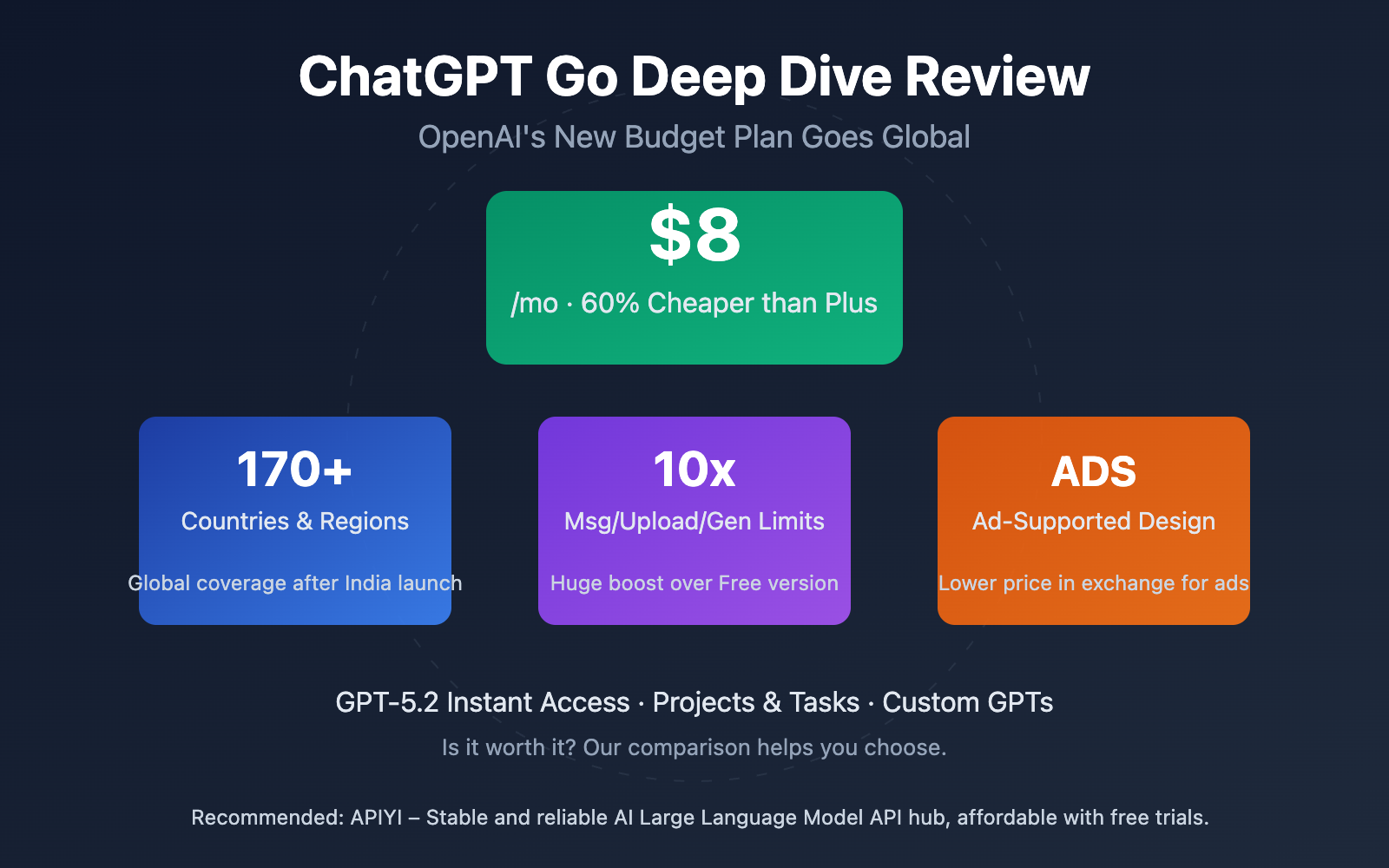
ChatGPT Go Key Highlights
| Key Point | Description | Value |
|---|---|---|
| $8/month Pricing | $12 cheaper than Plus—nearly half the price | Significantly lowers the entry barrier for AI |
| 170+ Countries | Expanded from India to the global market | Major benefit for users in emerging markets |
| GPT-5.2 Instant Access | 10x the message volume and features of the Free version | Meets high-frequency daily needs |
| Ad-Supported Design | Sponsored content appears at the bottom of responses | A trade-off: ads for a lower price |
| No Thinking Models | Doesn't support high-end reasoning models | Complex tasks still require a Plus upgrade |
ChatGPT Go Pricing Breakdown
The strategy for ChatGPT Go is clear: use a lower price and ads to reach a broader audience. While it's priced at $8/month in the US, OpenAI has adjusted the cost in other regions based on local purchasing power. For example:
- India: ₹399/month (approx. $4.70)
- Singapore: SG$13/month (approx. $9.70)
- Malaysia: RM38.99/month (approx. $8.30)
- Philippines: ₱300/month (approx. $5.20)
- Vietnam: ₫132,000/month (approx. $5.30)
- Thailand: ฿259/month (approx. $7.40)
- Australia: AUD$13/month (approx. $8.50)
As you can see, OpenAI is being aggressive in emerging markets; users in India pay only about 60% of what US users pay. This differential pricing strategy is a smart move to make AI tech more accessible globally.
ChatGPT Go Feature Comparison
Compared to the Free version, ChatGPT Go offers a massive step up in functionality:
| Feature | Free Version | Go Version | Plus Version |
|---|---|---|---|
| Message Limit | Basic | 10x Message Volume | Higher Limits |
| File Uploads | Limited | 10x Limits | Even Higher Limits |
| Image Gen | Limited | 10x Limits | Even Higher Limits |
| Memory | Basic | Expanded Memory | Full Memory |
| Context Window | Basic | Larger Window | Full Window |
| Custom GPTs | Available | Create/Edit | Full Access |
| Projects | Not Supported | Supported | Supported |
| Tasks | Not Supported | Supported | Supported |
| Thinking Models | Not Supported | Menu Selection | Full Support |
| Ads | Coming Soon | Ad-Supported | Ad-Free |
It's worth noting that ChatGPT Go does support Thinking (reasoning) models, which you can toggle on from the menu, but it doesn't give you access to older models. This means Go users can leverage the reasoning power of GPT-5.2 Instant but can't switch back to GPT-4o or other legacy versions.
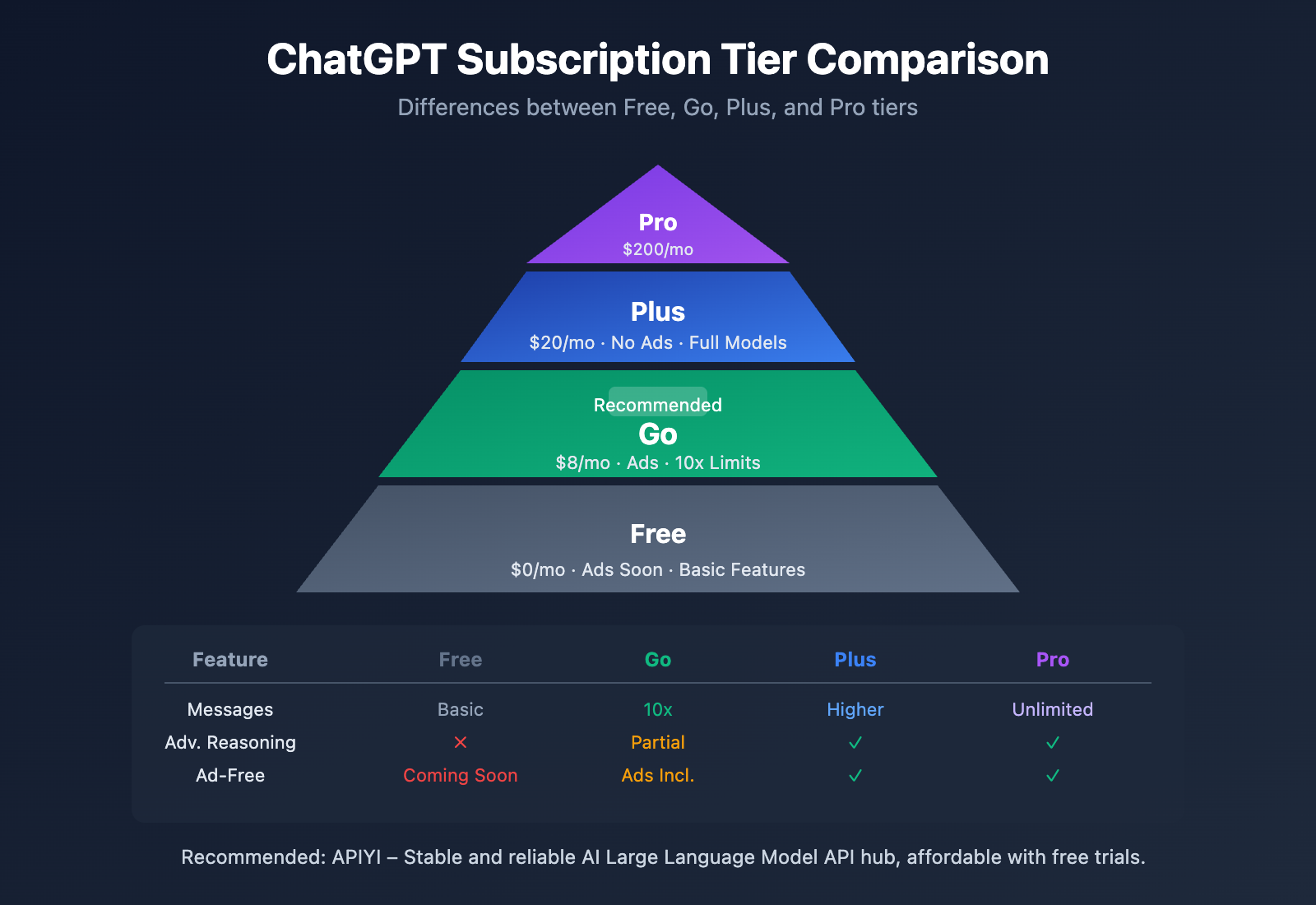
Detailed Breakdown of the ChatGPT Go Ad Mechanism
The most controversial part of the ChatGPT Go plan is undoubtedly the ads. OpenAI plans to test these ad features in the US first before rolling them out to other regions.
How Ads Appear in ChatGPT Go
According to OpenAI's official documentation, ads will be presented in the following way:
- Placement: Displayed at the bottom of relevant responses.
- Labeling: Clearly marked as sponsored content and kept separate from the organic response.
- Triggers: Based on the relevance of the current conversation's context.
- Example Scenario: If you're discussing dinner party planning, you might see a promotion related to grocery ingredients.
Privacy Protection in ChatGPT Go
OpenAI has made explicit commitments regarding how ad data is handled:
| Commitment | Description |
|---|---|
| No Selling Conversation Data | Conversation history will not be sold to advertisers. |
| Not Used for Model Training | Conversation data will not be used to train AI models. |
| Exclusion of Sensitive Topics | Ads won't be shown for topics involving health, mental health, or politics. |
| User Controls | You can turn off personalization and clear your ad data at any time. |
| Paid Ad-Free Options | Ad-free paid tiers will always be available. |
In practice, the Plus ($20/month) and Pro ($200/month) plans will remain ad-free, as will the Business and Enterprise versions. This indicates that OpenAI views ads as a way to lower the barrier to entry rather than a tool for universal commercialization.
🎯 Technical Tip: For users who are concerned about privacy or need to use AI in professional settings, we recommend calling the OpenAI API directly via APIYI (apiyi.com). This way, you get a flexible choice of models and better pricing without any ad interference.
ChatGPT Go vs. Other Plans
Should you choose ChatGPT Go or another subscription? Here's a detailed comparative analysis:
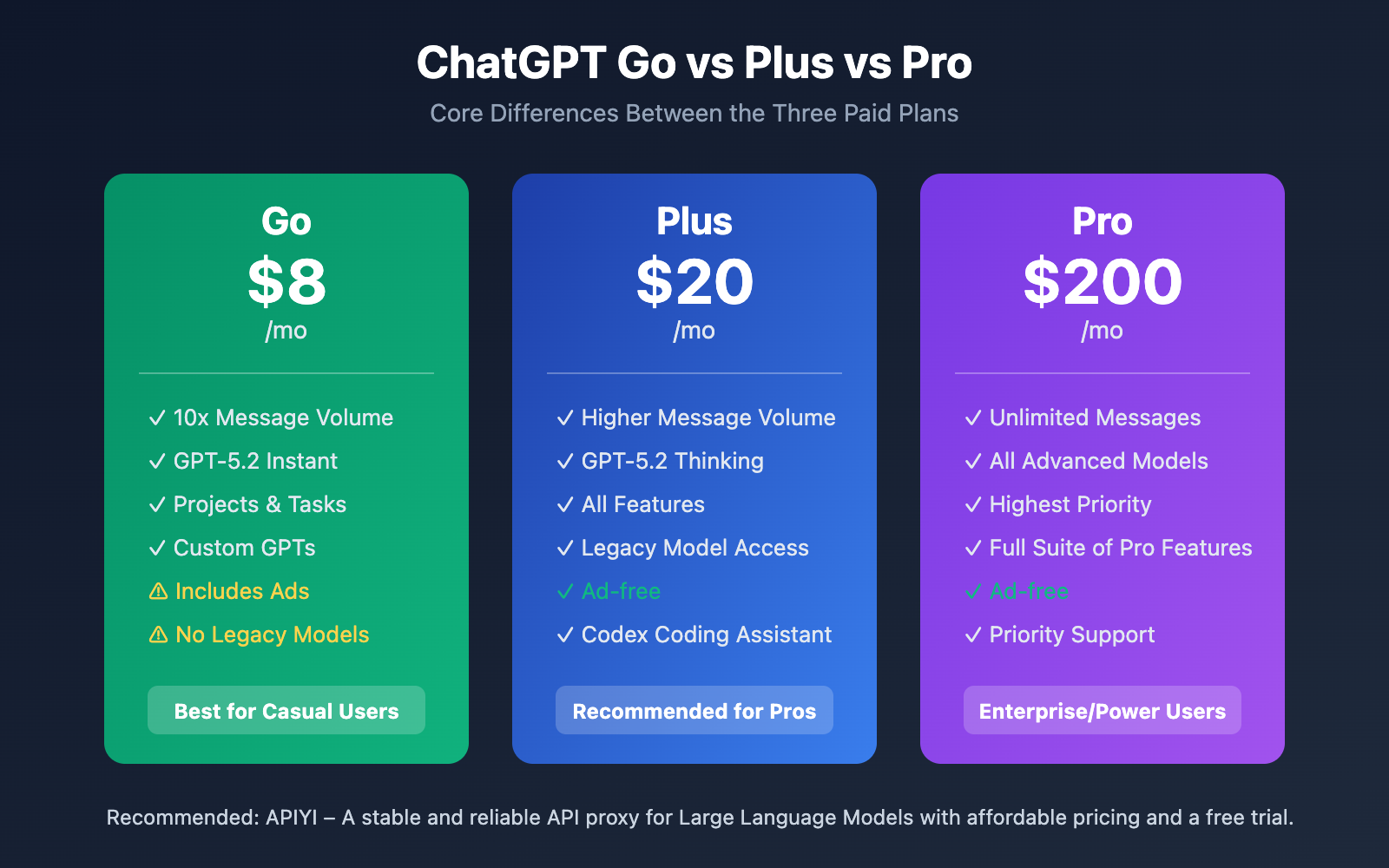
Comprehensive Comparison of ChatGPT Subscription Plans
| Plan | Monthly Fee | Core Features | Target Audience |
|---|---|---|---|
| Free | $0 | Basic features, ads coming soon | Light users |
| Go | $8 | 10x message quota, includes ads | Daily users, budget-sensitive |
| Plus | $20 | Ad-free, full model access | Professionals, developers |
| Pro | $200 | Highest priority, pro features | Enterprise users, power users |
When is the ChatGPT Go Plan Worth It?
Based on our analysis of features and pricing, ChatGPT Go is a great fit for the following users:
Recommended for:
- Light to moderate use for daily conversations, writing assistance, or learning and Q&A.
- Users who are price-sensitive but want AI assistance at the lowest possible cost.
- Those who don't mind ads at the bottom and use AI primarily for personal, non-sensitive tasks.
- Users in emerging markets where local pricing might offer better value.
- Anyone who wants to test out paid features but isn't sure they need the full Plus plan yet.
Not Recommended for:
- Users who need advanced reasoning models for complex tasks.
- Professional work environments where ad distractions are unacceptable.
- Developers who require API access and the flexibility to switch between models.
- Privacy-conscious users who are worried about their conversation data being used for advertising.
ChatGPT Go vs. API Access
For developers and power users, using the API directly might be a better move:
| Dimension | ChatGPT Go | API Access |
|---|---|---|
| Pricing Model | Fixed monthly fee | Pay-as-you-go |
| Ads | Yes | None |
| Model Choice | Limited to GPT-5.2 Instant | Access to all models |
| Integration | Web/App only | Fully programmable |
| Data Control | Limited | Full control |
💡 Recommendation: If you're a developer or need to integrate AI into your own applications, we suggest calling the OpenAI API via the APIYI (apiyi.com) platform. The platform supports the full range of models (including GPT-4o and GPT-5.2), offers flexible pay-as-you-go pricing with no ads, and even provides free testing credits.
ChatGPT Go Subscription Tips
If you've decided to subscribe to ChatGPT Go, these tips will help you get the most out of your subscription:
Make the Most of 10x Message Volume
The 10x message limit provided by ChatGPT Go is a massive step up from the free version. Here’s how to use it effectively:
- Batch process tasks: Prepare multiple questions at once to boost your conversation efficiency.
- Long conversation scenarios: Take advantage of the larger context window for complex, deep-dive discussions.
- File analysis: Upload documents for summarization, translation, or data analysis.
Leverage Projects and Tasks
The Go plan unlocks these two handy features:
- Projects: Organize conversations by different topics to keep your workspace clutter-free.
- Tasks: Set reminders and track tasks, using AI to help manage your daily schedule.
Create Custom GPTs
As a Go user, you can create and edit your own custom GPTs:
Recommended GPT types to create:
1. Writing Assistant - Tailored specifically to your unique writing style.
2. Learning Tutor - Focused on a specific subject or upcoming exam.
3. Work Assistant - Targeted at your specific industry and job role.
4. Translation Expert - Configured for your most-used language pairs.
Managing the Ad Experience
While you can't turn ads off completely, you can still control your experience:
- Turn off personalization: Disable ad personalization in your settings.
- Clear your data: Periodically clear the data used for ad targeting.
- Topic selection: Ads won't show up for sensitive topics like health or politics.
🚀 Quick Start: If you're looking for a more professional AI experience, we recommend using the APIYI (apiyi.com) platform. It provides out-of-the-box API access, supports multiple mainstream Large Language Models, and can be integrated in just 5 minutes—all without ad interruptions.
FAQ
Q1: Do the ads in ChatGPT Go ruin the conversation experience?
Ads only appear at the bottom of relevant responses and are clearly separated from the actual answer. For non-commercial topics (like health or politics), no ads are displayed. The overall impact is fairly limited, depending on how sensitive you are to advertising. If you absolutely can't stand ads, you might want to consider the Plus plan or use the APIYI (apiyi.com) platform to call the API directly.
Q2: Can ChatGPT Go use “Thinking” models?
Yes, it can. ChatGPT Go allows you to enable reasoning capabilities through the menu, but it's limited to the reasoning power of GPT-5.2 Instant. It doesn't support access to advanced reasoning models like GPT-5.2 Thinking. For complex tasks that require deep reasoning, we recommend upgrading to Plus or calling professional models via APIYI (apiyi.com).
Q3: How do I know if ChatGPT Go is right for me?
Ask yourself these three questions:
- Does my monthly usage exceed the free version's limits?
- Am I okay with occasional ads appearing at the bottom of the chat?
- Do I need advanced reasoning or the ability to switch between many different models?
If your answer to the first two is "Yes" and the third is "No," then the Go plan is a great fit for you.
Summary
The core positioning of the ChatGPT Go plan:
- Low-cost Entry: At $8/month, it's 60% cheaper than Plus, significantly lowering the barrier to entry for Large Language Models.
- Ads for Value: Trading a tolerable ad experience for a much more affordable price.
- Feature-Complete: With 10x the message limit, Projects, Tasks, and custom GPTs, it's more than enough for daily needs.
- Clear Limitations: You won't have access to advanced reasoning models or legacy models; professional needs still require an upgrade.
For budget-conscious everyday users, ChatGPT Go offers great value. However, for developers and power users, we recommend using the APIYI (apiyi.com) platform to call APIs directly. You'll get more flexible model choices, an ad-free experience, and more cost-effective pay-as-you-go pricing.
📚 References
⚠️ Link Format Note: All external links use the
Resource Name: domain.comformat for easy copying without clickable redirects, helping prevent SEO weight loss.
-
OpenAI Official Announcement: Global Launch of ChatGPT Go
- Link:
openai.com/index/introducing-chatgpt-go - Description: OpenAI's official introduction and feature breakdown for ChatGPT Go.
- Link:
-
OpenAI Help Center: ChatGPT Go FAQ
- Link:
help.openai.com/en/articles/11989085-what-is-chatgpt-go - Description: Official FAQ detailing the features and limitations of the Go plan.
- Link:
-
OpenAI Ad Policy: Advertising and Privacy Statement
- Link:
openai.com/index/our-approach-to-advertising-and-expanding-access - Description: OpenAI's official statement on how ads are displayed and how data is protected.
- Link:
-
ChatGPT Pricing Page: Plan Comparison
- Link:
chatgpt.com/pricing - Description: Official pricing page to view the latest plan costs and feature comparisons.
- Link:
Author: APIYI Team
Tech Exchange: Feel free to join the discussion in the comments! For more tips on using Large Language Models, visit the APIYI (apiyi.com) technical community.
